Audacity 4.0 has arrived, bringing a substantial interface and workflow overhaul to one of the best-known free, open-source audio editors. It is a major moment for software that has long occupied a useful, occasionally stubborn niche: the dependable tool people open when they need to cut a recording, clean up a clip, assemble a podcast segment, prepare game-audio assets, or perform a fast edit without committing to an expensive digital audio workstation.
The new release does not appear interested in discarding that identity. Instead, Muse Group’s update gives Audacity a more current visual language and a deeper editing toolkit while retaining an escape hatch for people who would rather keep the classic presentation. That balance matters. Audacity users often have years of muscle memory built around its familiar layout, and a redesign can be as alarming as discovering someone has rearranged every button on a controller the night before a tournament.
A new visual style, with the old one still available
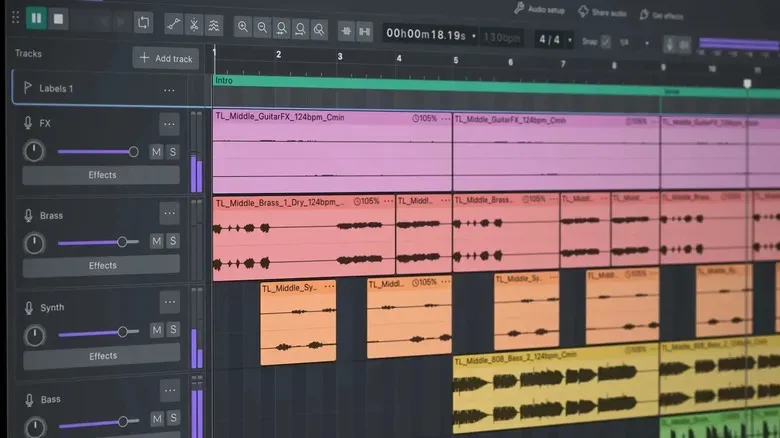
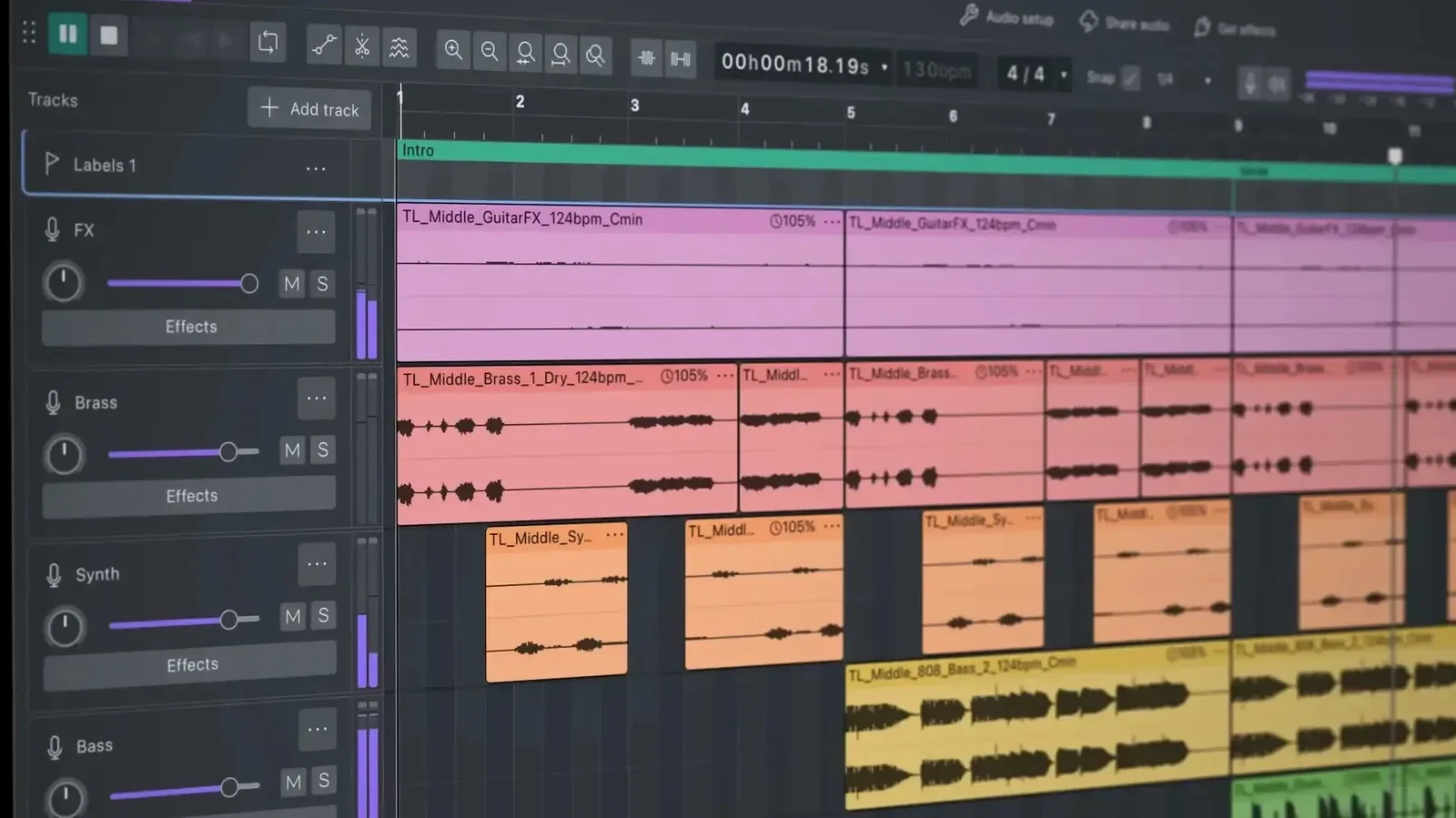
The most immediately visible addition in Version 4.0 is an optional dark mode. Audacity’s refreshed interface also uses colored clips and brighter accent colors for elements including gain sliders, making individual regions and controls more visually distinct than in the application’s traditional look.
That is a meaningful shift for an editor whose presentation has historically leaned toward pure function over flair. A dark workspace is not merely a fashionable coat of paint for everyone who works with audio. Long projects frequently mean staring at waveforms, timelines, meters, and control panels for extended stretches, so contrast and visual separation can affect how quickly a user can parse an edit.
Crucially, Audacity has not made the updated styling mandatory. The classic appearance remains selectable during setup. Users who prefer the old layout, or simply do not want a visual change complicating an established routine, can choose it from the start. It is an unusually considerate decision for a large redesign: the software gets to move forward without demanding that every longtime user immediately follow it into the future.
Non-destructive editing takes a larger role
The more consequential changes live in the timeline. Audacity had begun exploring non-destructive editing in Version 3.2, and Version 4.0 expands that approach substantially. In practical terms, edits no longer need to feel as final as they once did. When a clip is trimmed back, the audio covered by that trim can be revealed again if the cut was too aggressive.
That is particularly useful for dialogue, voiceover, captured gameplay, and music edits, where the difference between a sharp cut and an awkwardly swallowed syllable can be tiny. Rather than treating each trim as a small leap of faith, an editor can adjust and revisit the decision. The ability to recover material after pulling an edge too far is the kind of feature that may sound quiet on a changelog but becomes very loud when it saves an almost-perfect take.
Clips can now overlap as well. This opens up more flexible arrangements and makes it easier to manage transitions, layering, and complex timelines without forcing every piece of audio into a rigid sequence. Multiple clips may be selected and trimmed together through a single dragged handle, while grouping allows related pieces to be managed as a unit.
For game-focused creators, those options can be helpful for organizing commentary, game captures, ambient sound, stingers, and multiple takes in one project. They also make Audacity feel more prepared for projects that have outgrown the old “one waveform, one quick fix” reputation. The software is still an audio editor first, but its timeline is becoming less restrictive about how an editor gets from raw material to a finished file.
Automation-style envelope controls come to Audacity
Audacity 4.0 introduces a new envelope tool that will be recognizable to people familiar with automation workflows in applications such as Ableton Live and ProTools. Editors can click to add a control point and drag it to adjust properties such as gain over time.
This is a more precise way to shape volume than treating an entire clip as though it needs one fixed setting. A creator can use points to lower a loud laugh under a spoken sentence, raise a quiet moment, or guide a clip into and out of a transition. The waveform updates to display these changes in real time, giving editors a visual indication of where a gain adjustment may be driving part of a recording toward clipping.
That immediate feedback is valuable because audio editing is often a negotiation between what sounds right and what the screen reveals. A waveform cannot replace listening, but it can make potential trouble easier to spot before an exported file turns a dramatic moment into a burst of unwanted distortion. Combined with the new per-track meters, Audacity now gives users clearer ways to identify which track is pushing a mix too hard.
The overlap between this feature set and fuller digital audio workstations is hard to miss. Audacity is not suddenly being presented as a replacement for every specialized production suite, but Version 4.0 borrows workflows that have become familiar across professional and enthusiast creative software. The result is a tool that should feel more legible to users moving between different editors rather than one that insists on doing every routine task in its own peculiar dialect.
Fast cuts and microscopic adjustments
Another addition is a dedicated splitting tool for one-click clip cuts. Video editors may recognize the underlying idea immediately: choose the appropriate tool, click at the desired spot, and divide the clip. Similar tools are common in creative applications including Adobe Premiere and Logic Pro, so the approach should reduce friction for users who regularly work across audio and video.
Version 4.0 also supports sample-level editing when users zoom far enough into a clip. This is an especially granular form of control. A sample is a tiny unit of digital audio, and the ability to work at that level is useful when a recording is almost right but needs a minute correction. It will not be necessary for every simple cut, naturally, but it offers a route for exacting cleanup and micro-adjustment when broad timeline edits are not enough.
Put together, the splitting tool, track meters, envelopes, overlapping clips, grouping, and sample-level zoom tell a consistent story. Audacity is trying to make sophisticated work less awkward without making basic work harder. Someone who only needs to cut silence from a recording can still approach the software as a straightforward editor. Someone assembling a layered project has more room to make deliberate choices before reaching for another application.
The sync-lock change may divide established users
Not every alteration will land smoothly with veteran Audacity users. Version 4.0 removes sync-lock, the feature that kept several clips coordinated while edits were made. For people who relied on it heavily, its absence is likely to be the update’s most contentious workflow change.
New keyboard shortcuts have been added to reproduce that sort of coordinated behavior, but replacement shortcuts and a dedicated, familiar mode are not identical experiences. Anyone with a set editing habit built around sync-lock will likely need some time to reassess how they handle linked material. This is precisely why the preservation of the classic visual option is welcome, even though it cannot preserve every retired workflow.
The larger question is whether the newer collection of selection, grouping, and trimming controls provides a better long-term foundation. Audacity 4.0 clearly places its bet on modernized editing behavior, even if that means asking some users to change how they approach multi-clip work.
A bigger free tool for creators and PC players
Audacity’s appeal has always rested partly on access. Fully featured DAWs such as Ableton Live 12 and ProTools can cost hundreds of dollars or more, whereas Audacity remains free and open source. Bringing more advanced timeline behavior and automation-like controls into that environment gives hobbyists, students, video makers, podcasters, and game creators more options before software cost becomes a barrier.
That does not mean every creator needs these additions, or that every project calls for surgical sample edits and carefully shaped gain envelopes. But a free editor becomes more useful when it can scale with the project instead of forcing its user to abandon it the moment a timeline gets complicated. The same growing audience interested in PC creative tools can be seen around the games covered in our latest indie game roundup, where small teams and unusual ideas often benefit from accessible production software.
Audacity 4.0 is described as the largest update in years, and the details support that characterization. It is not only a dark-mode release, though the new appearance will be the first thing many people notice. It is a broad attempt to make editing more reversible, more visual, more precise, and more consistent with the workflows creators encounter elsewhere. For a program famous for getting the job done, that is a considerable expansion of what “the job” can be.