
A dust speck on a camera sensor can feel like a tiny emergency, particularly when it appears over and over in otherwise usable photographs. But the fastest-looking response—blowing directly at the exposed sensor with your mouth—is one of the easiest ways to escalate a manageable cleaning job into a more stubborn problem.
The issue is moisture. Breath is not simply a clean blast of air, and saliva can reach the sensor area when someone tries to dislodge debris at close range. That moisture may leave marks that are harder to remove than the original dust. Instead of correcting a small spot, a photographer can end up with a stain that remains visible across photographs and may require a more involved cleaning process.
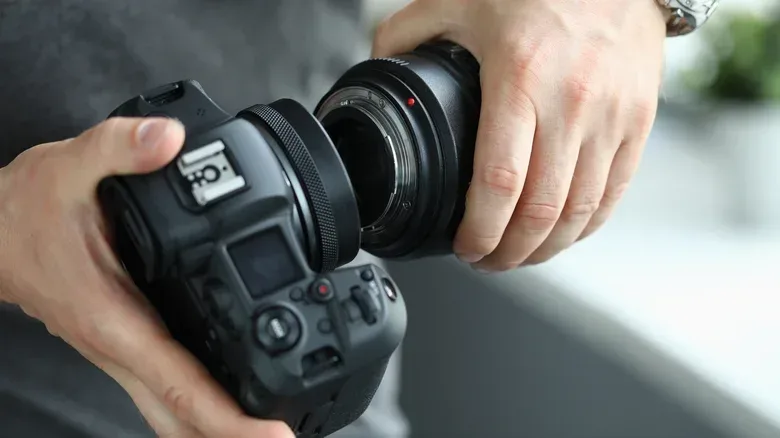
For interchangeable-lens cameras, some sensor debris is an ordinary consequence of changing lenses. The sensible goal is not panic or improvised cleaning, but using the least invasive option first and knowing when to stop.
The rule worth remembering: do not use your mouth as a blower
If a speck is visible on the sensor or shows up repeatedly in images, resist the urge to puff it away by mouth. The practical risk is that moisture from spit lands where the dust already is. Once that happens, the original loose particle is no longer the only concern: residue can create a difficult-to-remove mark.
This matters because dust and moisture behave differently. A loose dust particle may be shaken free by a camera’s cleaning system or moved with a controlled burst from a proper air puffer. A moisture mark, by contrast, may remain attached to the sensor surface. The attempt to solve the problem can therefore make it more persistent.
There is an additional reason not to treat every speck alike. The debris described as especially concerning includes abrasive material such as metal shavings or grains of sand. Abrasive particles introduce a greater risk than ordinary dust. Experimenting carelessly around an exposed sensor can turn debris into a scratch, which is a far more serious outcome than a spot in a photo.
What “sensor dust” means in practice
The camera sensor is the component that records the image. On a camera with interchangeable lenses, it is accessible when the lens is removed, which also creates opportunities for airborne debris to get inside. A dust speck can become noticeable when reviewing photographs, even if it was not obvious while changing a lens.
The important practical distinction is between an image symptom and the cleaning response. Seeing a spot in photos does not automatically mean a photographer should touch anything inside the camera. The source material’s recommended sequence begins with the feature the camera already provides, then moves to a purpose-built manual tool only if the problem persists.
Related coverage includes Never Blow on Your Camera Sensor: A Safer Way to Remove Dust.
That approach is deliberately conservative. It aims to remove loose particles without adding liquid, contact, or unnecessary handling near the sensor. For anyone who also spends time refining digital images after shooting, it is a useful reminder that prevention during capture can save effort later; image-editing tools continue to gain new capabilities, as covered in this look at newer image creation and editing features, but a recurring sensor mark is better addressed at the camera than worked around image by image.
First step: use the camera’s built-in sensor cleaning function
Most modern cameras offer an internal sensor-cleaning feature. Cameras capable of changing lenses will commonly include a menu option that uses vibrations to shake dust particles loose from the sensor.
This is the appropriate first response because it is built into the device and does not require putting an external object near the sensor. Find the sensor-cleaning option in the camera menus and run it before attempting anything else. Many cameras also allow automatic cleaning to be enabled when the device is turned on or shut down.
Automatic cleaning is not a promise that every particle will disappear, but it is a sensible maintenance layer. It gives loose dust a chance to be removed as part of normal camera use rather than waiting until a visible blemish interrupts a shoot.
Why this is the least-risk first move
- It relies on the camera’s own cleaning system rather than breath or direct contact.
- It is intended to shake loose dust particles through vibration.
- It may be configured to run automatically at startup or shutdown on supported cameras.
- It avoids immediately escalating to wet cleaning or improvised methods.
The limitation is equally important: if spots remain after this step, the camera has not necessarily failed and the situation has not necessarily become urgent. It simply means a loose particle may still be present or may not have been dislodged by the vibration cycle.
Second step: use a rocket blower, with gravity on your side
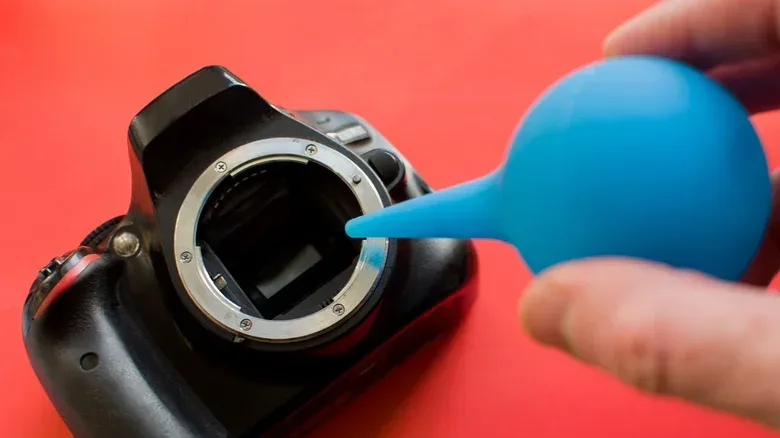
If the built-in function does not clear the specks, the next recommended tool is a rocket blower. This is a hand-operated, rocket-shaped air puffer that sends short bursts of air toward the sensor area. Unlike blowing by mouth, it is designed to move dust without introducing saliva.
Technique matters. Hold the camera so the sensor faces toward the ground, then direct the blower’s air upward toward it. This orientation gives dislodged particles a better chance of falling away instead of lingering in the chamber and settling back onto the sensor.
That simple use of gravity is the central advantage of the method. Cleaning is not merely about moving dust; it is about moving it out of the camera rather than redistributing it nearby. Pointing the sensor downward makes the process more purposeful than aiming air at an upward-facing opening and hoping the particle goes somewhere useful.
A restrained cleaning order
- Notice a persistent spot in photographs or debris on the sensor.
- Do not blow on the exposed sensor with your mouth.
- Run the camera’s built-in sensor-cleaning function through its menus.
- If the spot remains, use a rocket blower.
- Keep the sensor facing down and puff air upward so freed particles can fall away.
- If the issue still is not resolved, consider professional help rather than experimenting further.
Where wet cleaning fits—and why it is not the casual next step
A wet clean refers here to using a dedicated cleaning solution. It may be an option for someone who has the necessary know-how, particularly if moisture residue has already become a stubborn stain. It is not presented as the default answer for ordinary dust.
That difference matters. A wet clean is a more involved intervention than vibration or a manual air puffer. Without the relevant knowledge, it is easy to turn a simple dust concern into damage. The key warning is not that every sensor problem demands a professional, but that an uncertain owner should not keep escalating their approach around a delicate exposed component.
Professionals are the prudent fallback when built-in cleaning and a rocket blower have not solved the issue, especially if the debris might be abrasive or a stain has developed. The cost of pausing and seeking help can be much lower than the cost of a permanent scratch or an enduring mark across future photos.
Practical implications for photographers who change lenses often
Lens swapping makes occasional sensor dust difficult to avoid. That is not evidence of misuse by itself. The useful habit is having a simple response plan before the first visible spot appears: know where the camera’s sensor-cleaning menu lives, consider enabling its automatic cleaning option, and keep a rocket blower as the manual follow-up tool.
Just as importantly, avoid treating a speck as a reason to rush. Ordinary debris may be inconvenient, but it is often addressable through the camera’s vibration-based cleaning or careful blower use. Moisture from mouth-blowing and the danger of scratching around abrasive particles are the avoidable complications.
In short, use the camera’s own sensor-cleaning feature first. If needed, use a rocket blower with the sensor facing downward. Leave wet cleaning to people who understand the process, and seek professional assistance when the basic steps have not worked. A little restraint is what keeps a minor dust spot from becoming the mark that follows every photograph.