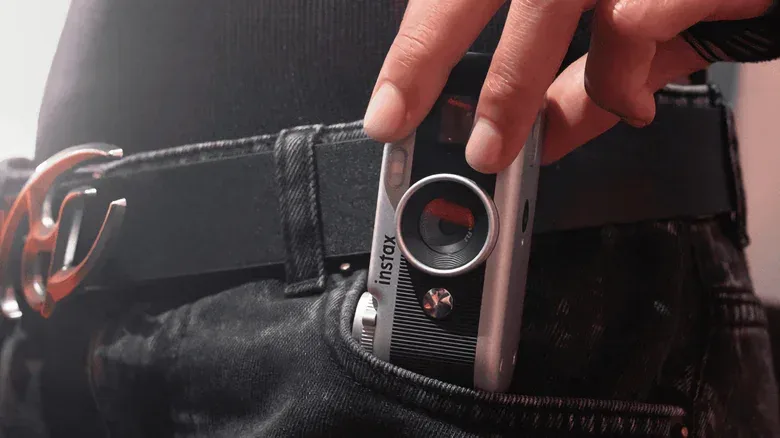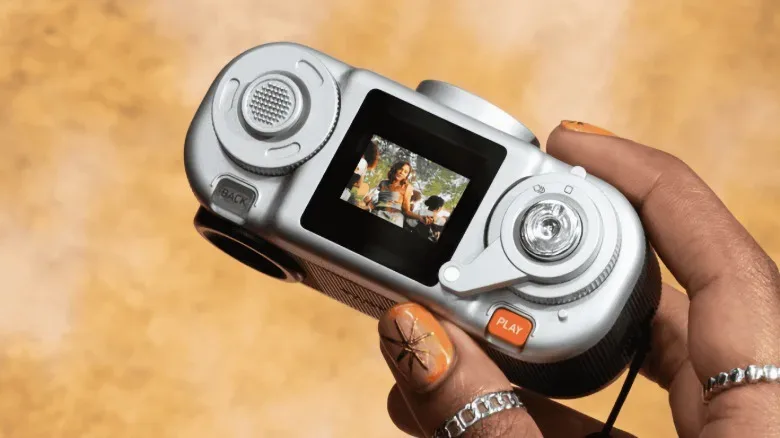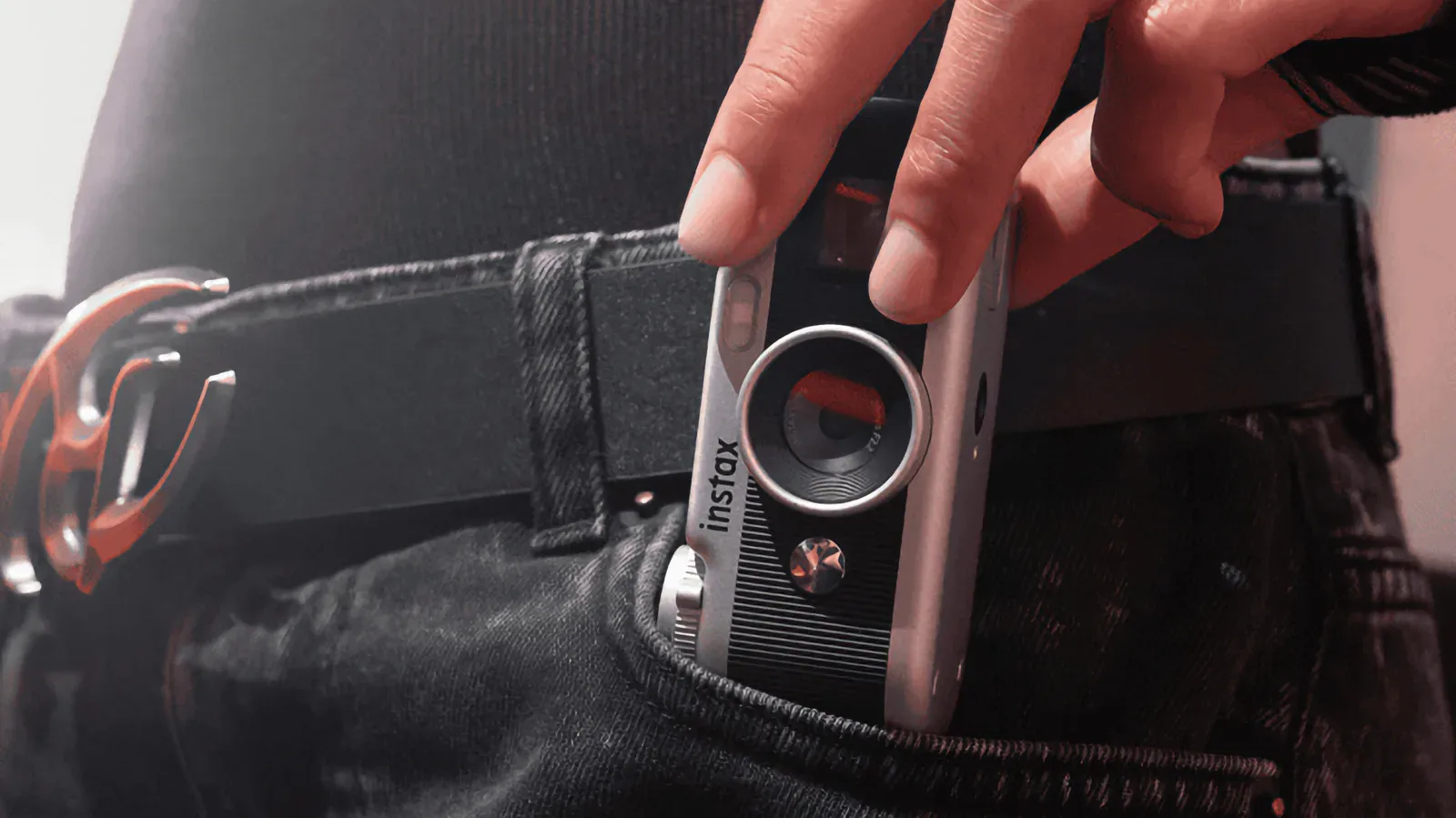
Fujifilm’s Instax Pal 2 is a small digital camera with an unusually clear purpose: it is not trying to replace the camera already sitting in your pocket. Instead, it leans into the appeal of having a separate object for taking pictures—one with a shutter button, a lever, a dial and viewfinders—while retaining a practical route back to a phone.
The new model builds on the original Instax Pal’s separation of camera and printer. Where the earlier concept was chiefly a tiny capture device designed to work alongside printing, the Pal 2 is positioned more confidently as a standalone digital camera. Its package combines digital effects, physical interaction and several ways to move or print photos, including a USB-C connection directly to a smartphone, Bluetooth transfer and support for printing through an Instax Link printer.
It is available to pre-order for $170 in all-white or a silver-and-black two-tone finish. That price and the supplied specifications make the Pal 2 a niche accessory rather than a raw-specification challenger to a modern phone camera. The appeal is the experience around the image: choosing a look at the camera, framing through a dedicated viewfinder and accepting a more limited device as part of the fun.
A compact camera designed to be used, not merely carried
The Instax Pal 2 measures 1.46 by 1.65 by 3.63 inches, or 37 by 42 by 92 mm. It is larger than the original, more rounded Pal and has been designed for horizontal shooting. That matters because the camera’s shape encourages a familiar, landscape-style grip rather than treating the device as a novelty button or a keychain attachment.
Its compact dimensions still put it firmly in the “take it along” category, but it is not so small that carrying it is effortless in every situation. This is a device for someone who deliberately chooses to bring a camera, perhaps in a pocket or bag, rather than someone looking for an always-attached keyring camera.
That distinction says a lot about the Pal 2’s role. Smartphones remain the more capable option for detail and convenience, but a phone also concentrates messaging, editing, sharing and every other distraction in one screen. A dedicated camera changes the sequence: first take the photo, then decide whether to transfer, edit or print it. The Pal 2’s hardware is built to make that first step feel more intentional.
What the camera hardware can do
The Pal 2 uses a 1/3.06-inch CMOS sensor and can shoot at either 10 megapixels or 1 megapixel. Megapixels describe the number of pixels in an image; in broad terms, more pixels can preserve more image detail. They do not by themselves determine whether a photo looks better, since sensor size, lens characteristics, processing, lighting and focus all contribute. Still, the 10MP setting is the option for users who want the camera’s fullest stated resolution, while 1MP offers a markedly lower-resolution alternative that may suit a deliberately lo-fi result.
The listed f/2.2 aperture refers to the lens opening. A smaller f-number generally indicates a wider opening, which can help a camera gather light, though the final result also depends on the rest of the imaging system. Fujifilm also includes autofocus, auto white balance and an LED flash. Autofocus is the camera’s ability to adjust focus automatically for a subject, while auto white balance attempts to keep colors looking natural under different kinds of lighting. Those automated tools should reduce some of the friction of quick snapshots, even as the device emphasizes a more hands-on shooting ritual.
There are two viewfinding options: an optical viewfinder at the rear and a digital viewfinder on top. An optical viewfinder is a direct way to look through or along the camera for composition, without the scene being rendered as a live digital image. A digital viewfinder, by contrast, presents an electronic display and can also support menu navigation. Offering both is notable on a camera this small because it gives users a physical framing method alongside the screen-based one.
The lever and dial are the point
The most distinctive elements are the controls. A lever selects frames associated with Fujifilm’s Instax film styles, while a dial cycles through downloaded color filters or effects. The Pal 2 also includes a digital timer and a flipbook-animation-style capture mode.
Frames and filters are not new photographic ideas, and phone apps can apply both without a separate device. The difference here is that the selection happens before the picture is taken and is tied to a physical control. A user can turn a dial to settle on a color treatment or use the lever to pick a frame, then press the shutter. That makes the visual choice part of the capture rather than a purely post-shot editing task.
It is also a useful reminder that “retro” design is often less about reproducing old technical limitations than it is about restoring a particular type of interaction. The Pal 2 does not abandon digital convenience. It allows downloadable effects, offers digital viewing and can send files to a phone. Rather, it places software-driven looks behind tactile controls. The result is a hybrid: a digital camera whose behavior is meant to feel more playful and self-contained than a camera app.
The flipbook-style mode similarly frames the device as something for short, expressive moments rather than solely for single still images. Specific output details for that mode are not established here, so prospective buyers should avoid assuming it behaves like a particular video format or animation workflow. What is clear is that it extends the Pal 2 beyond conventional one-photo-at-a-time capture.
USB-C transfer gives the Pal 2 its most practical advantage
The built-in USB-C connector is arguably the most consequential feature for everyday use. It enables direct transfer of images to a smartphone for further editing. That means the Pal 2 can preserve its separate-camera feel without requiring its owner to stay in a separate photo-management system afterward.
Bluetooth transfer is also supported, providing a wireless alternative, and the camera can print directly to an Instax Link printer. Together, those options give the camera three distinct paths after an image is captured:
- USB-C to a phone: a direct route for moving an image to smartphone editing and sharing tools.
- Bluetooth: a wireless transfer option for users who prefer not to connect physically.
- Instax Link printing: an option for turning selected digital shots into prints through a compatible printer.
This flexibility is important because the camera itself is not presented as an all-in-one instant-print device. It separates capture from printing, leaving the owner to decide which images deserve a physical copy. For people who value Instax-style output but do not want every picture automatically committed to a print, that division could be useful.
It also puts the Pal 2 in a more sensible place beside a phone. The phone remains the editing, storage and sharing hub; the camera is the capture tool with its own visual character and controls. As digital ecosystems keep asking users to interact through more layers of software, there is a real appeal in hardware that makes one small task feel immediate. For another example of how interfaces and digital systems shape consumer experiences, see our coverage of virtual currency pricing and player protections.
The caveat: interface speed could undercut spontaneity
The notable reported drawback is a slow interface. That is more than a minor specification complaint on a camera whose identity depends on being spontaneous. If changing settings, navigating menus or getting to a desired effect takes too long, the tactile controls may lose some of their charm at the exact moment a photo opportunity appears.
How much that matters will vary by user. Someone treating the Pal 2 as a deliberate, social snapshot camera may tolerate pauses in exchange for its physical controls, filter selection and printing options. Someone expecting phone-like responsiveness may find the slowdown harder to accept, particularly when the device already asks them to carry a second camera.
Potential buyers should therefore weigh the camera as an experience-driven product. The Pal 2 has a 10MP mode, autofocus, auto white balance, flash and direct phone transfer, but its central promise is not technical supremacy. It is a compact digital camera that makes a case for committing to a shot with a dedicated shutter, choosing effects with a dial and lever, and deciding afterward whether that image belongs on a phone or on an Instax print.
For people already using Fujifilm’s printing ecosystem, that mixture may be especially appealing. For everyone else, the key question is simpler: whether tactile controls, downloadable effects and a standalone shooting object are worth $170 when a smartphone will likely produce more detailed photos. The Instax Pal 2 is designed for buyers whose answer is yes—not because their phone cannot take the picture, but because they want taking it to feel different.