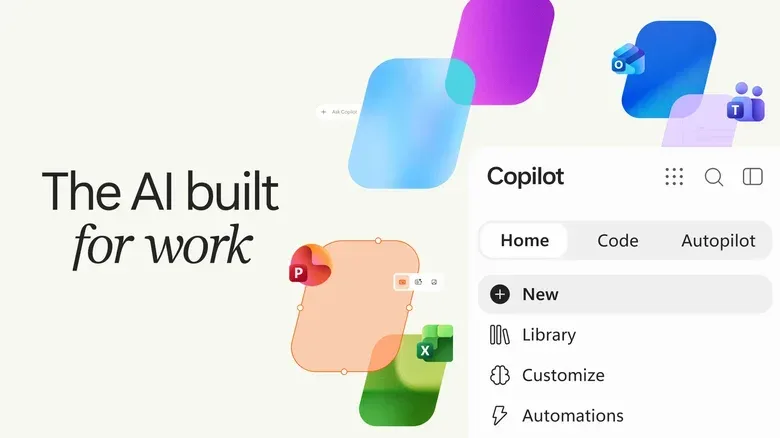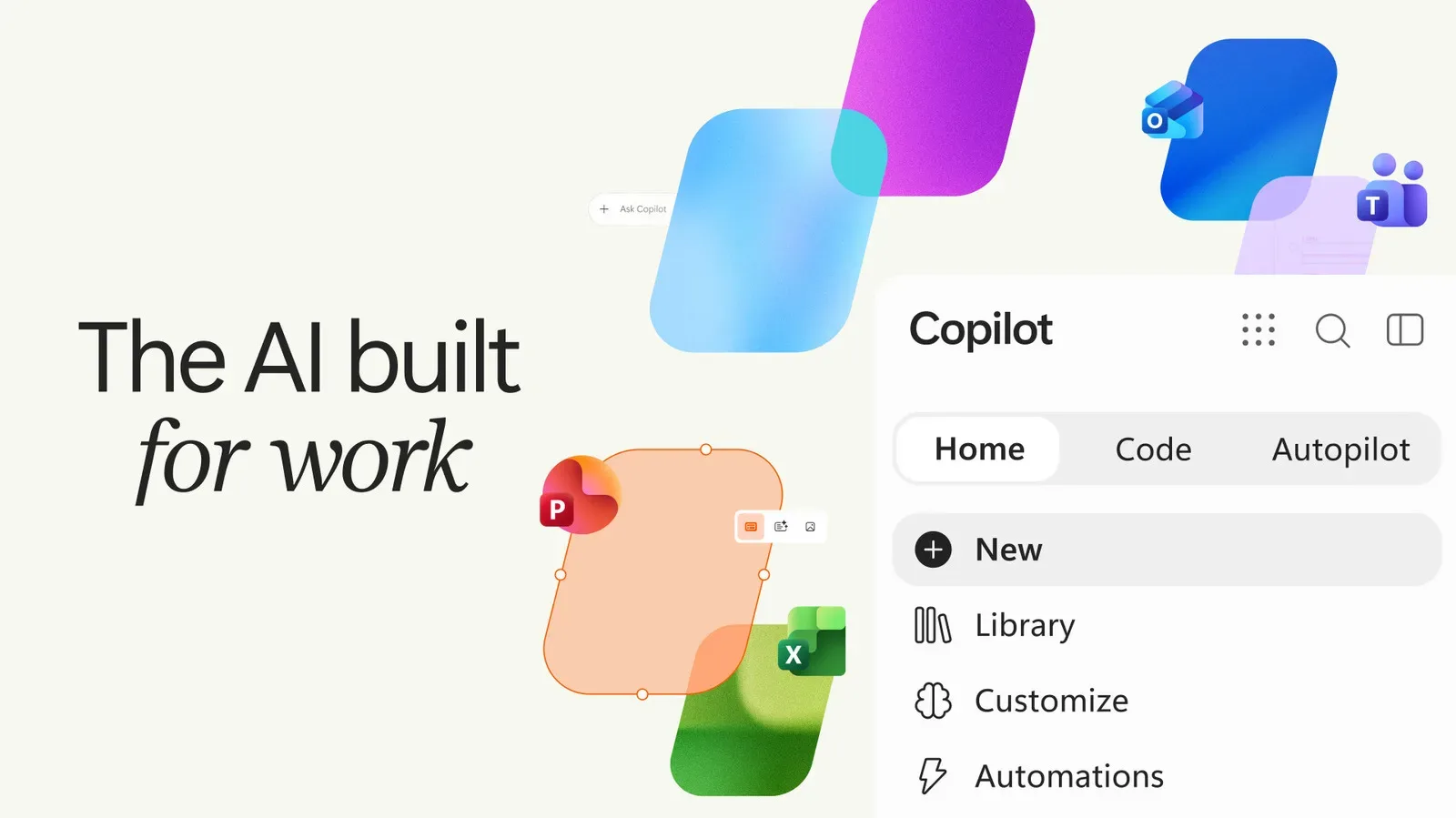
Microsoft is preparing another redesign of its dedicated Copilot app, this time organizing it around three distinct jobs: asking questions, creating lightweight tools and handing off recurring work. The planned interface introduces Home, Code and Autopilot tabs, alongside direct integration with Office apps.
It is a more focused pitch for Copilot than a general promise that AI should appear everywhere. The new layout separates conversational requests from tool-building and longer-running automated work, which could make it easier to understand what the app is meant to do—and, just as importantly, when a user is asking it to act rather than merely answer.
That distinction matters. A chatbot can provide a draft or explanation in response to one prompt. An agentic system, by contrast, is intended to carry out a sequence of actions toward a goal. Microsoft’s proposed Autopilot tab places that second, more consequential idea front and center.
Three tabs, three levels of assistance
The Home tab will be the starting point for ordinary AI conversations and other work inside Copilot. Microsoft says it ultimately intends for Home to route requests intelligently across Copilot’s various modes. A straightforward question could remain a Chat task, while a more involved request could be sent to a Copilot mode designed for delegated work.
In practical terms, that proposed routing is an attempt to remove a choice users may not be equipped to make. People generally know whether they want an answer, but may not know which model, workflow or automation system should produce it. A Home screen that interprets intent could simplify the experience—provided its choices are clear enough for users to understand what will happen with their request.
The Code tab is aimed at a different problem: translating an idea for a small utility into something usable without requiring conventional programming knowledge. A user can describe an app, tracker, dashboard, automation or workflow in everyday language, and Copilot is intended to select an approach and build it. Examples cited include simple desktop widgets and data-management dashboards.
That is not the same as promising that every plain-English request becomes a polished, production-ready application. The information available describes small tasks and tools, rather than a replacement for professional software development. Still, the idea is potentially useful for people who have a narrowly defined need—a tracker, a dashboard or a repeatable workflow—but lack the coding skills to begin from a blank page.
Then there is Autopilot, the tab built around agentic capabilities. Microsoft describes it as a place where Copilot can respond to threads or handle recurring tasks without continual user input. Its supplier-review example is deliberately broad: the system could create a schedule and workback plan, handle preparation, meetings and follow-ups, and contact stakeholders for updates.
What “agentic” means in this context
“Agentic” is a frequently used AI term, but here it has a specific practical meaning: the system is being positioned to take a multi-step assignment and proceed through work over time. Rather than returning one block of text, it may organize stages, communicate with people and keep a process moving.
The supplier-review scenario shows why that is a larger leap than ordinary chat. It combines planning, recurring administrative work, follow-up and outreach. Those are tasks with dependencies: meetings need scheduling, preparation precedes meetings, and follow-ups occur after them. The notable part of Microsoft’s description is not any one of those activities; it is the claim that Copilot can manage the chain with no ongoing input from the user.
For businesses that constantly turn data into reports, presentations and decisions, the appeal is obvious. Repetitive coordination can consume substantial attention even when no individual step is especially difficult. An assistant that can structure the process and chase updates could shift the human role toward reviewing the work, making judgment calls and addressing exceptions.
But delegation also changes the kind of oversight that matters. With a chat response, a person can inspect an answer before using it. With a system that is responding to threads, creating plans and contacting stakeholders, review needs to happen before, during and after the workflow. The available details do not specify the controls, permissions or review mechanisms for Autopilot, so those implementation questions remain open.
Office integration gives the redesign a workplace center
Direct integration with Office apps is a central part of the refresh. That makes sense because the announced use cases—processing data, generating reports and building presentations—are work that commonly ends in office documents and related materials.
The integration also clarifies who may find the update most immediately relevant. Microsoft is presenting the app as useful to consumers and businesses, but the strongest examples are organizational ones: dashboards, workflows, stakeholder updates and supplier reviews. They involve shared information, recurring processes and a need to communicate results in a consistent format.
For individual users, the Code tab may be the most accessible part of the pitch. Someone who can articulate the fields they need in a tracker or the outcome they want from a simple automation may be able to get closer to a working starting point without learning syntax first. Yet natural-language creation does not eliminate the need to check whether the result matches the request. Plain English can be vague, and a tool that appears sensible may still use the wrong assumptions, labels or steps.
For teams, Office integration could make Copilot more relevant at the point where work is documented and shared. However, the same basic rule applies: generated material and automated activity still need accountable owners. An AI-created dashboard is only as trustworthy as its inputs and setup; an automated follow-up is only appropriate if its timing, recipients and wording fit the situation.
A cleaner product story, with unanswered details
The tabbed design is a notable attempt to give Copilot a clearer internal map. Home is for general assistance. Code is for making small tools from descriptions. Autopilot is for ongoing, delegated workflows. That structure is easier to explain than a single catch-all AI surface where chat, coding and automation sit together with no obvious boundaries.
The routing planned for Home is especially important to that product story. If it works as described, users could begin with a request rather than a technical decision about which mode to select. The system would determine whether it is best handled as a simple chat or as a more involved delegated task. That could reduce friction, though it also places more weight on Copilot correctly identifying the request’s complexity and intent.
Microsoft says the intelligent routing capability is planned for Home eventually, which is an important qualification. It should not be treated as a feature confirmed to arrive alongside every other element of the redesign. Likewise, the supplied details describe capabilities and example uses but do not provide a rollout date, pricing, platform list or a full technical account of how the features will function.
Those omissions are meaningful for prospective users. A business considering recurring automation would want to know exactly what the system can access, what it can send, when a person is asked to approve an action and how the resulting work can be reviewed. None of those answers can be assumed from a high-level description of agentic capability.
Why the Code tab may be easy to misunderstand
Natural-language coding is often described as if it turns an idea directly into finished software. Microsoft’s framing is more modest: users describe a small app, tracker, dashboard, automation or workflow, and Copilot chooses an approach and builds it. The examples are widgets and data dashboards, both of which suggest targeted utilities rather than sprawling applications.
That narrower ambition can be a strength. Many workplace frustrations are small but persistent: a team needs a clearer view of information, a repeatable checklist or a task that should not require rebuilding the same document every week. A conversational builder may lower the barrier to addressing those needs.
Yet the phrase “no programming skills required” should be read as a statement about entry, not a guarantee that no judgment is required. A user still has to explain the desired outcome clearly and evaluate what is built. In a work setting, they must also determine whether the output is suitable for the people and process involved. The easier it becomes to create a workflow, the more valuable careful review becomes.
What to watch as the app evolves
The refresh is best understood as Microsoft putting different degrees of AI assistance into a visible progression. Chat answers a question. Code constructs a lightweight solution. Autopilot takes responsibility for a recurring sequence of tasks. Office integration connects those capabilities to the documents, data and presentations that define much day-to-day work.
For users, the practical question is not whether every part of Copilot should be used. It is which level of assistance fits the task. A simple question may only need Chat. A repetitive manual tracker may be a candidate for Code. A repeatable coordination process may eventually fit Autopilot, but only where its scope can be understood and monitored.
That measured approach may be more useful than treating AI as a single magic button. The new Copilot app is trying to make its roles legible: ask, build or delegate. Whether it becomes compelling will depend less on the labels than on how reliably it turns those three choices into work people can verify and use.
Microsoft’s latest move also sits within a broader shift in how software companies describe AI: away from a feature that merely writes on command, and toward a layer that can organize tasks and produce working artifacts. For more context on how AI interfaces are increasingly shaping the tools people use around games and technology, see this look at an Android update designed around a dual-screen handheld home screen.