A limited-time early Black Friday listing has brought the Lenovo Tab One to $100, a $40 reduction from its stated $140 usual price. That works out to roughly 29% off, and puts a compact Android tablet into a price bracket that may be most compelling for straightforward media, web and casual-use duties rather than as a replacement for a laptop or a high-end gaming device.
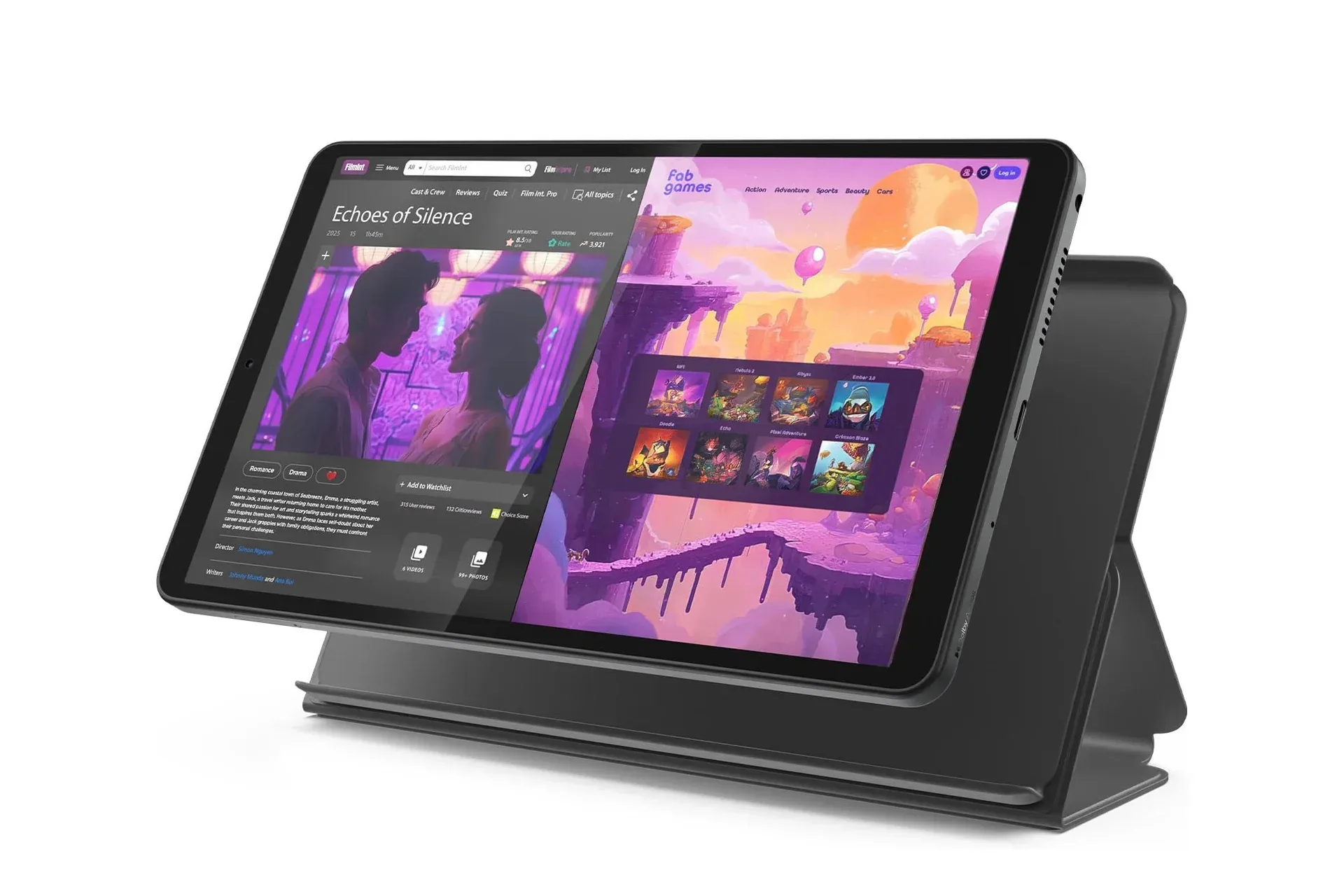
The deal matters less because it declares one tablet the universal bargain champion and more because the package covers several basics that can otherwise raise the cost of an entry-level device. Lenovo Tab One’s listed specifications include an 8.7-inch HD display, a MediaTek Helio G85 processor, Dolby Atmos speaker support, USB-C charging at up to 15W, and a folio case that can also serve as a viewing stand. It weighs under one pound, according to the listing.
There is a useful distinction to make when reading a low-cost tablet offer: the sale price tells shoppers what they pay now, while the specification list indicates the jobs the hardware is designed to handle. Neither automatically answers every practical question. The supplied details do not establish storage capacity, memory configuration, display resolution, software support period, camera performance, expandable-storage support, or whether a charger is included. Those are worth confirming on the live product page before checking out, particularly when the tablet is being bought as a gift.
The key numbers behind the Lenovo Tab One listing
- Sale price: $100 for a limited time
- Stated regular price: $140
- Discount: $40, or approximately 29%
- Display size: 8.7 inches
- Brightness: up to 480 nits
- Processor: MediaTek Helio G85
- Display refresh rate: 60Hz
- Video-streaming claim: up to 12.5 hours
- Charging: up to 15W over USB-C
- Included accessory: folio case with stand functionality
What the display specifications actually tell you
An 8.7-inch screen places the Tab One firmly in compact-tablet territory. It should be easier to carry than larger models and potentially better suited to holding for an episode, an ebook, browsing, or a few rounds of a touch-focused game. A smaller physical screen also means less room for multitasking and less visual space for games built around dense menus, small subtitles or detailed maps. That is not a flaw in itself; it is a trade-off tied to portability.
The listing calls the panel HD and rates it at 480 nits of brightness. Nits are a measurement of screen luminance: higher numbers generally indicate a display that can appear brighter. The 480-nit figure is relevant when a tablet is used in a brightly lit room, where a dim panel can make darker video scenes and interface text harder to see. Brightness is only one piece of display quality, though. It does not independently describe sharpness, color behavior, contrast, viewing angles or reflective glare. Those details are not provided here.
The Tab One has a 60Hz refresh rate. Refresh rate describes how often a screen redraws its image each second; 60Hz means up to 60 refreshes per second. For video playback, menus, reading and most basic tablet tasks, 60Hz remains the familiar baseline. It also gives context to the claim that scrolling and games should feel fluid: the panel is designed for conventional 60-frame-per-second presentation, not for the faster refresh rates associated with some gaming-oriented phones, tablets and monitors.
What the Helio G85 and 60Hz screen suggest for games
The MediaTek Helio G85 is the tablet’s listed processor. In a device such as this, the processor handles the operating system, applications and game workloads; its graphics component is especially relevant to 3D games. The practical reading of the supplied specification is modest but useful: it positions the tablet for everyday apps, web browsing, scrolling and casual gaming, with the listing describing gaming as responsive and lag-free.
That description should not be stretched into a guarantee that every game will run at maximum visual settings or maintain a particular frame rate. A game’s result can vary with its update, graphical complexity, online connection, installed apps, heat and available storage. The provided information also does not identify the Tab One’s RAM amount or its internal storage, both of which can affect how comfortably a device handles multitasking and large game downloads.
For buyers selecting a tablet primarily for games, the sensible question is therefore not simply whether it “plays games.” Most modern tablets do. Instead, match the device to the games and habits involved. Smaller, touch-first titles and cloud-streamed services have different demands from large 3D releases. Long reading sessions, video playback and web use make a different case again. The $100 price is a strong part of the equation, but it does not erase the need to verify the configuration and the intended use.
Streaming battery claims need a little interpretation
Lenovo Tab One is rated for up to 12.5 hours of video streaming. That is a useful headline figure for someone buying a compact device for a commute, travel or shared entertainment around the house. Still, the word up to matters. Battery claims are typically tied to a defined usage scenario rather than every possible mix of brightness, volume, wireless activity and applications.
Video streaming can involve a display running continuously, speakers or headphones, Wi-Fi activity and video decoding, so it is a more meaningful workload than an idle-time number. Actual longevity will nevertheless depend on settings and conditions. Raising screen brightness, turning up speaker volume, using demanding apps, downloading content in the background or playing intensive games can change the result. Conversely, offline reading and lighter tasks may present a different power profile.
The listed 15W USB-C charging is another convenience feature rather than a complete charging-time promise. Wattage measures power delivery, but the time from empty to full also depends on the battery’s capacity and the charging behavior at different percentages. The available details support saying that the Tab One can charge at up to 15W via USB-C; they do not establish a specific full-charge duration.
A case in the box improves the practical value
The bundled folio case is one of the more tangible parts of this offer. It protects the tablet and screen while it is not in use, and folds into a stand for hands-free viewing at a desk or table. A stand can be useful for watching video, following a recipe, making a video call or pairing the tablet with a separate keyboard. It also saves buyers from immediately having to find a basic protective cover after purchase.
There is still room for a quick fit-and-finish check. A folio case can protect against everyday scuffs and cover the display, but the information supplied does not make claims about drop protection, water resistance or keyboard functionality. Buyers who need those things should not assume they come with the included accessory.
How to approach the $100 offer
The Tab One deal is best evaluated as a compact, general-purpose tablet package: an 8.7-inch screen, ordinary 60Hz operation, a processor intended to keep everyday navigation and casual games moving, a stated video-streaming estimate, and a case included in the price. At $100 instead of $140, the $40 saving is concrete, while the limitations of the available specification sheet remain equally concrete.
Before a limited-time promotion ends, it is sensible to verify the exact model configuration, the seller, return terms, delivery timing and any accessories required for the intended setup. Shoppers comparing several Black Friday tech purchases may also want to separate a true need from a tempting low price; the same deal-season caution applies to storage hardware, where claimed performance deserves a close read, as covered in this look at a portable SSD Black Friday listing.
For someone who wants a light tablet for streaming, browsing, reading and uncomplicated touch gaming, the Lenovo Tab One’s listed hardware and included folio make the $100 price notably easier to justify than its stated regular price. For heavier gaming, serious multitasking, large local libraries or specialized productivity, the missing configuration details are not minor footnotes—they are the next things to check.
Shop the products
Check current price, model and availability at the retailer.