There are few modern rituals more awkward than sharing your live location “for now” and realizing “for now” has quietly become forever. It happens on trips, at conventions, during long travel days, before dates, or when friends split up to hunt different booths, food trucks, or collectible tables. Location sharing is useful precisely because it removes the need for a running stream of messages asking, “Where are you?” But the old choices could be a little too blunt: share for a short period, share for a day, or leave the digital tracking beacon switched on indefinitely.
With iOS 27, Apple is expanding the timing controls in the Find My app so iPhone owners can set a location-sharing period that better matches the actual plan. The update adds a Custom option alongside the familiar choices for one hour, the current day, and ongoing sharing. Instead of forcing a weekend away into a sequence of repeated daily settings—or risking an accidental permanent share—users can choose a far more exact expiration point.
The update also introduces a separate option designed for people who normally share their location continuously with somebody they trust: a temporary Hide Location control. That makes it possible to pause visibility without dismantling the longer-term sharing relationship and rebuilding it later.
Find My gets a timer that understands real schedules
Before iOS 27, Find My location sharing offered broad duration choices: one hour, one day, or indefinitely. Those are perfectly workable for a quick meetup, an all-day outing, or a close family arrangement. The trouble is that plenty of real plans sit in the uncomfortable middle ground.
A four-day gaming event, a multi-stop road trip, an overnight airport delay, an evening when a babysitter is on duty, or a long dinner and concert does not naturally fit a one-hour or one-day preset. The new Custom setting is intended to fill that gap.
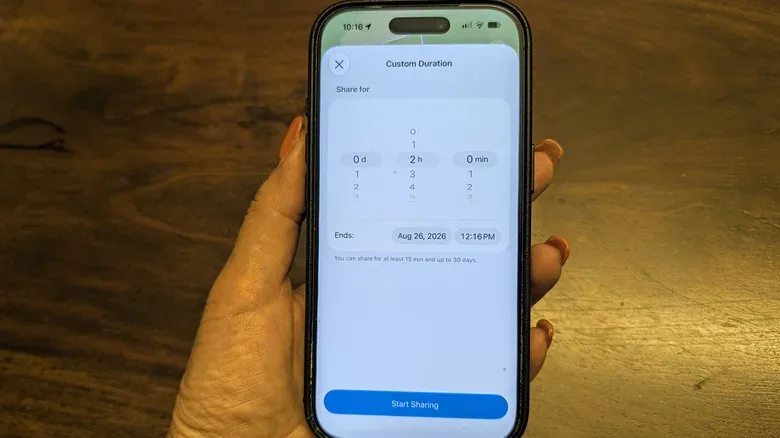
When Custom is selected, Find My presents rolling controls that can set a duration in days, hours, and minutes:
- Days can be set from one to 30.
- Hours can be selected from one to 23.
- Minutes can be selected from one to 59.
- The shortest possible sharing period is 15 minutes.
That range allows for a lot more than a neat whole number. Someone can share for an hour and a half, for three days, or for a very particular window such as one day, three hours, and five minutes. For people who would rather not do calendar arithmetic while rushing through a train station, the same interface also supports setting a specific date and time when sharing should end.
That is a modest interface change with a surprisingly practical effect. A group heading to a weekend tournament can set sharing to stop when everyone expects to be home. A parent can provide a time-limited safety check during an outing. Friends traveling separately to a meetup can stay visible through the whole journey without treating a one-hour timer as a recurring side quest.
Related coverage includes iOS 27 Gives Find My More Control Over Temporary Location Sharing.
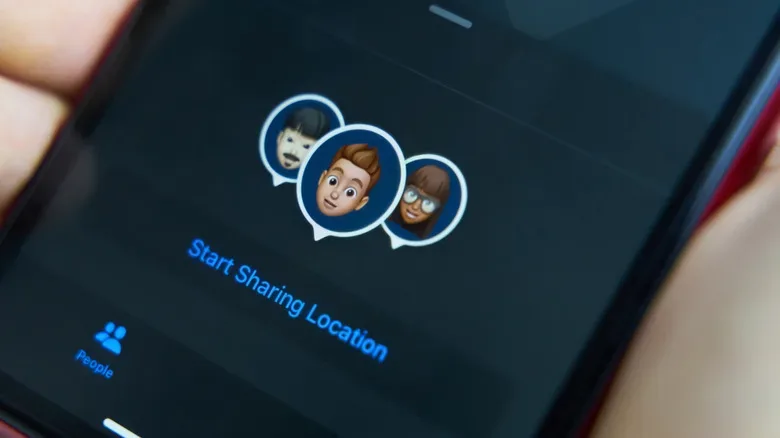
Once location sharing begins, the selected person can open the People list in Find My, tap the sharer’s name, and view their location. When the chosen deadline arrives, that access ends. The central benefit is that the stop point is established at the start, not remembered later after everyone has dispersed and the group chat has moved on to posting blurry photos of dinner.
How the custom sharing choice fits into Find My
The exact screen flow can vary slightly as iOS software evolves, but the important decision comes when sharing a location with a person in Find My. Rather than treating the timer as an afterthought, it is worth deciding what the recipient actually needs.
- Choose the person with whom you intend to share your location in Find My.
- Open the location-sharing controls and select the appropriate duration option.
- Use Custom when the standard one-hour, today, or always choices do not match the plan.
- Set a duration with the day, hour, and minute controls, or choose a precise end date and time.
- Confirm the share, then remember that the recipient can see your position until the selected window ends.
The key word is appropriate. More precision does not mean every situation requires minute-by-minute optimization. A 15-minute share may be enough to coordinate pickup outside a busy venue. A few hours may make sense when people are moving between a restaurant, theater, and transit stop. A multiday timer is more useful for travel. The best timer is generally the shortest one that safely covers the purpose of the share.
That approach also reduces the chance that a convenience feature becomes background noise. Location tools are most useful when everyone knows why access exists, who has it, and when it will stop. The new iOS 27 controls make that agreement easier to encode directly into the setting rather than relying on memory.
Hide Location pauses an existing always-on share
iOS 27’s other Find My addition is aimed at a different scenario. Some people keep continuous sharing enabled with a spouse, partner, parent, child, or another trusted person. Usually, that arrangement is about logistics and reassurance, not a requirement that every errand be visible at every moment.
The new Hide Location option can temporarily pause that established sharing setup. A person may want to stop by a florist, bakery, or gift shop without spoiling a surprise. They may be visiting a friend unexpectedly, preparing a surprise party, or simply wanting a brief pocket of privacy before returning to their normal arrangement.
Importantly, this is not described as silently making a person appear somewhere else. It pauses the location visibility. Someone checking Find My while the pause is active will see that the location cannot be found. That distinction matters: the feature is about stepping away from a continuous feed, not creating a false trail.
For households that normally share locations all the time, pausing can be much more convenient than removing a person from sharing and later setting everything up again. It preserves the broader relationship while letting the user briefly take the map pin off the board.
Custom timers solve the “I will definitely remember to turn this off later” problem. Hide Location solves the “I usually share, but this particular errand is classified” problem.
Privacy and safety need the same feature, not opposing ones
Location sharing often gets framed as either a safety tool or a privacy risk. In ordinary life, it can be both depending on consent, context, and control. A timed share can help a roommate know that someone reached a destination safely after a date. It can make a crowded event easier to navigate. It can help a family regroup after a long drive.
It can also be inappropriate when it is demanded, monitored without meaningful agreement, or treated as proof of trust. A more adjustable timer does not solve those relationship issues on its own. What it does provide is a better set of boundaries for users who choose to share: a clear end time, a shorter minimum period, and less pressure to choose permanent access simply because the presets were inconvenient.
It is sensible to review active shares from time to time, especially after trips, temporary work arrangements, or changes in a relationship. If location sharing is connected to a safety plan, everyone involved should understand what a pause means and have another way to communicate if needed. The Hide Location option may be convenient for a surprise, but it should not replace a direct conversation in situations where somebody depends on location visibility for immediate welfare checks.
Availability: iOS 27 beta first, with the usual beta warning
These Find My features are part of iOS 27 and are available to people running the iOS 27 public beta before the operating system’s official release. Public beta access can be appealing for anyone eager to use the new controls, but it comes with the normal testing-software tradeoff: bugs, unfinished behavior, and unexpected rough edges remain possible.
Anyone considering a beta installation should back up their iPhone beforehand. That is particularly important for a device handling travel plans, authentication apps, messages, photos, and location data. A beta is not merely an early unlock for a new button; it is pre-release software intended for testing.
For mobile players and travelers already weighing their next iPhone move, the broader hardware side of the equation is covered in our look at iPhone 18 Pro carrier credits for mobile gamers. iOS 27’s Find My changes, meanwhile, are less about flashy hardware and more about reducing one tiny recurring friction point: letting people share where they are for exactly as long as they mean to.
That may not sound like a blockbuster feature, but the best quality-of-life additions rarely do. They simply turn an awkward choice between “not long enough” and “much too long” into a setting that matches the plan.