iOS 27.2 is now available as the first major update to iOS 27, bringing the iPhone Duo onto the same software version as Apple’s other iPhone models. Its changelog is broad rather than built around a single headline feature: it ranges from a more capable Siri AI and a privacy-control redesign to small app-interface changes, new family profile tools and substantial security maintenance.
For people who use an iPhone as a gaming, streaming and group-chat device, several changes stand out. The Games app now offers more useful social context, Apple TV can place up to four live sports streams on one iPhone screen, and FaceTime’s Dual Capture support expands to group calls on compatible phones. Meanwhile, the update addresses more than 160 security vulnerabilities. None were known to be actively exploited, but the scale of the security work alone makes this a release worth taking seriously.
Siri AI gets memory, more context and tighter app exclusions
The most significant functional changes sit in Siri AI. It can now recall earlier conversations, letting a user ask follow-up questions about an answer it gave previously. Apple’s example is returning to a restaurant recommendation, but the principle is broader: the assistant is intended to retain the thread of a prior exchange instead of requiring the person to start from scratch.
That capability matters because a conversational assistant is most useful when it can preserve context. “Context” here means the information needed to understand a request, including what was discussed earlier. A request such as “what was the second one?” only works if the assistant can connect it to an earlier list. iOS 27.2 adds that kind of continuity to Siri AI conversations.
Siri AI can also draw information from photos attached to Messages, Calendar event attendees and voicemails. Apple says results should improve when Siri uses Safari history and Reading List as well. These are meaningful additions because they broaden the places from which Siri can retrieve relevant details. They also make privacy settings more important: data sources that can make answers more useful are still sources some people may prefer to keep outside an assistant’s reach.
iOS 27.2 redesigns the related controls. The new Excluded Apps feature makes it possible to select the apps Siri, Search and suggestions are allowed to access in a faster, more centralized way. The earlier App Access arrangement required exclusions one app at a time. This is a practical change for anyone who wants to keep certain applications out of device-wide suggestions without reviewing a long series of individual toggles.
Another smaller but welcome Siri change is granular text selection. Instead of copying an entire answer, users can select only the portion they need. It is a basic interaction improvement, but a useful one for moving an address, a short fact or a specific instruction into a message or note without cleaning up extra text.
There are important limits. Siri AI requires an iPhone 15 Pro or later. Its language availability expands with French, Japanese, Korean, Portuguese and Spanish, but it remains unavailable in the EU and mainland China. Those boundaries should be checked before users expect the update’s Siri features to appear on their own device.
Messaging and media changes are designed around everyday sharing
Messages Suggestions return in iOS 27.2 after appearing during the iOS 27 beta period and being removed before the wider launch. The feature lets users choose categories of suggestions, including Calendar, Reminders, Notes, Maps, and Flights and Packages. The specific value is in turning information in a conversation into something actionable without manually recreating it in another app.
Photos receives a set of maintenance-oriented upgrades. Shared Albums now allow captions and comments to be edited. There is also a feature intended to avoid duplicate photos, plus reminders before albums expire so important images and videos can be saved. None of these alters how a photo is taken, but they address the much more common problem of managing material after it has been shared.
Apple Music’s change is visual: the app has a new black-and-white icon, replacing its red one, and red highlights have been removed from navigation and other parts of the interface. It follows the service’s recent rebranding. Users should not read a new icon as a new music feature; this is a visual identity adjustment rather than a stated change to playback or catalog functions.
Podcasts also changes the organization of its Home tab. The previous Up Next section is replaced by separate New Episodes and Continue Playing areas. Splitting those queues makes the distinction clearer between something newly released and an episode already underway.
Games app makes friend activity less opaque
The Games app gains a modest but sensible social update. Its Friends tab now includes context around friend suggestions, while player pages show the games friends have played recently. In social software, “context” is often what transforms a vague recommendation into a useful one. A bare suggestion answers only who the system thinks a player might know; added context provides a reason for the suggestion.
Recent-game information has a similarly straightforward benefit. It can help friends see what each other have been playing without leaving the Games app, which is especially useful when trying to coordinate a multiplayer session or simply find common interests. The update does not promise new game discovery systems, new multiplayer functionality or changes to specific games. It improves the information around the existing social layer.
That restraint is worth noting. Platform-level gaming features are often most helpful when they reduce friction rather than demand another place to manage a library. iOS 27.2’s Games changes appear aimed at making the Friends view more legible: why a suggestion exists, and what a friend has been playing lately.
Apple TV Multiview arrives on iPhone
iOS 27.2 expands Apple TV Multiview to iPhone. The feature permits up to four live sports streams to be viewed simultaneously, turning the phone into a compact multi-game screen for eligible events. Multiview is limited to sports carried within an Apple TV subscription: Major League Soccer, Formula 1 in the United States, and Friday Night Baseball doubleheaders during the Major League Baseball season.
The limitation is central. Multiview is not described as a general four-video mode for every service or every Apple TV program. It applies to the named live sports programming included in the subscription. For fans following overlapping fixtures, races or a baseball doubleheader, however, its appeal is obvious: fewer switches between streams and a way to keep multiple events in view at once.
On a small display, four streams necessarily make each individual view smaller. The practical advantage is monitoring rather than replacing a full-screen viewing experience. Users can keep track of concurrent action and then focus on the stream that deserves attention. It is an example of a feature whose usefulness depends strongly on viewing habits rather than a universal improvement for every Apple TV subscriber.
iOS 27.2 also adds profile creation to the Apple TV app on iPhone and iPad. Profiles need a name, a rating profile and an indication of whether the profile belongs to a child. A child profile defaults to a PG content limit, with customization available for more precise TV and movie age-rating controls. This gives households a way to separate viewing settings at the phone or tablet level without presenting the feature as a broader change to subscription access.
FaceTime and iPhone Duo additions
FaceTime Dual Capture is now available during group FaceTime calls. Dual Capture streams video from the front and rear cameras at the same time. On compatible iPhones running iOS 27, flipping the camera during a FaceTime call automatically activates Dual Capture.
The supported devices are iPhone 17, iPhone 17 Pro, iPhone 17 Pro Max, iPhone Air, iPhone 18 Pro, iPhone 18 Pro Max and iPhone Duo. The feature can be helpful when a caller needs to remain visible while also showing something in front of them, though iOS 27.2 does not make it available across the entire iPhone lineup. Apple has also added an option to bring a third-party sign-language interpreter or live captioner into a call, an important accommodation option for conversations that need it.
The iPhone Duo receives additional update-specific features: Apple Pencil USB-C support and Edge Light, which illuminates the user’s face during video calls. iPhone Duo owners weighing the practical costs of device ownership may also want to read our look at iPhone Duo repair math and AppleCare.
Shortcuts gains a Duo-specific automation trigger for when the phone is opened or closed. An automation is a rule that runs an action after a chosen event. In this case, the device’s physical state can act as that event. Elsewhere, the Workout automation now supports the Fitness app, the App automation can provide the name of an app that was closed, and users can configure window layout through the Show Actions and Show Describe a Shortcut menu items. Shortcut names and icons can now be edited from the library as well.
Image labels, privacy prompts and small quality-of-life details
iOS 27.2 adds SynthID labels to Image Playground pictures and certain Photos edits. SynthID is a label system used to identify relevant AI-generated or AI-edited imagery. In this release, watermarks are added when the Photos app’s Extend and Reframe tools are used, and for major edits with Clean Up. Images can be checked through Google’s SynthID Detector website.
The exact scope matters: the supplied changes apply to Image Playground images and some specified edits in Photos, not a blanket claim that every image on an iPhone receives a SynthID label. The goal is provenance: providing a way to identify certain kinds of generated or substantially altered visual material.
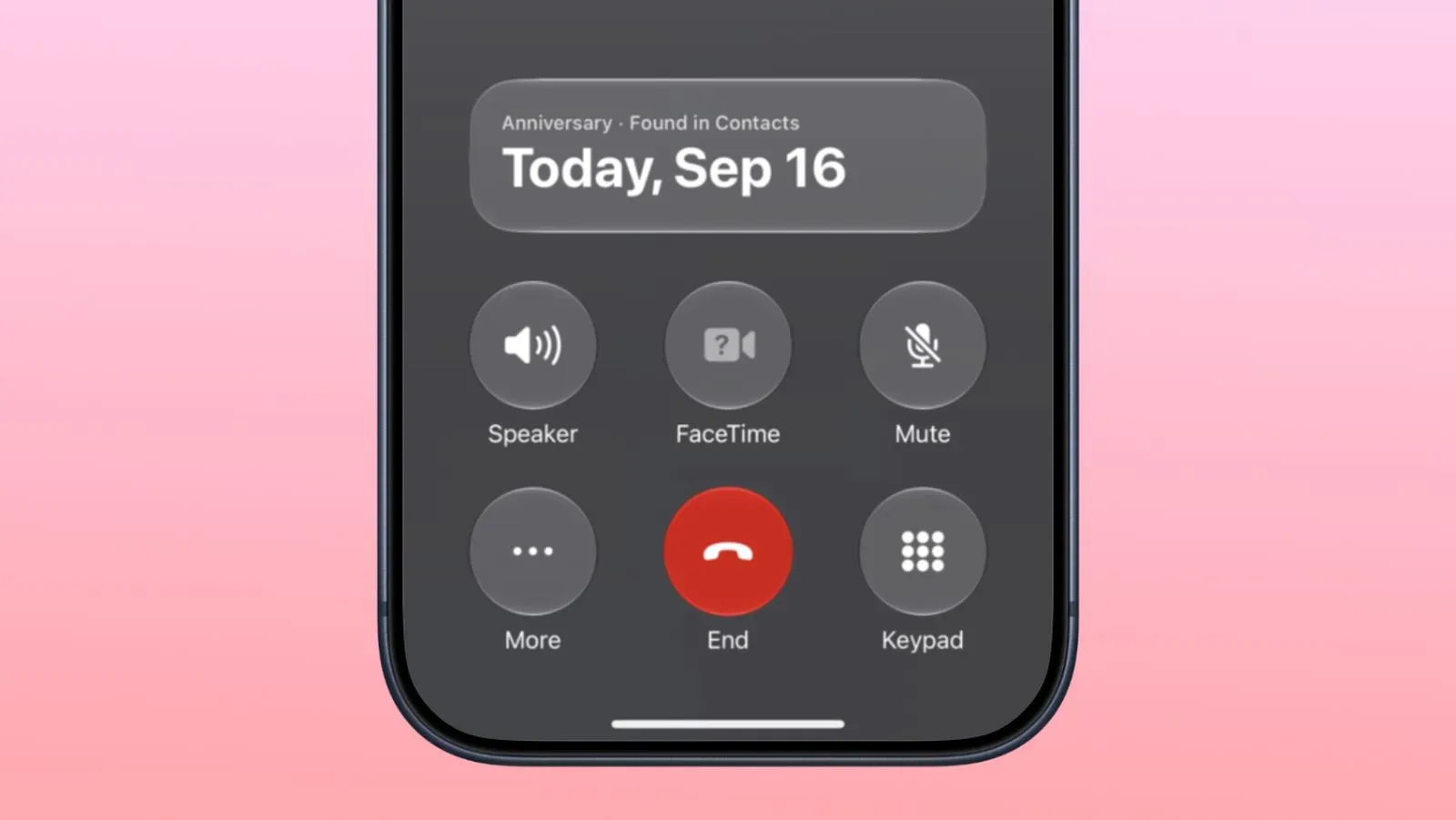
Other refinements are far more low-key. The Phone app’s Call Context can remind a user about a contact’s anniversary when placing a call, provided that anniversary has been saved in Contacts. The Clock app uses smaller a.m. and p.m. labels in the alarm list. These are small interface decisions, but software updates are often judged on whether they remove tiny annoyances as much as on whether they introduce a marquee feature.
For EU users, App Tracking Transparency supports an alternative expanded prompt and annual re-prompting. The alternative prompt is required in France, Germany, Italy, Poland and Romania. App Tracking Transparency is the permission framework that asks users about tracking across apps and websites owned by other companies. The update changes how that consent request can be presented in the stated markets; it should not be mistaken for a new promise that all tracking disappears automatically.
The immediate practical takeaway: update for the security fixes
Apple says iOS 27.2 resolves more than 160 security vulnerabilities. None of those issues were actively exploited, but the absence of known exploitation does not make a large batch of fixes unimportant. Security vulnerabilities are flaws that can potentially be used to compromise confidentiality, integrity or normal device operation. Patching them reduces exposure to known problems.
The redesigned Health app tested during the iOS 27.2 beta is not part of this release and is expected later in the year. That is a useful distinction for anyone who encountered beta discussion and assumed the new Health interface would arrive now.
Overall, iOS 27.2 is a varied update with different reasons to matter to different iPhone owners. Eligible Siri AI users receive the biggest capability changes. Sports viewers get a specialized but potentially valuable Multiview option. Game-focused users see clearer social information in Games. iPhone Duo owners gain Pencil support, Edge Light and a new device-state automation. Across all compatible devices, the extensive security fixes provide the clearest universal reason not to overlook the release.