Signal is putting another obstacle between private chats and the AI agents increasingly woven into phones and computers. The encrypted messaging service says it will block screenshots by default on iOS 27 and will use protections on Android when an AI assistant attempts to capture what is on screen.
The aim is straightforward: stop assistant features from treating a supposedly private conversation as convenient context. Tools such as Apple’s Siri AI and Google’s Gemini Intelligence can inspect on-screen information to respond to prompts and carry out tasks. That functionality may be useful when someone wants help with the visible app, but it also creates a privacy problem when the app contains sensitive messages. Information visible inside an encrypted chat can potentially be pulled beyond the chat app and onto a remote server outside the control of both the user and Signal.
There is an important distinction here. End-to-end encryption protects messages while they travel between participants and generally prevents the service running the conversation from reading them. It does not automatically protect words once they are displayed on a recipient’s screen. If another layer of software can view, screenshot, record, or extract that displayed content, encryption alone cannot put the text back behind the lock.
A screen is now another privacy boundary
The new measures reflect a major shift in the threat model for messaging apps. Traditionally, users thinking about secure chat have focused on account takeovers, intercepted traffic, lost devices, or a platform’s ability to inspect its own servers. AI assistants add a more immediate concern: software with broad system permissions can look at content in the moment a person is reading it.
That is why Signal has described on-device AI agents as an existential issue for private messaging. The danger is not limited to a malicious actor breaking encryption. It can arise from an authorized helper being granted the ability to understand the screen, notifications, or a computer’s accessibility features. A tool designed to summarize, answer questions, or automate a task may see more than a user intends to hand over.
Signal previously moved against a related feature on Windows 11 by preventing Microsoft Recall from capturing snapshots of chats. The new iPhone and Android protections extend that defensive posture to AI functions built into mobile operating systems.
What changes on iPhone and Android
The implementation differs by platform, which matters for anyone trying to understand what is being blocked and when.
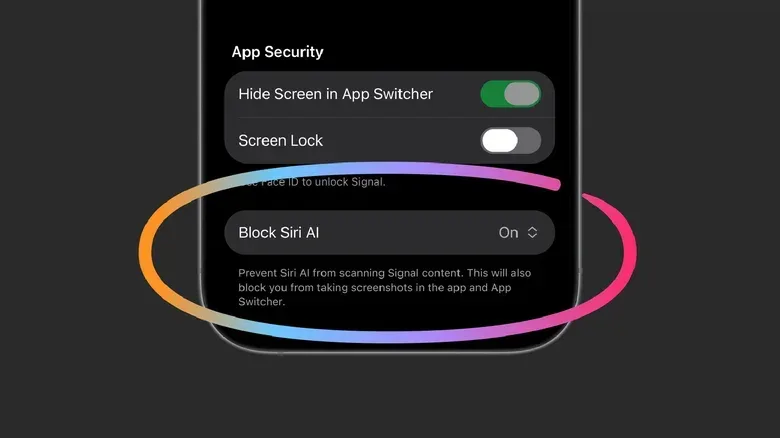
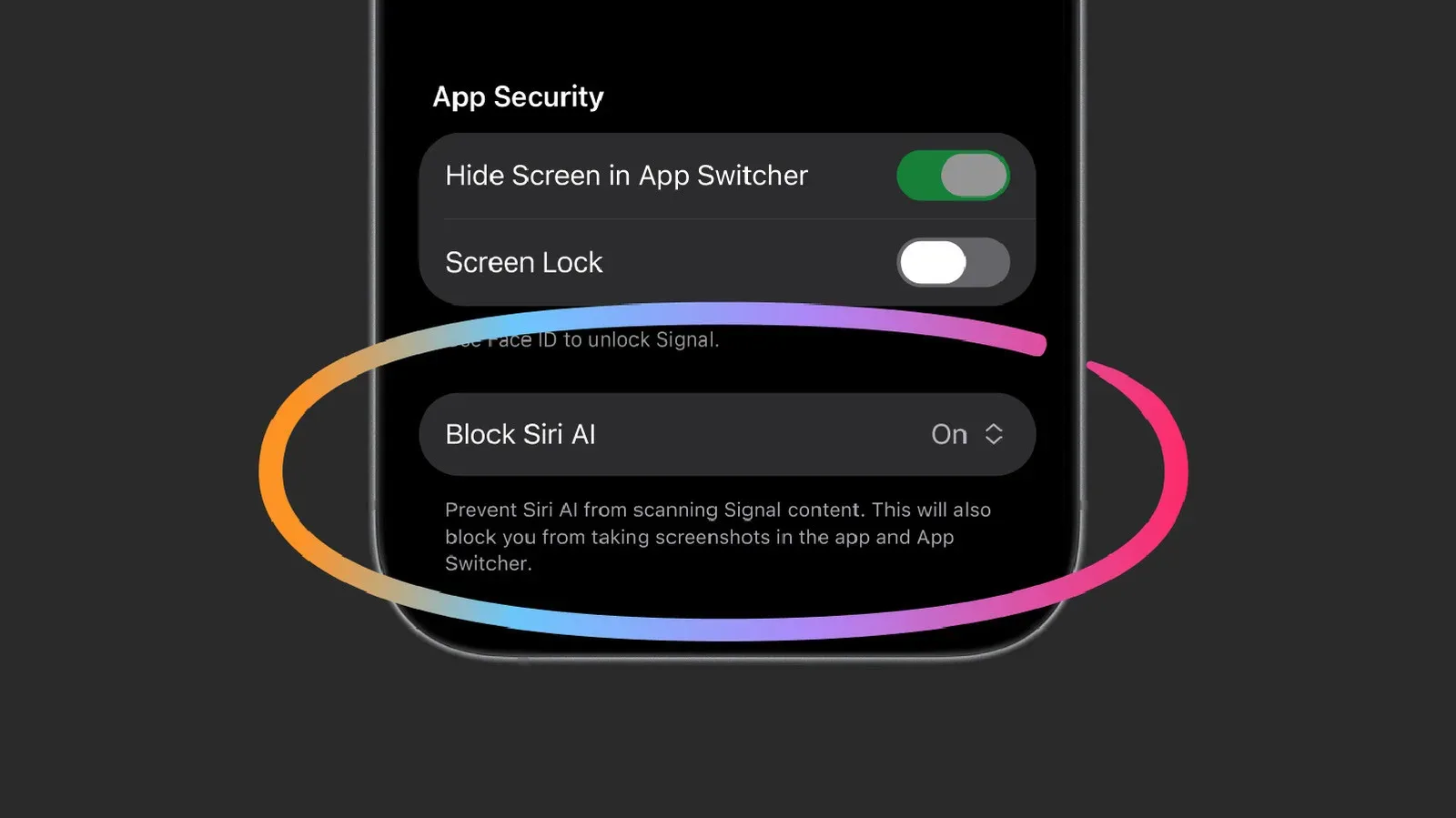
- On iPhone: Signal adds a new Block Siri AI setting, enabled by default. Users will see an option to turn that protection off when Signal detects a screenshot attempt.
- On Android: Signal relies on its existing Screen security option. A prompt offers a way to disable the protection when the app detects an AI assistant attempting to read the display.
The difference is technical rather than cosmetic. The source of the capture attempt and the controls available to an app are not identical across operating systems. Signal’s approach is therefore tailored to what each platform permits rather than presented as one universal switch.
For users, the practical takeaway is that the safeguards are designed to be on before a problem occurs. That default is significant. Privacy controls that require someone to discover a setting, understand a technical risk, and turn it on manually are easy to miss. A default setting makes the protective choice the ordinary one, while retaining an off-ramp for people who decide they need a feature that conflicts with it.
What screenshot blocking does—and does not—do
It would be a mistake to treat the change as a complete wall around every Signal message. Signal itself is explicit that the defense has limits.
Most obviously, conversation privacy involves more than one device. If the person on the other end of a chat has disabled protections, an assistant or agent on their device may still be able to read messages you sent. One participant’s secure settings cannot impose a technical boundary on another participant’s phone or computer.
Nor does screen capture cover every avenue through which an agent might obtain information. Signal warns that third-party agents may inspect notifications or search files. Those routes do not necessarily depend on a screenshot at all.
Permissions are central to that issue. On Android, an agent can read message material from notifications when it has been allowed to do so. On a Mac, accessibility permissions can create particularly sweeping access. Accessibility permissions are intended to help software interact with the system for assistive purposes, but their breadth means they can become a powerful gateway to content and controls. Signal characterizes that kind of access as a “skeleton key.”
Mac users face the starkest limitation in this account: Signal says it currently has no user protections there against this form of AI-agent access. That does not mean a Mac user has no privacy options whatsoever; it means the new application-level safeguards described for iOS and Android do not provide an equivalent defense on macOS.
Why the operating system is the real battleground
Signal’s broader request is not merely for users to toggle a setting. It wants Apple and Google to offer a standard, system-level way for developers to tell AI agents not to read their apps’ content.
That would move the choice closer to the operating system, where assistants obtain their capabilities in the first place. A standard opt-out could let a private messenger, financial app, health service, or other sensitive application declare a protected space without having to devise separate workarounds for screenshots, overlays, and individual assistant behaviors.
At present, Signal says operating-system makers do not offer a route to restrict AI access without making drastic compromises to the core experience of an app. In other words, developers are being forced into difficult tradeoffs: leave broad visibility available, or use defensive restrictions that may also interfere with ordinary user behavior.
This is a familiar platform-governance problem in a newer form. An operating system can enable useful cross-app functions precisely because it has broad reach. Yet the same reach can conflict with an app’s promise that certain information should remain compartmentalized. The question is not whether assistants should exist, but whether users and developers get a clear, enforceable way to mark some content as off limits.
It is also part of a wider conversation about how large platforms control personal data and user choice. The stakes differ, but the debate around platform power and governance is visible in other technology policy stories, including the discussion around a possible TikTok Europe takeover.
Privacy is a shared setting, not a solo achievement
The hardest part of this issue is social as much as technical. A conversation is jointly held. You can secure your own phone, decline broad permissions, and retain Signal’s defaults, but you cannot fully control what happens when your contact’s device is configured to let an agent read notifications or analyze screens.
That same collective privacy challenge appears with AI-enabled glasses. A person may object to being recorded, but the recording decision is often made by the wearer. Concerns about recording bystanders have helped lead to restrictions in places including courtrooms and schools, and to a broader social backlash against always-ready cameras.
AI assistants create a quieter version of that problem. Instead of an obvious camera pointed outward, software may be observing a conversation in the background because it was allowed to help organize, summarize, or act on a device owner’s behalf. The people represented in a chat may have no direct way to approve that access.
Practical implications for Signal users
Signal’s update offers meaningful friction against a specific category of exposure, but it is best understood as one layer in a larger privacy posture.
- Keep the new protection enabled unless there is a clear reason to disable it.
- Be cautious when an AI product asks for access to notifications, accessibility controls, files, or the screen. Those permissions can reveal more than the immediate task appears to require.
- Remember that sensitive discussions depend on the practices of every participant. A secure messaging app cannot fully counter a contact’s permissive device settings.
- Do not confuse encryption with immunity from screen-level access. Encryption remains valuable, but displayed content needs protections of its own.
Signal says it is talking with Apple and Google about a more durable solution and is cautiously optimistic about that work. Until a platform-level control exists, the company’s screenshot and screen-security measures offer a practical defense, not a final answer. Private messaging in an AI-heavy device environment is no longer only about who can intercept a message in transit. It is increasingly about what trusted software is allowed to see after the message arrives.