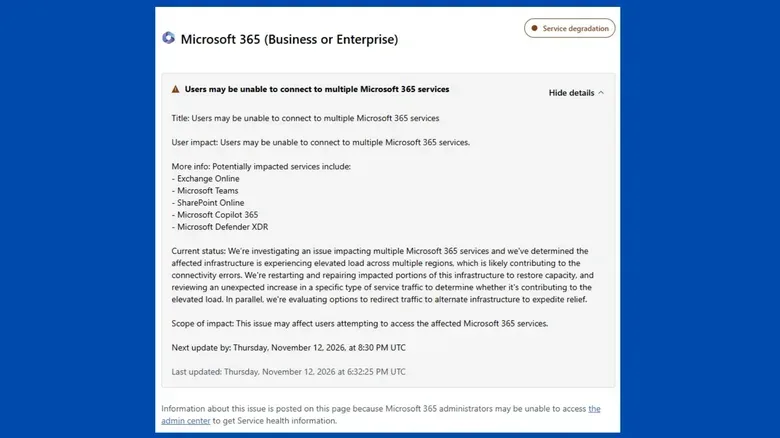
Microsoft is investigating an outage affecting multiple Microsoft 365 services, with Outlook, Teams, SharePoint Online, Microsoft Copilot 365 and Microsoft Defender XDR identified as potentially impacted. The disruption appears to extend beyond email: connectivity errors have affected a group of services that many workplaces use together for communication, meetings, files, security operations and AI-assisted work.
The company said the affected infrastructure is experiencing elevated load across multiple regions, which it believes is likely contributing to the errors. Its response includes restarting and repairing impacted portions of that infrastructure, examining an unexpected increase in a particular kind of service traffic, and considering the redirection of traffic to alternate infrastructure to restore service more quickly.
Early reports centered on people being unable to access Outlook email. However, the potential impact list makes clear that this is not necessarily an Outlook-only problem. Microsoft’s own service-status page was also difficult for some people to load during the incident, complicating a basic but important task for affected users: confirming whether a failure is local or part of a wider platform disruption. For continuing coverage, see our Microsoft 365 outage report.
Which Microsoft 365 services may be affected?
The services listed in the incident update cover several different functions. A problem spanning them can feel much larger than an email outage because organizations commonly link these tools into the same daily workflow.
- Exchange Online: Microsoft’s hosted email and calendaring service, closely associated with Outlook access.
- Microsoft Teams: A collaboration platform used for chat, calls, meetings and team coordination.
- SharePoint Online: A cloud service used for intranet content, shared documents and team sites.
- Microsoft Copilot 365: Microsoft’s AI-related service within the 365 environment.
- Microsoft Defender XDR: A security product used to bring together detection and response information across an organization.
The status notice pointed to Business and Enterprise tiers of the affected Microsoft 365 tools. At the same time, individual users also appeared to be encountering problems. That distinction matters because service plans can help describe Microsoft’s formal incident scope, but a shared underlying infrastructure issue can be noticed by people outside the initially named customer tiers as well.
What “elevated load” means in this incident
Elevated load means the affected infrastructure is handling more demand or work than expected. In an online service, that pressure can take several forms: requests for pages or data, traffic moving between systems, authentication attempts, or other service activity. Microsoft has not identified the precise traffic type publicly in the information available so far, only that it is reviewing an unexpected increase in a specific kind of service traffic.
The practical effect can be a connectivity error. Rather than a user receiving the usual result—an inbox, a Teams message list, a SharePoint page or another service response—the request may time out, fail to connect, or load inconsistently. The underlying cause need not be a problem with an individual user’s device, local network or account. Microsoft’s description instead places the investigation at the infrastructure level and says the elevated load is occurring across multiple regions.
That wording is important because it is still an investigation, not a final root-cause report. Microsoft has said that the unusual traffic may be contributing to the load, but it has not definitively said it is the cause. Users and administrators should treat that difference carefully: a suspected contributor is not the same as a confirmed explanation.
Why one disruption can interrupt several work routines
Microsoft 365 is often used as a connected set of services rather than a menu of separate apps. Email may be where a team receives a meeting invitation or document link; Teams may be where colleagues coordinate; SharePoint may be where the shared material is stored. When access becomes unreliable across several of those points at once, normal workarounds can narrow quickly.
For example, moving a conversation away from email is less helpful if a linked meeting or document service is also experiencing connectivity issues. Likewise, a security team using Defender XDR may face extra friction if the service used to view or investigate security information is affected. The available details do not establish the exact experience for every customer, but the breadth of the named services explains why an incident of this kind can have consequences beyond delayed messages.
Copilot’s presence on the list is also notable. AI tools are increasingly folded into broader workplace platforms, so availability is tied not only to the model-facing feature itself but to the surrounding cloud service environment. During an infrastructure incident, users should not assume an AI-related failure is isolated to the AI feature; it may be one visible symptom of a wider platform problem.
Microsoft’s stated recovery steps
Microsoft described three parallel lines of work:
- Restarting and repairing impacted infrastructure: This is intended to restore lost capacity in the affected portions of the platform.
- Reviewing unusual service traffic: The company is assessing whether the unexpected rise in a specific traffic type is adding to the elevated load.
- Evaluating traffic redirection: Microsoft is considering whether requests can be moved to alternate infrastructure to reduce pressure and speed recovery.
Capacity here refers to the amount of demand infrastructure can process reliably. If enough capacity is unavailable or overwhelmed, requests can queue, slow down or fail. Redirecting traffic is a way of sending some of those requests through different infrastructure instead of relying exclusively on the strained path. Microsoft did not provide a recovery time in the available update, so there is no confirmed timetable for full restoration.
What affected users and administrators can do
With a multi-service outage, the most useful immediate actions are usually operational rather than technical experimentation. Repeatedly changing passwords, reinstalling applications or modifying local settings is unlikely to resolve a provider-side capacity problem and can create unnecessary confusion.
- Confirm the scope with colleagues: Check whether others are seeing the same issue in Outlook, Teams, SharePoint or another Microsoft 365 service.
- Document time-sensitive work elsewhere: If a message, deadline or decision must be recorded immediately, use an approved alternative communication channel available to your organization.
- Keep track of unsent work: If composing mail or editing cloud-based material, preserve local copies where possible before refreshing, closing a browser or retrying a failed action.
- Watch official status communications: Incident updates may change as Microsoft narrows the scope or confirms recovery actions.
- Avoid assuming a local fault: A broader incident can affect users differently, and a failed page or client connection is not by itself proof that a device is misconfigured.
For organization administrators, clear internal communication can be especially valuable while status tools themselves are slow or unavailable. A short notice that identifies the issue as an active Microsoft 365 connectivity incident, explains the services that may be involved, and directs staff to an approved fallback channel can limit duplicate support requests and prevent people from spending time on ineffective local fixes.
What remains unknown
Several details remain unconfirmed. Microsoft has not publicly identified the specific type of traffic under review, said exactly which regions or customers are affected, or given a time for resolution. It has also not established whether every service named in the status update is experiencing the same symptom or severity.
The situation is therefore best understood as a developing, multi-service Microsoft 365 incident tied to elevated infrastructure load. Outlook access was among the earliest reported problems, but the potential impact reaches into collaboration, content-sharing, AI and security services. Microsoft’s mitigation work is focused on restoring capacity, investigating the traffic increase and potentially shifting traffic to alternate infrastructure.