Food tracking usually fails for a mundane reason: entering every coffee, snack, ingredient and partial serving becomes more work than most people want to do. Google Health Premium’s Nutrition section is built around reducing that friction. Its proposed advantage is not that it invents nutrition logging—several wearable companion apps and dedicated nutrition services already offer it—but that it gives users several quick ways to turn a meal into a record.
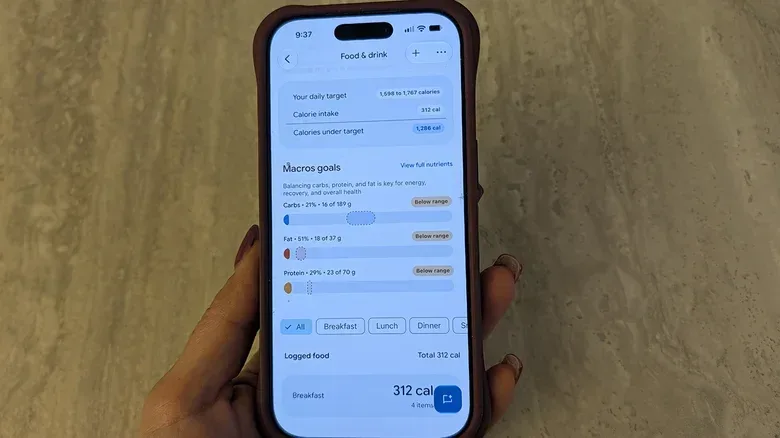
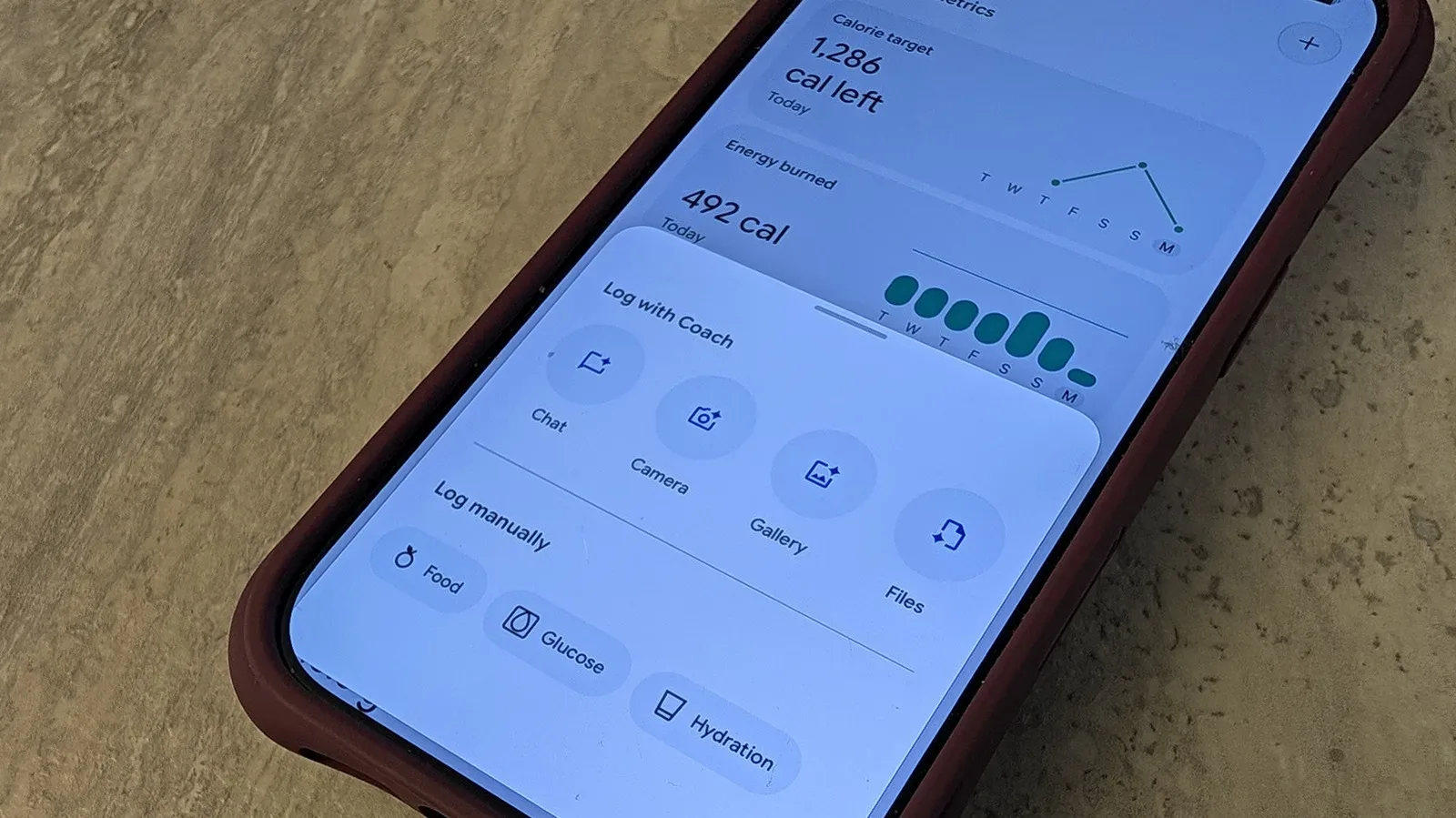
For people using the Google Health app with a Fitbit tracker or Google Pixel smartwatch, the feature set connects daily intake with activity information already being recorded by the wearable. The app can present a calorie target, calorie intake and estimated calorie burn, along with goals for carbohydrates, fat and protein. The real test is consistency: a detailed dashboard is only as useful as the food entries behind it. Photos, barcode scans and spoken descriptions are intended to make that consistency more realistic.
Google Health Premium is listed at $9.99 per month, while Google One subscribers can receive it at no extra charge. Once enabled, Nutrition appears under the Health tab. It is a subscription feature rather than a general promise that every Google Health user will see the same tools without Premium.
A food diary designed for the moment before you forget
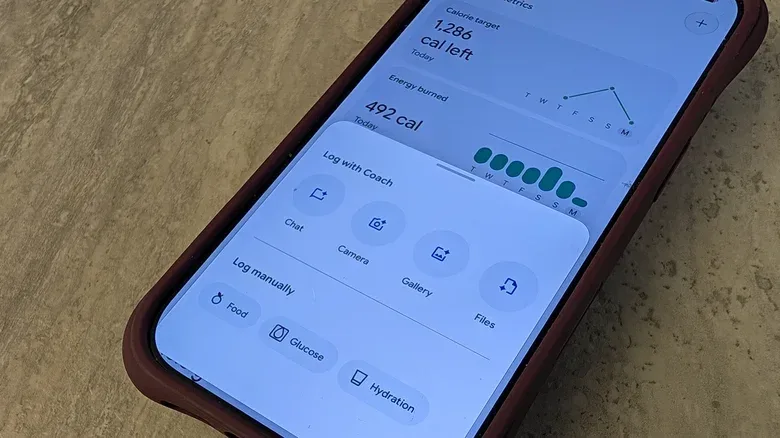
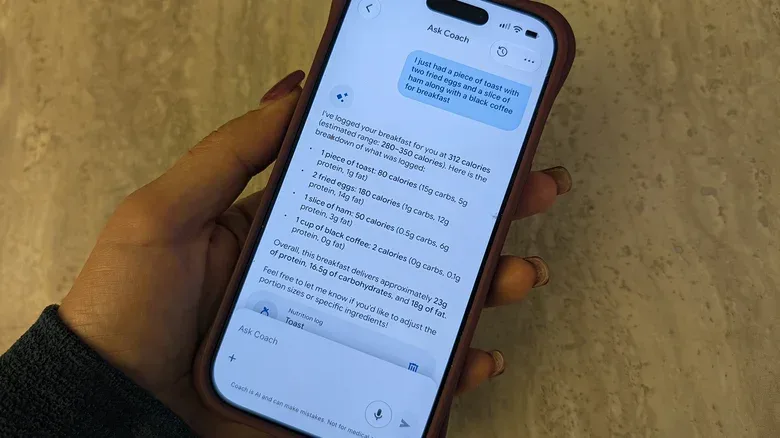
The practical strength of this system is choice. A user can open the Nutrition card and tap the plus symbol, use the + Log control in the daily summary on the Today page, or place Food & Drink among the app’s customizable tabs. Those routes matter because logging systems become irritating when the entry point is buried behind several screens. Google Health Premium also lets users invoke the Ask Coach assistant and either type or say what they ate.
That creates four distinct approaches, each suited to a different kind of meal:
- Natural-language descriptions: A simple spoken or typed rundown, such as coffee, a banana and coconut yogurt, can be used to create an entry.
- Photo logging: Users can take a picture from within the app or upload an existing meal photo for analysis.
- Barcode scanning: Packaged ingredients can be scanned individually.
- Packaged-food photos: A picture of an item such as cereal or a protein bar can also be used for nutritional analysis.
Photo logging is the most immediately appealing of the options. A meal photo is less demanding than searching a database and assembling a plate one component at a time. It may also fit the habits of people who already take pictures of meals. The app is described as identifying the dish and working from its ingredients to calculate nutritional information.
That convenience should not be mistaken for perfection. A photo can show a salad, but not necessarily every detail that changes the final entry: portion size, a lighter dressing, substitutions or how much was actually eaten. Google Health Premium addresses that limitation by allowing edits. Someone who ate half a serving can adjust the portion; someone with a Caesar salad can specify light dressing. Those corrections are not a nuisance around the edges of the experience. They are a necessary part of turning a convenient estimate into a more personally useful food record.
What the dashboard is actually tracking
The app’s Nutrition section brings together two sides of a daily energy picture. On one side is food consumption, which the user must log. On the other is calorie burn, which is calculated from wearable-recorded inputs including steps, activity and heart rate. A companion Fitbit tracker or Pixel smartwatch therefore serves a different role from the food log: it supplies the activity context.
Related coverage includes Google Health Premium Makes Meal Logging Faster With Photos, Barcodes and Ask Coach.
The calorie target is based on profile details including gender, age, height, weight and average activity. The daily summary can show how many calories remain relative to that target, or how a person stands in relation to a calorie deficit and calories burned. In plain terms, a calorie deficit is the state the app is measuring when recorded intake is below the relevant energy-burn comparison. The dashboard is designed to keep that running calculation visible rather than leaving users to do it themselves after every meal.
The same page presents macros, shorthand for macronutrients in this context: carbohydrates, fat and protein. Instead of reducing food records to a single calorie number, users can see goals for each macro and the percentage already reached through logged meals. That is particularly relevant for people trying to monitor protein while also keeping an eye on carbs, fat or total calories.
There is an important distinction between seeing a target and producing reliable results. The app can calculate against the information it has, but it cannot account for an unlogged coffee, snack or late-night popcorn. Likewise, a meal recognition result may need a portion correction. The feature’s usefulness rises with fuller, more accurate records—not because more numbers are inherently better, but because incomplete inputs make a day’s remaining-calories display less representative of what was consumed.
Why the wearable connection changes the point of food logging
A standalone food diary can tell a person what they entered. Google Health Premium’s pitch is broader: pair meals with signals from a tracker, then look for connections between eating patterns, sleep and workouts. The app may identify patterns such as poorer sleep after caffeine or a heavy late meal, or stronger workout energy after a larger breakfast. It can also make eating recommendations oriented around staying within calorie guidance or reaching a protein goal.
These are pattern-based suggestions, not guarantees about cause and effect. A user might notice a recurring relationship in their own records, but a record of caffeine and sleep does not by itself prove that one specific item caused a particular night’s sleep outcome. The practical value is in providing prompts for attention: if a pattern repeats, users have a clearer record to review and can decide whether an adjustment is worthwhile.
The Fitbit connection is especially relevant for people who already wear one throughout the day. The more continuous the activity data, the more directly the Nutrition dashboard can place logged food alongside steps, exercise and heart-rate-derived calorie estimates. Owners looking to make their tracker experience more practical can also review Fitbit Edge settings for battery life, GPS and daily comfort, since a wearable only contributes useful routine data when it is comfortable enough to stay on and powered through the day.
The least disruptive way to use it
The available logging methods support different levels of effort. Someone preparing a meal from packaged ingredients may find barcode scans more appropriate than a single photo. Someone at a restaurant may prefer a meal photo, followed by edits for the amount eaten. A rushed user can describe a meal to Ask Coach. And a person who forgot to log in real time can sit down later, speak or type a recap of the day and check where their intake stands.
A sensible workflow is to treat rapid entry as the first step and review as the second:
- Choose the fastest entry method that fits the meal: photo, barcode, typed description or speech.
- Review the recognized dish or packaged item rather than assuming the first result matches the serving.
- Edit meaningful details, including portions and additions such as dressing.
- Check the day’s calories and macro progress after several entries, not just after one meal.
- Use repeated records to look for possible routines around sleep, activity and meal timing.
This is not about turning every meal into a spreadsheet exercise. In fact, the core appeal is that a person can record the essentials without manually hunting down every entry. A picture taken for social media can be repurposed for the log; a product’s barcode can save description work; a spoken recap can catch up a day that got away from the user. The system’s flexibility is meaningful because no single input method is ideal for breakfast at home, a packaged snack, dinner out and an evening drink.
Premium value depends on whether the friction really disappears
Google Health Premium enters a crowded category. Oura and Garmin companion apps offer nutrition logging, and MyFitnessPal is among the established third-party options. That makes the value of Google’s approach less about the existence of a food diary and more about how smoothly it slots into a health routine already centered on Fitbit or Pixel hardware.
For a person who uses neither a compatible tracker nor the wider Google Health ecosystem, the subscription’s Nutrition tools may be less compelling. But for a Fitbit or Pixel smartwatch wearer who wants calorie and macro records without constant database searching, the integration has a clearer purpose. Activity, heart rate and steps are already being logged; Premium adds an intake side that can be populated with relatively low-effort inputs.
The most useful framing is modest: meal photos and voice descriptions can lower the barrier to food logging, but they do not remove the need to check and correct entries. Barcode scans can simplify packaged food, yet users still need to decide what and how much they consumed. The dashboard can expose a pattern, but it cannot replace a user’s judgment about it. Those limitations are not unique to this app—they are simply the trade-off behind making a detailed daily record possible without demanding a full-time data-entry job.
For users willing to log with reasonable regularity, Google Health Premium’s Nutrition section offers a consolidated way to see calorie targets, calorie burn, daily intake and macro progress. Its best feature may be the lack of insistence on one ritual. Take the photo. Scan the box. Say the meal aloud. Make the correction. Then let the running daily view do the organizing.