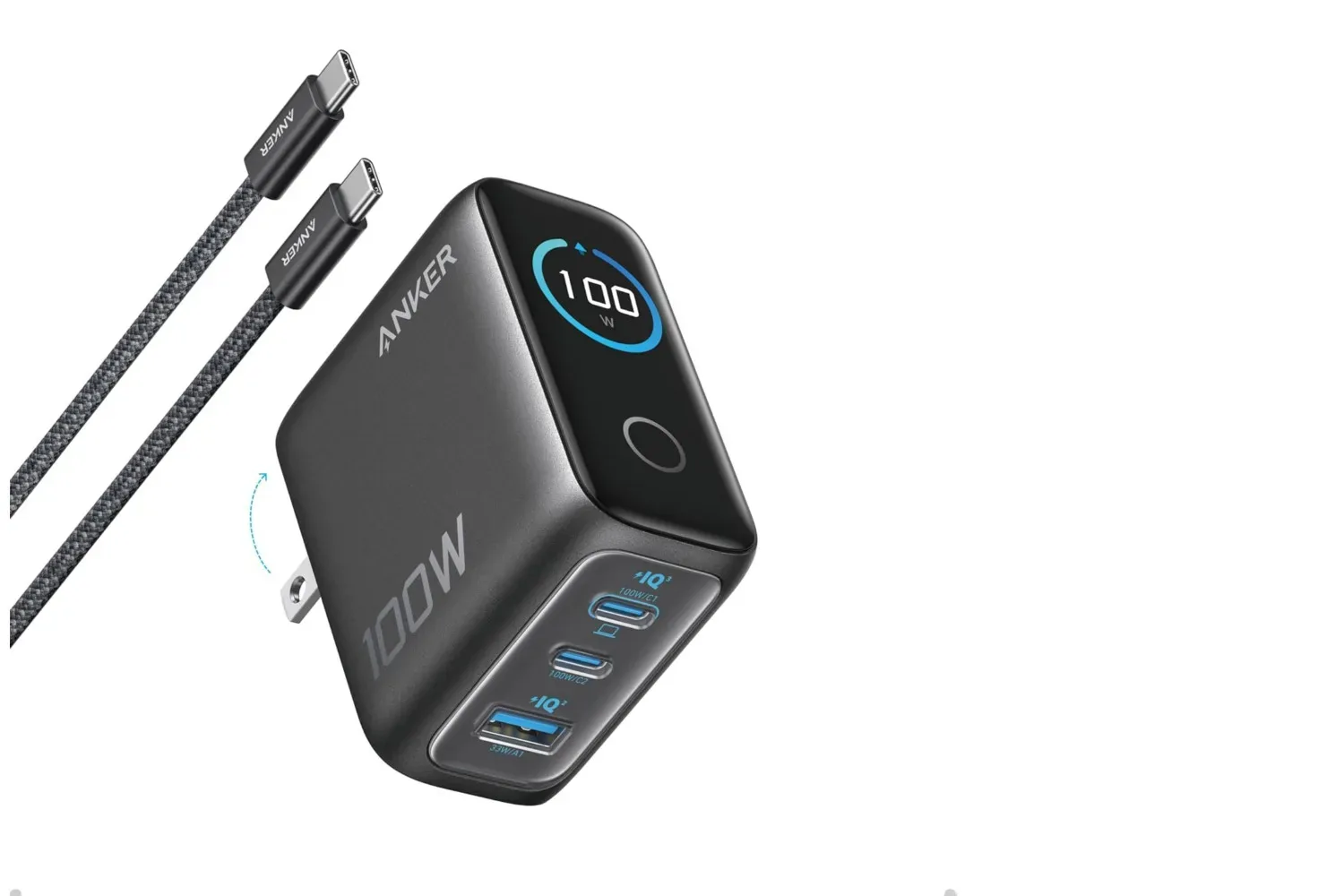
Anker’s compact 100W charger is listed at $46 in Dark Gray and Silver, down from $70. That is a $24 reduction, or 36%, on a power adapter designed to consolidate several common charging jobs into one small wall unit.
The deal applies to a three-port model with two USB-C connections and one USB-A connection. It includes a 4.9-foot USB-C-to-USB-C cable, and the listed discount is applied at checkout without a code. The offer is described as available to Prime and non-Prime shoppers alike.
For people who routinely have a phone, laptop, tablet, headphones, controller, or other accessories competing for outlet space, the appeal is less about making one device charge faster than physics allows and more about reducing charger clutter. A single adapter with a mixture of newer USB-C and older USB-A ports can replace a handful of single-purpose bricks—provided its power allocation matches the devices connected to it.
What the 100W rating means—and what it does not
The key number is 100W, short for 100 watts. A watt is a measure of power: broadly, it describes how much energy a charger can deliver at a given moment. In this case, the charger can provide up to 100W from one USB-C port when that port is used alone.
That maximum matters most for devices that can accept more power, such as compatible laptops. The supported-device list includes MacBook Air and MacBook Pro models, Lenovo ThinkPad laptops and Google Pixelbook devices, alongside iPad Pro, iPad Air, iPad mini, iPhone, Samsung Galaxy phones and gaming consoles. It also covers accessories including Apple Watch Series devices and AirPods Max.
There is an important distinction between a charger’s maximum output and what every connected device receives. The 100W figure applies to a single USB-C port in solo use. Once several ports are occupied, the available power has to be shared among the connected devices. The supplied information does not provide a port-by-port split for simultaneous charging, so shoppers who need a particular laptop to receive a specific amount of power while other gear is connected should check the product’s detailed specifications before buying.
That does not undermine the practical value of a three-port adapter. It simply frames the best use case accurately: it is a flexible shared charging station, not a guarantee that three devices will each receive the unit’s peak rating at the same time.
USB-C plus USB-A is a useful transitional combination
Two USB-C ports cover the cables increasingly used by recent phones, tablets, laptops and other electronics. The USB-A port keeps room for accessories or older devices that have not moved to USB-C. For a desk, bedside outlet or travel bag full of mixed-generation hardware, that combination avoids forcing every device into the same cable standard immediately.
The included USB-C-to-USB-C cable is also meaningful in a modest but practical way. A charger is only useful if the required cable is available, and the bundled 4.9-foot cable means a buyer does not necessarily need to add one separately for USB-C charging. It will not solve every setup—USB-A devices still need their appropriate cable—but it makes the basic single-device USB-C arrangement more straightforward out of the box.
For laptop owners, it is worth remembering that compatibility and charging behavior are related but not identical questions. A listed compatible laptop may charge through USB-C, while the charging rate can depend on the laptop, cable and whether other ports are in use. This is particularly relevant to people building a compact work-and-play setup around a portable PC, much like the hardware considerations around a high-spec Surface Laptop configuration. The charger’s single-port ceiling is the clearest stated benchmark; the multi-device distribution should be verified for more demanding rigs.
The display gives the charger a little more visibility
This Anker model includes a bright built-in display that can show information including the charger’s total operating time. Rather than leaving the adapter as a completely opaque part of a setup, the screen gives the user a way to view basic operating information directly on the unit.
The display rotates based on how the charger is positioned in the outlet. That is a small design point, but a sensible one: wall outlets can be oriented differently, and a screen is more helpful if it remains readable whether the brick is plugged in horizontally or vertically.
The adapter is also described as fitting securely in the outlet even with all ports occupied. That matters because the practical burden of a multi-port wall charger is not only what it can charge, but whether the connected cables turn it into a loose, awkward lever hanging from the socket. Its compact, lightweight design is intended to make it easier to carry, while the firm fit is intended to make a fully populated charging setup less precarious.
Thermal monitoring is a safety-minded feature, not a reason to ignore setup basics
Anker says the charger uses smart temperature control to monitor heat during use. Thermal control refers to systems that watch operating temperature and manage the charger with safety in mind. Charging creates heat, particularly when higher power is involved or several devices are connected, so monitoring is a relevant part of an adapter’s design.
Still, a temperature-monitoring feature should not be interpreted as permission to treat any charger carelessly. Keep the brick and cables in a normal, unobstructed setup, use appropriate cables for the device being charged, and avoid assuming that every USB-C cable is interchangeable for every power need. The source material confirms an included USB-C-to-USB-C cable but does not provide its specifications beyond length, so it is best not to make unsupported assumptions about its capabilities in every possible charging scenario.
Likewise, the claim that the charger maintains peak output for twice as long as most other 100W chargers in its price range is a comparative performance statement provided for this product. It suggests the adapter is designed to sustain high output longer rather than dropping away from peak power quickly. However, no testing methodology, competitor list or exact duration is supplied here, so the most responsible reading is that it is a manufacturer-facing feature claim rather than a universal performance measurement.
Who this charger makes the most sense for
The $46 listing is most compelling for someone with a deliberately mixed device lineup. A person carrying a USB-C laptop and phone but still using a USB-A accessory can use all three ports without bringing separate wall bricks. It is also a logical fit for a shared outlet where a tablet, phone and accessory need to charge at the same time.
- Travelers: A compact three-port unit can reduce the number of charging bricks packed for compatible devices.
- Desk users: Two USB-C ports and USB-A offer a neat way to cover a laptop, phone and older accessory from a single wall outlet.
- Mixed-device households: The stated compatibility spans Apple, Samsung, Lenovo and Google hardware, while the USB-A port preserves flexibility for accessories.
- People who value at-a-glance status: The rotating display and operating-time readout distinguish it from a more basic, screenless power adapter.
Conversely, it may be unnecessary for someone who charges only one low-power device at a time, already has enough quality chargers, or needs confirmed multi-port power figures for a particular high-demand laptop workflow. In those cases, the better question is not whether 100W sounds large, but how much power the actual connected devices need concurrently.
Price and availability details to check before purchase
The stated offer places the charger at $46 from a regular price of $70, with both Dark Gray and Silver discounted. Since retail promotions can change, prospective buyers should confirm the final price, color selection and checkout total before placing an order. The listed terms say the reduction appears directly at checkout and does not require a coupon code.
At that price, the value proposition is straightforward: a compact 100W charger with two USB-C ports, a USB-A port, a rotating display, temperature monitoring and a bundled 4.9-foot USB-C cable. Its strongest advantage is not that it erases the need to understand power sharing. It is that it offers a more organized starting point for charging several compatible devices from one outlet, without automatically requiring a separate cable purchase for the first USB-C connection.
Shop the products
Check current price, model and availability at the retailer.