Not every useful piece of tech needs to be a major purchase. Some of the most practical accessories are gloriously narrow in purpose: they stop a phone from sliding around the car, make late-night trips through the house less blinding, or keep crumbs from establishing permanent residency beneath a keyboard’s keys.
The catch is that “cheap” is not the same thing as “useful.” A low price can make it easy to accumulate adapters, charging gear and novelty devices that solve no actual problem. The better approach is to identify a specific recurring annoyance, then buy the smallest, simplest accessory that addresses it. Compatibility, placement and safe use matter far more than a dramatic product claim on the box.
Here are 11 inexpensive gadget categories and what to consider before adding any of them to a desk drawer, car, kitchen or gaming setup.
1. Motion-sensor lights for nighttime navigation
A motion-sensor light is a simple answer to the problem of turning on a bright bathroom light in the middle of the night. Battery-powered adhesive puck lights can be placed without drilling, while plug-in models operate more like an automatic night light.
The distinction matters. A stick-on light is flexible because it can go where there is no outlet, but it relies on batteries and adhesive. A plug-in unit takes up a socket, yet avoids battery changes. Some plug-in examples offer an automatic mode that activates only after detecting motion, plus a dim night mode that brightens when somebody approaches.
Light-emitting diode, or LED, lighting uses relatively little energy, which is why it suits an always-ready night-light role. The practical question is not whether the gadget is sophisticated; it is whether its brightness and trigger behavior fit the route you actually take after dark. A light that is too bright defeats the point, while one placed where it cannot see movement is merely decorative.
2. Adhesive magnetic phone mounts: secure placement, serious caveats
For a car without a built-in infotainment screen, an adhesive magnetic mount can be a very inexpensive way to keep a phone in one predictable place. A WixGear option is listed at $6.99: one magnetic piece attaches to the phone or, preferably, its case, and the other attaches to the dashboard.
This is a more permanent choice than a temporary clip or suction mount. Strong adhesive is useful precisely because it is not designed to be moved repeatedly. Before attaching anything, choose the position carefully. It should be accessible without blocking an important view, and it should not sit immediately beside a vent. Big temperature swings may affect adhesion, and hot air blowing onto a phone is undesirable in its own right.
Related coverage includes 11 Budget Gadgets That Can Make Everyday Tech Problems Easier.
The most important limitation is human rather than mechanical. A mounted phone can still distract a driver. A holder may make hands-free calls, navigation prompts or music controls easier to manage, but it does not make active phone use safe while driving. Apple has also indicated that magnets can affect photo quality in some situations, another reason to watch for unintended effects after fitting one.
3. A compact keyboard vacuum
Brushes can loosen debris around keyboard keys, but a small USB-rechargeable vacuum is intended to collect it instead of simply moving it elsewhere. Models in this category may include a nozzle, brush attachment and charging cable. Those extras can push the price beyond $10, while less expensive alternatives can vary sharply in quality.
There is a basic safety step worth observing: disconnect a standalone keyboard or shut down a laptop before cleaning. That helps avoid accidental input while working around the keys. A compact vacuum is not a replacement for careful maintenance of every computer component, but it can be a focused tool for the crumbs and dust that settle into narrow gaps.
It is also worth separating keyboard cleaning from screen cleaning. Screens require their own care because inappropriate materials or methods can cause problems. For a broader troubleshooting-minded reminder that computers benefit from methodical steps rather than impulse fixes, see this guide to checking a MacBook black screen.
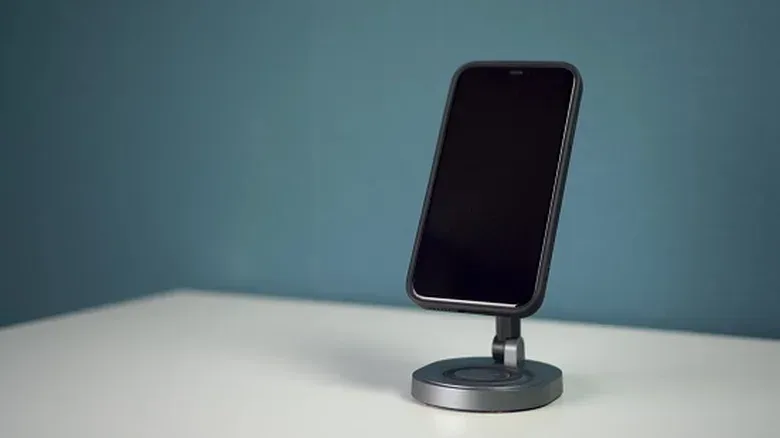
4. A phone stand that earns its desk space
A phone stand sounds almost comically basic until a video call, recipe, stream chat or improvised webcam setup needs one. Modern iOS and Android software can use a phone as a webcam, including an older handset that has been repurposed rather than discarded. But the arrangement needs a stable way to hold the phone in frame.
A low-cost stand such as a Nulaxy model is useful only if it works with the devices and positions you need. Look for a universal design rather than one tied to a single handset. The stand should remain stable in both portrait and landscape orientation, and its bottom should leave room for a charging cable. That opening becomes important during longer calls, because a phone that cannot charge while mounted turns a neat setup into a countdown timer.
Stability is more valuable than fancy articulation for many people. The goal is consistent framing without leaning a phone against whatever object happens to be nearest.
5. Earbud cleaning pens and kits
Earbuds collect wax and debris in a place where cleanliness can affect both appearance and performance. A dedicated cleaning pen generally combines a small brush with a flocked sponge: a soft, fibrous cleaning surface intended for tight areas. The $6.99 Hyashee cleaning pen is presented for AirPods, though its brush-and-sponge arrangement can also suit other earbud brands.
A $9.99 Midukit alternative adds brushes and sticky putty. The putty is designed to lift dirt by adhesion rather than force it farther into a crevice. This is a useful example of a small accessory having a specific mechanical purpose. It is not magic; it simply offers tools sized for openings and surfaces that fingers and large cloths cannot reach well.
For households with multiple sets of earbuds, one cleaning kit may be more sensible than treating every sound issue as a warranty problem. The key is using cleaning accessories carefully, not aggressively, around delicate components.
6. Bluetooth camera shutter remotes for inclusive photos
A Bluetooth camera remote helps the person who sets up a group photo also appear in it. The ATUMTEK Wireless Camera Remote Shutter is listed at $8.99 for two units, supports Android and iOS, and is described as pairing with a phone from up to roughly 30 feet away. A Zttopo wireless Bluetooth shutter is in a similar price range.
Bluetooth is a short-range wireless connection standard, and its usefulness here is uncomplicated: pressing the remote triggers the paired phone’s camera without requiring someone to reach the screen. It is an inexpensive feature, but it addresses a persistent social problem with family and group pictures.
The remote is only one piece of the arrangement. The phone still needs a stable location, whether that is a tripod or a stand. It is a classic example of accessories working as a small system: the shutter solves triggering, while the stand solves positioning.
7. Turn a USB thumb drive into a bootable antivirus tool
An old USB thumb drive can be more than storage. It can be prepared as a bootable antivirus tool for a Windows computer. A basic 32GB USB 2.0 SanDisk drive has been cited around $9.99, but an unused drive already sitting in a drawer may do the job.
Bootable means the computer can start from the USB drive rather than its usual operating system. This matters when malware has compromised the installed system so thoroughly that its normal antivirus software cannot be reached or used. Starting from a separate disk can provide a way to scan and clean from outside the affected operating system. ESET SysRescue Live is one cited example of software that can be made bootable from a flash drive.
This is not a promise that every infected machine will be easily repaired. It is, however, a practical reason to keep a compatible spare drive available. It also illustrates why old hardware should not automatically be treated as worthless: a modest USB drive may become an emergency utility rather than another forgotten storage device.
8. A magnetic kitchen timer instead of another screen
Digital assistants and smart displays can set timers, but a dedicated kitchen timer has advantages: it is inexpensive, single-purpose and does not depend on voice recognition. A DALSHABET magnetic timer is listed at $9.99 and attaches to a refrigerator or another magnetic kitchen surface.
The interface is deliberately manual: turn the dial to set the time. That is not a flaw if the goal is immediate, tactile control. It also avoids adding a screen or an account-dependent device to a task that only needs an alert after a set interval.
The right timer is the one that will be noticed and used. A magnetic mount helps by putting the control where cooking happens instead of hiding it in a utensil drawer.
9. Webcam stickers for physical camera blocking
Webcam covers prompt a useful digital-hygiene conversation. A physical barrier can prevent a camera from capturing video when it is covered, but it does not address the more common risks of malware installation or credential theft. A low-cost vinyl webcam sticker, such as the $8 BLOCKED set, is therefore a narrow privacy measure, not a complete security plan.
Mac users have an additional design consideration: the camera’s green indicator light accompanies camera activation. Traditional sliding covers can also create a risk of damaging the screen on especially thin laptops, because the lid may not have room for their added thickness. A thin sticker may be the less intrusive option for a work laptop or older desktop display.
The value here is certainty and routine. When the sticker is in place, the camera is physically obscured. Just do not confuse that reassuring physical control with a substitute for protecting accounts and avoiding malicious software.
10. USB adapter kits reduce connector panic
A single adapter solves a single mismatch. A kit is a low-cost attempt to cover several common mismatches before they become a problem. The $8.59 IANFAN 12-piece USB kit is positioned for that role, while a Povdite kit focuses on USB-C compatibility and includes a case and charging cable.
USB frustrations tend to involve three different issues that are easy to blur together: the physical connector on a cable, the port on a device, and the capabilities supported by that connection. An adapter may make two plugs fit, but that does not automatically mean every function expected from the connection is available. Even so, a compact assortment can be useful when the immediate hurdle is simply connecting USB-A and USB-C-era accessories without purchasing a large multiport hub.
For gamers and PC users, it is worth applying the same deliberate check to every cable path. A connector that physically fits is only the start; where a display cable is connected can affect which graphics hardware is used. That issue is explained in this look at a monitor cable mix-up and graphics hardware.
11. Wireless charging pads: convenient, but not cord-free
A wireless charging pad does not eliminate cables altogether. The pad still needs its own power cord. What it can eliminate is the repeated act of plugging a compatible phone or earbuds directly into a cable. That distinction is important when judging whether the accessory earns a place on a bedside table or desk.
The NANAMI Fast Wireless Charger Pad is listed at $9.99, supports Android phones, iPhones and earbuds that support wireless charging, and has a maximum output of 15W. W, or watts, is a measure of power. A higher maximum figure does not guarantee that every device will charge at that exact rate; charging behavior depends on the pad, the phone or earbud case, and compatibility between them.
That is why a charging pad should be treated as a convenience purchase rather than a universal upgrade. Check that the devices you intend to use support wireless charging, recognize that cheaper pads may charge at different speeds, and consider whether one pad is enough for the number of people in the household. If the answer is yes, it can reduce connector wear-and-tear and cable swapping. If not, it may simply become one more powered item in the accessory drawer.
Shop the products
Check current price, model and availability at the retailer.