More complete DLC handling
PS5 App Dumper 2.10, released on October 3, 2026, significantly expands how downloadable content is displayed and dumped. Each installed title now shows its DLC count, while the interface can reveal the names and sizes of the installed packages.
When a game is running, the new Dump DLC action can copy its DLC without repeating the main application dump. The DLC is placed beside an existing game dump, and users can choose which packages to process when several are available. If a selected DLC dump already exists, the new operation replaces it.
DLC dumps now retain metadata from the installed package, including param.json and the icon. That makes the resulting folders more complete and useful for identifying their contents. The update also explains when a DLC package only unlocks content already present in the game. Because the console never mounts those packages, there is no separate content for the dumper to copy, and the interface now says this instead of presenting an unusable dump option.
Clearer dump status and folder names
Version 2.10 adds a DUMPED badge to every title with a completed dump found by the Dumps page. Titles with only an interrupted dump receive an UNFINISHED badge, making it easier to distinguish a usable backup from one that needs attention. The release also corrects an oversized rendering problem that made the UNFINISHED label appear much larger than intended.
New game dump folders include the application title by default. A folder can therefore use a name such as PPSA01325-app0_ASTRO's_PLAYROOM rather than only the application identifier. The folder_titles setting controls this behavior, and the Rename action on the Dumps page can switch existing game dumps between names with or without the title.
Earlier dumps are not renamed automatically. Dumps created with version 2.00 or older remain recognized under their existing names, while Rename provides an optional way to apply the newer naming style. DLC folders keep their own names, and a folder used by a ShadowMount-running game is left unchanged because the mount link points to that location.
The Dumps page also becomes more practical on smaller screens. Tapping a dump path copies it, and the list has been adjusted to fit a phone display more comfortably. Together with the new status badges, these changes make it easier to locate a dump, identify its state and share or inspect its path from a mobile browser.
A larger queue for batch dumping
The queue now accepts up to 64 titles, compared with the previous limit of 16. PS5 App Dumper can use its web interface to start titles, wait for them to mount and process them in sequence, while the queue continues to run on the console rather than depending on an open browser window.
The broader queue is useful for users managing a large collection across internal and external storage. Each queued title can still have its own settings, including decryption, FSELF conversion, backport targets and PS4 split behavior. The interface also identifies custom per-title settings, helping prevent a batch operation from being mistaken for a single global configuration.
Fixes for stalled installations
The release fixes a case where titles stuck at 99 percent remained marked as installing indefinitely. Those titles could not previously be dumped because the application treated them as permanently incomplete. Once the stale installation state is corrected, they can be considered by the normal dumping workflow.
The update preserves the project's existing distinction between a genuinely unfinished installation and one that has reached the usable content exposed by the console. Some installations do not fetch every optional PlayGo chunk immediately, so the displayed percentage is not by itself a complete description of whether a title can be processed.
What PS5 App Dumper does
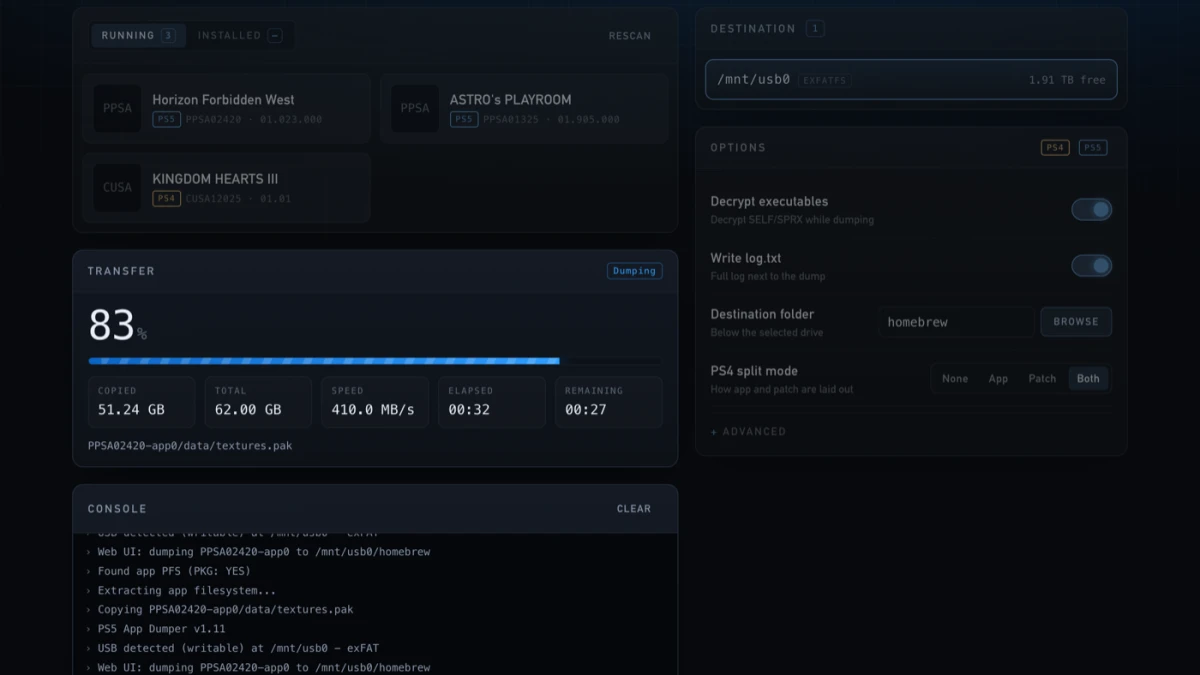
PS5 App Dumper is a payload for a PS5 capable of running payload software. It reads mounted application files from the console and writes dumps to a USB storage device attached to the PS5. The web interface is a control surface: it runs over the network in a browser on a phone, PC or the console, but the dumped files are not transferred over that network connection.
The browser interface lists mounted titles with their names, icons and versions, shows whether a title comes from disc or a package, and reports available space on potential destinations. It can start a listed title when the console's launch services allow it, select the running title and show progress, transfer speed, estimated time and logs. A dump is rejected when it would not fit on the selected destination rather than being allowed to fill the drive.
The software can also find existing dumps on configured storage locations and identify finished or incomplete results. Its settings include output folders, title-based naming, decryption, optional executable conversion, backport options, logging and queue timing. Users should note that the payload writes to a USB drive connected to the console; the browser connection only controls the process and displays its state.
The web interface is normally served on port 8081, moving to a nearby port if that port is busy. Remote devices can be required to enter a six-digit access code before they are allowed to start, stop or delete operations. The project warns that the interface uses plain HTTP and that visible titles, logs and folder names are not hidden from other devices able to reach the console, so it should be used on a trusted network.
Compatibility and release details
The project is intended for PS5 systems able to run payloads, with the README listing firmware support from 1.00 through 13.60. It specifically says that the web interface features were tested on firmware 5.10 and 12.00, while behavior on other firmware versions may differ because the relevant system services are not identical. These compatibility statements are project-provided rather than independent performance results.
The v2.10 release is identified by the exact tag v2.10 and includes the PS5 App Dumper ELF payload. Existing dumps remain compatible with the new release, including older folders that do not yet include the application title in their names. The project credits MangoScango for the change that completes DLC dumps with their package metadata.