Updated Tinfoil compatibility
KitNX 1.0.2 updates the project’s Tinfoil compatibility for Atmosphere 1.12.1. The release includes an Atmosphere 1.12.1-compatible package3 and refreshed SHA-256 verification data for both the stock and TLS package3 files.
These changes give KitNX the compatibility data needed for its package3 management functions on systems using the newer Atmosphere release. The project version has also been incremented to 1.0.2.
Maintenance and recovery tools
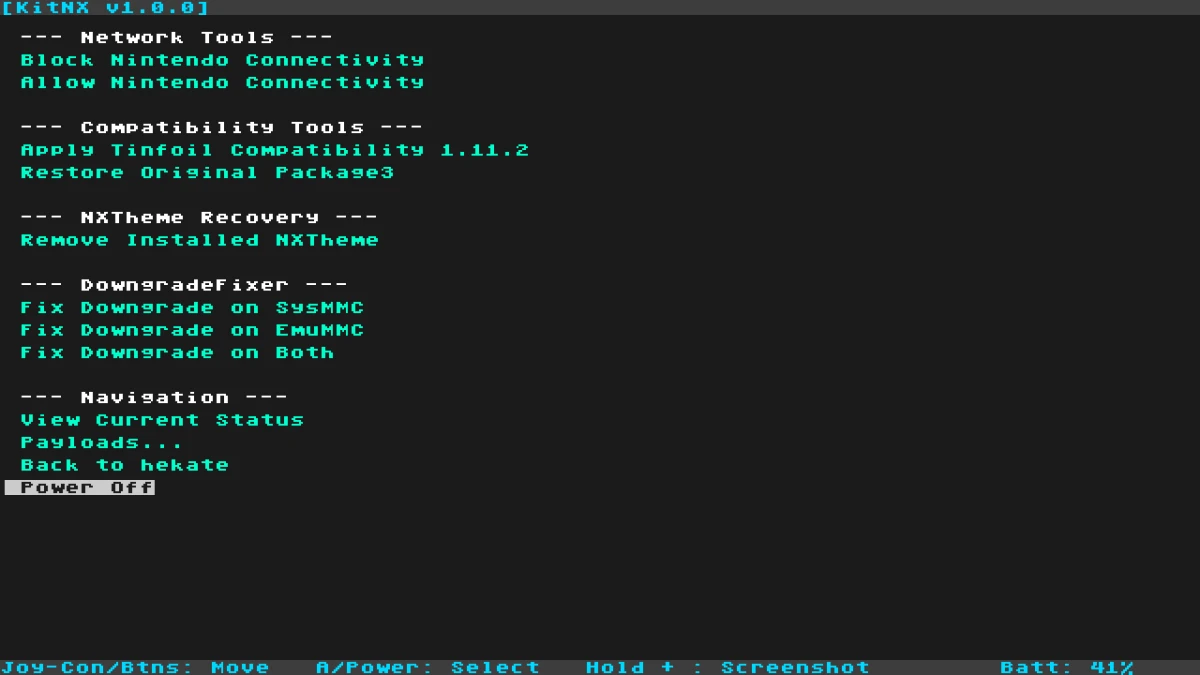
KitNX is an all-in-one bare-metal maintenance and recovery payload for Nintendo Switch. Its guided interface combines several commonly used functions, so users do not need to open TegraExplorer separately to select an individual script.
The compatibility menu can apply the bundled Tinfoil-compatible Atmosphere package3 and back up or restore the original package3 and boot logos. KitNX also includes options to remove an installed qlaunch theme override from the Atmosphere contents directory.
Network tools can block or allow Nintendo connectivity on sysMMC and display the current network and compatibility configuration. Allowing sysMMC network access does not remove the risk of a console ban, and the project recommends keeping NAND and SD-card backups.
Targeted downgrade recovery
KitNX provides downgrade-state recovery for sysMMC, emuMMC, or both. The process derives BIS keys, mounts the encrypted NAND SYSTEM partition, and removes the specific SYSTEM save file associated with the downgrade state.
The project separates these NAND operations from its SD-card maintenance features. Network, compatibility, and theme tools modify files on the SD card, while downgrade recovery operates on the encrypted NAND SYSTEM partition. Destructive actions require an explicit VOL+ confirmation.
The downgrade menu disables emuMMC targets when no emuMMC configuration is detected. Users should still maintain current backups before using recovery functions.
Using the release
The release includes KitNX-1.0.2.zip for SD-card deployment and a standalone KitNX.bin payload. The documented setup is to extract the ZIP to the root of the SD card, or use the standalone payload by copying KitNX.bin to bootloader/payloads/. From Hekate, open Payloads and select KitNX.bin.
KitNX uses Volume Up and Volume Down for navigation and Power to confirm selections. Its Tinfoil compatibility files are stored under config/kitnx/tce/. Existing backups under config/netman/tce/backup/ remain available as a restore fallback.
Release details
KitNX 1.0.2 was published on October 16, 2026. This release is focused on updated Tinfoil compatibility for Atmosphere 1.12.1 rather than a broad change to the project’s maintenance and recovery functions.
The updated package3 and verification data are the main practical changes. The release also preserves KitNX’s existing network controls, package3 backup and restore options, qlaunch theme removal, and targeted downgrade-state recovery in the same guided payload.