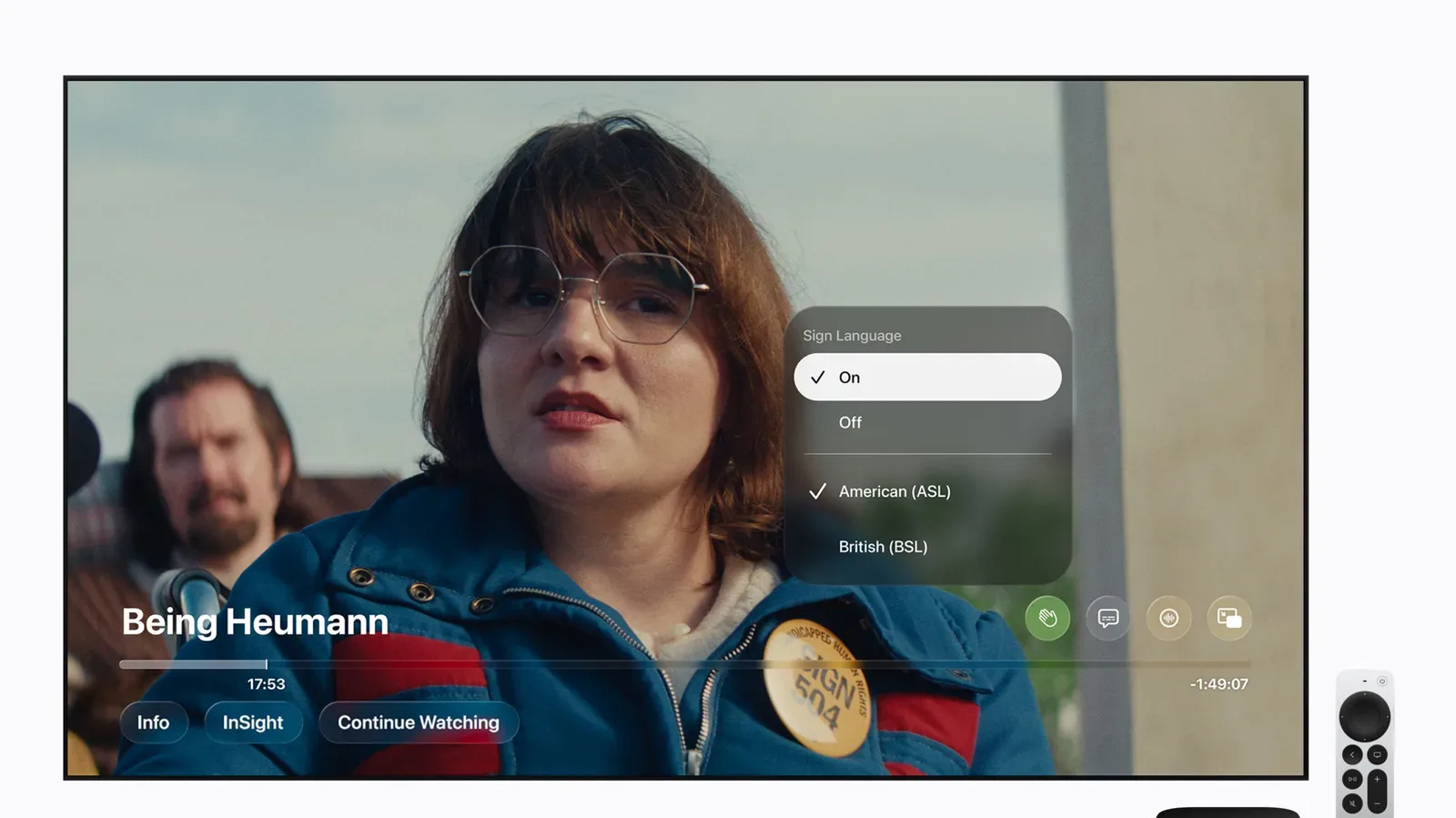
Apple TV is preparing to add sign language interpretation to a selection of its original films, beginning November 13 with Being Heumann. The new accessibility option will place an interpreter on screen during playback, giving viewers a sign-language presentation alongside the film rather than relying on text alone.
The first rollout centers on Being Heumann, a film about disability-rights activist Judy Heumann. Apple also says F1 will offer both American Sign Language (ASL) and British Sign Language (BSL) interpretation. Greyhound and Way of the Warrior Kid are due to receive the feature later in the year, with further Apple Original titles planned beyond that initial group.
It is a limited catalogue launch, not a platform-wide switch that instantly applies to every film or series in the app. That distinction matters for viewers: availability will need to be checked title by title, and the languages offered can differ between supported releases. In this first set, ASL and BSL are specifically confirmed for F1.
What sign language interpretation means here
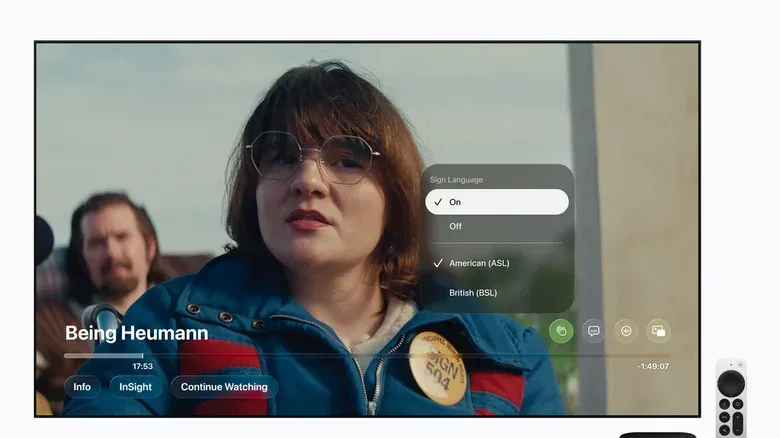
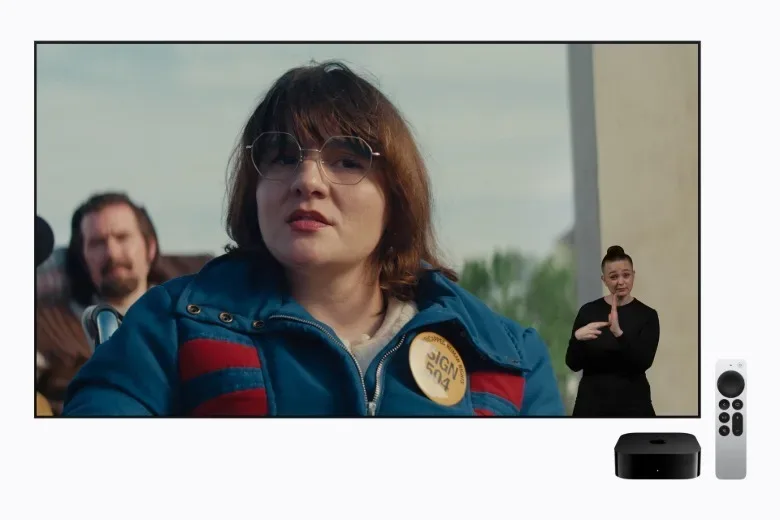
Sign language interpretation in this implementation is a visible performance layered over the movie. Once enabled during playback, the interpreter appears in the lower-right corner of the screen. The viewer can select the Sign Language option above the playback progress bar and then choose from the languages available for that title.
This is distinct from subtitles and closed captions. Subtitles generally render spoken dialogue as written text, while captions can also communicate meaningful non-speech audio such as music cues or sound effects. An on-screen interpreter, by contrast, conveys the material in a sign language. ASL and BSL should not be treated as interchangeable labels for the same thing: they are separate languages, which is why a title’s available interpretation options are important information rather than a minor technical setting.
It is also separate from audio description, another accessibility tool already represented in the Apple TV interface by the AD icon. Audio description provides spoken narration of key visual details for blind and low-vision audiences. The new Sign Language marking will sit among those familiar accessibility indicators, represented by a hand-shaped symbol.
Apple says the interpretations were designed and tested by Deaf and native signers. That is a meaningful part of the stated approach, because an interpretation layer has to work within the viewing experience: it needs to remain understandable while fitting alongside the action, framing and visual rhythm of the particular film. Apple describes each performance as being crafted to complement the title it accompanies.
How to turn it on in the Apple TV app
Viewers will first need a compatible version of the Apple TV app. Apple lists iOS 27.2, iPadOS 27.2, macOS 27.2, tvOS 27.2 and visionOS 27.2 as supported software versions. Supported third-party devices can also use the feature when running the latest app software.
Related coverage includes Apple TV Adds ASL and BSL Interpretation to Select Original Films.
After updating, the setup process has two stages:
- Open the Apple TV app’s settings and enable the Sign Language feature.
- Browse, search for or begin playing a title that supports interpretation, then select Sign Language above the progress bar and choose an offered language.
With the setting enabled, supported movies should show the Sign Language symbol while browsing or searching. During a film, the interpreter is overlaid in the bottom-right portion of the picture. The availability indicator is therefore useful before playback, while the player control is where the interpretation language is selected.
For households that share a device, this two-part process is worth noting. Enabling the feature in settings makes it easier to identify compatible titles, but playback still requires the viewer to choose the relevant interpretation option. The practical outcome is that a supported title can be discovered in the catalogue and then configured at the point of viewing, rather than treating sign language as an automatic replacement for every audio or caption choice.
Discovery is part of the rollout
Accessibility options only help if people can find the films that provide them. Apple’s plan includes several routes for that discovery. The hand icon will flag compatible titles in the app, and future app search will recognize descriptive queries including “with ASL” and “with BSL.” Apple also plans a dedicated in-app collection called Movies & Shows with American Sign Language.
Those discovery tools are particularly important because support begins with a small, named set of originals. A viewer looking for ASL interpretation should not have to open every title’s playback menu to determine whether it is present. Search terms and a curated collection establish a more direct path, although the announced collection is specifically named for American Sign Language rather than a general label covering every sign-language option.
The rollout also places the feature in the ordinary Apple TV viewing flow rather than in a separate version of a film. The title remains in the normal catalogue, recognizable through its accessibility icon, and the interpreter is chosen from the playback interface. That approach can make sign-language-supported programming easier to encounter alongside other films, while preserving a clear option for viewers who want to turn the presentation on.
The first films set for support
Being Heumann is the launch title on November 13. Its subject gives the debut a direct connection to disability advocacy: the film tells Judy Heumann’s story. The selection makes the first release more than a technical demonstration, pairing a new viewing option with a film focused on a figure associated with disability rights.
F1 is the other title confirmed for the initial group with both ASL and BSL interpretation. Apple has not established, in the information available so far, that every future participating film will necessarily receive both languages. Viewers should therefore use the title-level information in the app rather than assume a language selection from one film carries over to another.
Greyhound and Way of the Warrior Kid will follow later in the year. Apple has not provided a more exact timing in this rollout outline, nor has it detailed the complete next wave of films. The safe expectation is continued expansion, not a promise that every Apple Original has sign language interpretation today.
Why the implementation details matter
On-screen interpretation comes with choices that ordinary captions do not: where the signer is positioned, how the performance occupies the frame, and how viewers access it on different device types. Apple’s stated bottom-right placement provides a consistent location across the supported Apple TV app ecosystem. Consistency can reduce the friction of learning a new control, whether someone watches on an iPhone, iPad, Mac, Apple TV device or Vision Pro.
At the same time, the bottom-right overlay is part of the image, which is why the claim that each interpretation was individually crafted for its film is notable. A film’s composition can place important action or visual information in different areas of the frame. Apple has not outlined its production process in greater detail, but it has said Deaf and native signers were involved in the experience’s design and testing.
The availability of ASL and BSL also illustrates why naming the language clearly is essential. “Sign language” is not a single universal setting. The announced controls allow viewers to choose from what is available for the specific title, and the planned search phrases make that language information part of finding something to watch.
For viewers interested in film accessibility developments more broadly, Joking Joystick has also examined how documentary storytelling can frame public figures and power in a look at Alex Gibney’s Musk.
What viewers should expect next
The immediate checklist is straightforward: update the Apple TV app on a supported device, turn on Sign Language in app settings, and look for the hand icon on participating titles. For playback, select the Sign Language control above the progress bar and choose the language listed there.
Beyond the November 13 debut of Being Heumann, the most useful development to watch will be catalogue growth and language availability per title. Apple has committed to more originals after the initial set, along with ASL- and BSL-based search discovery and its planned ASL collection. For now, the feature’s significance lies in adding a dedicated, visible interpretation option to Apple TV’s accessibility menu—and in giving supported films a presentation designed with Deaf and native signers involved in testing and design.