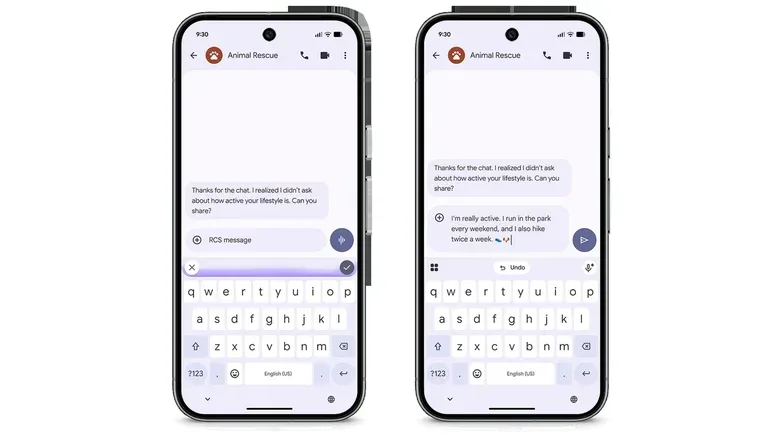
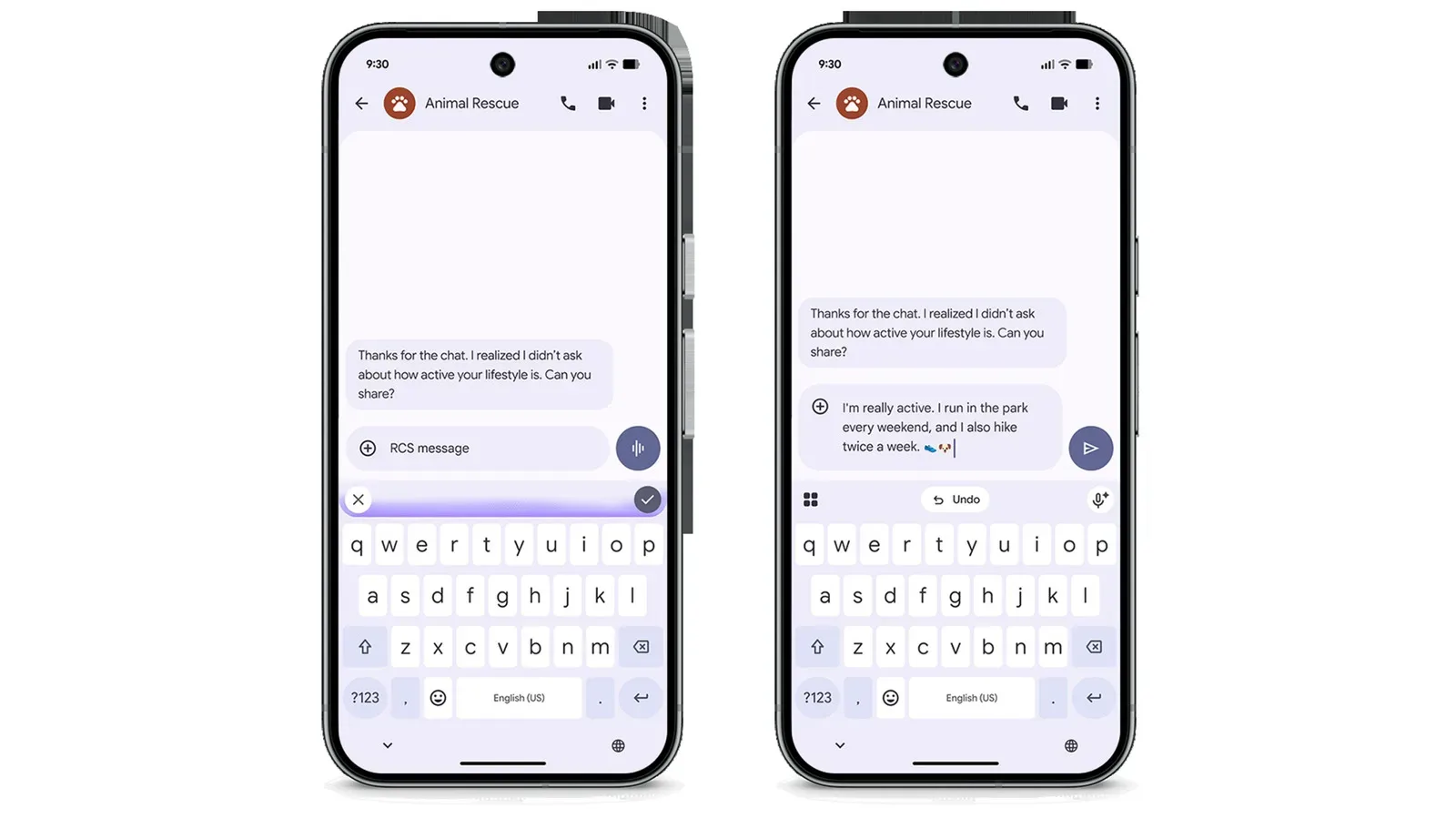
Google is extending Rambler, its Gemini-powered dictation feature, to the Pixel 10 series as part of its November Pixel update. The tool first stood out on the Pixel 11 family because it attempts to turn the untidy reality of spoken input into a message that reads as if it was deliberately typed. Now, Pixel 10 owners are set to receive that capability without needing the newer handset.
That matters because voice input usually asks people to make a choice: speak naturally and accept a messy transcript, or speak in a stiff, punctuation-conscious way to reduce the editing that comes later. Rambler is positioned as an attempt to remove that trade-off. It is built into the keyboard and is designed to take natural speech, including hesitations, restarts and spoken corrections, then turn it into coherent, grammatically corrected text.
The broader update also reaches beyond dictation. Google is bringing additional Gemini Intelligence features to the Pixel 10 family, expanding widget creation to phones, adding AI-powered icon styles, widening HiLight notifications on the Pixel 11 Pro, and offering step-by-step workout routines on newer Pixel Watches and phones. Separately, the Pixel Tag tracker is now on sale, with a $29 single-tracker price and a $99 four-pack.
What Rambler is meant to do
Rambler is a text-entry feature, not merely a basic speech-to-text transcriber. Speech-to-text normally refers to software converting audio into written words. Rambler goes further by applying language processing after, or alongside, that conversion. Its stated job is to clean up the way people actually talk.
In practice, that includes dropping filler sounds such as “um” and “ah,” removing unnecessary words, handling a speaker changing course mid-sentence, and smoothing out self-corrections. Someone might begin a message, revise a detail aloud, pause to find the next phrase, and keep speaking. Rather than preserving every verbal detour exactly as spoken, Rambler is intended to deliver a polished final passage.
The distinction is important. A word-for-word transcript can be useful for notes, interviews or accessibility purposes, where preserving the speaker’s original phrasing may be the point. A messaging tool has a different goal: producing text that is ready to send. Rambler is clearly aimed at the second use case.
For Pixel 10 users, its arrival means one of the Pixel 11’s headline input features is no longer tied exclusively to the latest phone generation. It also reflects a familiar shift in modern smartphone software: a feature that initially helps define a new device can later become a software benefit for recent hardware.
Why keyboard-native dictation changes the equation
Being keyboard-native is a meaningful part of Rambler’s pitch. It places the feature where people already compose texts, replies and short notes instead of presenting it as a separate voice assistant interaction. The practical benefit is reduced friction: users can start from the ordinary act of entering text and switch to speech when typing is inconvenient.
That could be most helpful when a message is too detailed for a quick typed reply but too brief to warrant opening a dedicated notes or transcription app. It may also appeal to people who do not normally dictate messages, precisely because cleanup is part of the feature’s purpose. The value is not simply speaking faster; it is potentially reducing the follow-up task of correcting the transcript.
There is still a sensible limit to how much trust any editing system should receive. A tool that removes verbal clutter and resolves self-corrections is making decisions about what the speaker meant. Users sending names, addresses, dates, instructions or other consequential details should review the final text before tapping send. That is not a criticism unique to Rambler; it is a practical rule for any system that transforms rough input into refined language.
The same caution applies to tone. Spoken language gets much of its meaning from timing, emphasis and context. A cleaner sentence can be more readable, but users may still want to check that a message remains as formal, casual, direct or nuanced as intended.
More Gemini Intelligence features for Pixel 10
Rambler is one part of a wider Gemini Intelligence rollout for the Pixel 10 series. Google says the update includes personalized suggestions and new multi-step automation tools for jobs such as ordering groceries or booking a taxi.
“Multi-step automation” describes a system handling a sequence of actions rather than a single command. In the examples given, the difference is between searching for a grocery service and moving through the stages involved in placing an order, or between finding transport information and progressing through a taxi booking. The supplied details do not spell out exactly which services, regions or confirmation steps are involved, so Pixel owners should treat the feature’s real-world usefulness as dependent on the options presented on their devices.
Personalized suggestions likewise imply that the software may offer more context-aware help. The broader appeal is convenience, but it also puts a premium on keeping an eye on what an automated flow is preparing to do. Tasks involving purchases, travel or bookings are not trivial simply because the interface makes them easier to initiate. Reviewing details before a transaction is completed remains the practical habit.
The expanding role of AI in consumer devices is also part of a larger conversation about how such systems are assessed. For related context on AI evaluation rather than Pixel features specifically, see this look at New York’s independent AI testing program.
Widgets and icon styling come to more Pixel devices
Google is also bringing Create My Widget to phones, with Pixel Watch support planned for later. The feature uses natural-language prompts to create custom widgets. A widget is a small interactive or informational element placed on a device’s home screen; common examples include weather, calendar and media controls. The supplied information does not detail the specific types of widgets that can be generated, but the premise is letting people describe the kind of home-screen element they want instead of assembling it through conventional configuration menus.
New AI-powered icon styles are arriving this month as well. Together with custom widgets, that signals an emphasis on personalizing the surface of the device: not only what a phone can do, but how its home screen looks and presents useful information.
For many people, these appearance-focused tools will be less consequential than dictation or automation. But they fit the same broader approach. Natural-language input is being used not only to compose messages or initiate actions, but also to shape interface elements that previously required more manual setup.
HiLight adds Google Messages alerts on Pixel 11 Pro
On the Pixel 11 Pro, the HiLight camera-module notification system is expanding beyond incoming calls to support Google Messages. If a message arrives from an important contact, the camera module will glow.
The update gives HiLight a more selective communication role. Rather than simply flagging every event in the same way, it is tied to messages from people the user considers important. The supplied details do not explain how contacts are selected or what customization options are available, but the intended use is clear: make priority messages more noticeable without asking users to continuously inspect the screen.
It is a small feature compared with an AI-driven dictation system, yet notification design can have a sizable everyday impact. The best outcome for a visual alert is not necessarily more alerts. It is an alert that tells a user something worth checking has happened.
Workout routines reach Pixel Watch 3 and newer
Google has also announced step-by-step workout routines for Pixel Watch 3 and newer watches, as well as phones. The routines can track live metrics on a watch or phone display and log repetitions while the workout is underway.
Live metrics are measurements shown during an activity rather than only summarized after it ends. Rep logging, meanwhile, refers to recording repetitions of an exercise as they are completed. Combining those functions makes the feature sound designed to provide structure during a session, not just store a record afterward.
The available information does not identify the workout types, metrics or exercises supported, so it would be premature to assume a particular training plan or level of coaching. Still, for users with supported devices, the update extends the Pixel ecosystem’s focus from messaging and home-screen tasks to guided activity tracking.
Pixel Tag is now available, with compatibility limits to note
Finally, Google’s Pixel Tag tracker is now available to buy. Announced in August, the pill-shaped device is positioned as an AirTag-style tracker and costs $29 individually or $99 for a pack of four.
The baseline pairing requirement is a device running Android 9 or later. However, Google specifies that the tracker’s full suite of features requires a device with Bluetooth 6.0 support that is also running Android 16.
That distinction is important for prospective buyers. Compatibility and full functionality are not the same promise. An older Android device may be able to pair with Pixel Tag, while a phone lacking Bluetooth 6.0 or Android 16 may not get every feature. Anyone considering a purchase should check both their Android version and Bluetooth support rather than assuming that Android 9 compatibility alone guarantees the complete experience.
Across Rambler, automation, widgets, fitness features, notifications and the new tracker, the November changes are less a single product launch than a spread of software and device additions across the Pixel lineup. For Pixel 10 owners, the central news is straightforward: polished, Gemini-assisted dictation is joining the phone they already have. Whether that becomes a daily habit will come down to a simpler question—how often the finished message needs less correction than typing it would have taken.