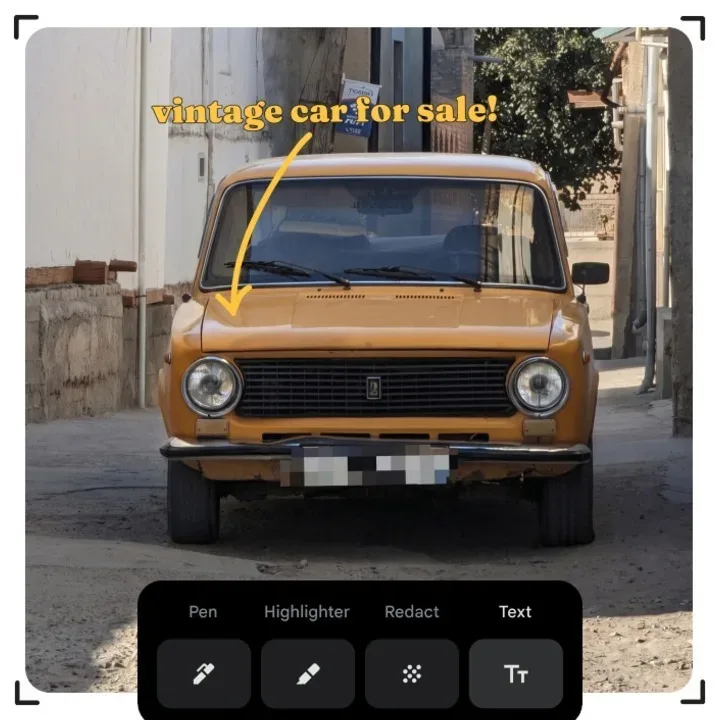
Google Photos is adding a practical privacy-minded editing option to its Android app: Redact, a Markup tool designed to obscure selected details in a photo with a pixelated block. The obvious use is covering a vehicle’s plate number before sharing an image, but the purpose is broader: users can hide any portion of a picture they do not want visible.
It is a comparatively straightforward addition amid a larger set of AI-focused Google Photos updates. That distinction matters. Plenty of new photo features are built around generating, restyling or searching images, while Redact addresses a much more immediate sharing problem: a photo can be worth posting or sending, but not every detail captured inside it belongs in the final version.
What the Redact tool does
Redact is part of the upgraded Markup feature in Google Photos. Markup refers to the app’s set of direct-on-image annotation controls—the tools used to draw, highlight or add text over a picture. With Redact, a selected part of the photograph can be converted into a pixelated area rather than simply covered by a hand-drawn scribble.
The vehicle-plate example neatly explains the feature’s value. A person may take a photo of a car at an event, on a street or while documenting a sale, then decide the registration detail should not travel with the image when it is shared. Pixelation makes that portion visually distinct from the rest of the photo and signals that it was intentionally withheld.
That can be useful for screenshots and everyday images as well. A photo might include a name, address, account-related information, a child’s identifying detail, a work document in the background or another element that is not appropriate for a group chat, social post or public listing. The update gives Android users an editing step inside the same library app where they already store and share pictures.
Pixelation is an editing treatment, not a broad privacy strategy
In this context, “redact” means visually obscuring information within the image itself. It is worth treating that as a targeted publishing tool. It helps a user make a shareable version of an image, but it does not change the fact that the unedited original may remain in the person’s photo library.
There is also a practical workflow lesson: edit the version intended for sharing, then inspect it at normal size before sending it. The goal is to ensure the sensitive region is fully covered and that no similar information remains elsewhere in the frame. This is especially relevant when a photograph contains several identifying details rather than one isolated number.
The value here is convenience rather than spectacle. It removes some friction from a common decision—whether to avoid sharing a useful image altogether or take it into another editor first. A built-in option can encourage people to make a safer choice before a picture leaves their device.
Markup also gets more control
Redact arrives with other Markup improvements. Google Photos is adding new fonts, along with precise thickness sliders for pens and highlighters. A thickness slider is a control that adjusts the width of a digital stroke; more precision means a user can make a narrow annotation for a small detail or a broader highlight for an area that needs emphasis.
These changes reinforce Markup’s role as a practical communication tool. Annotations can turn a photo into directions, feedback, a record of a detail or a simple visual joke. New fonts can make text overlays more flexible, while more controllable pen and highlighter sizes should help annotations stay legible without swallowing the underlying image.
The upgraded Markup tools, including Redact, are rolling out worldwide to all Google Photos users on Android. A rollout means the tools may not necessarily appear for every eligible person at precisely the same moment, but the stated availability is broad: Android users globally are included.
Wardrobe expands in the US, India and Brazil
Google is also extending access to Wardrobe, a feature that creates a catalog of clothes and jewelry from images already in a person’s library. The catalog can then be used for styling ideas. It is intended to make a photo collection more useful as a record of what someone owns, rather than only a chronological archive of moments.
Wardrobe is rolling out to Android and iOS users in the United States, India and Brazil. People in those countries who do not yet have it are expected to receive access soon. No broader regional availability was specified.
The concept depends on a familiar reality of modern photo libraries: people often photograph clothing, accessories and purchases, whether deliberately or incidentally. Wardrobe turns those images into a more structured reference point. The appeal is not that it creates new clothing; it is that it may make existing items easier to remember and consider together when looking for outfit ideas.
That sort of organization sits adjacent to the privacy discussion around Redact. One feature helps users extract more value from what is already in their library, while the other helps them limit what appears in a version they decide to share. Both place Google Photos more firmly in the role of an active image workspace rather than a passive gallery.
Prompt-based finding and editing remains subscriber-limited
Google Photos is also available within Gemini Spark for Google AI Pro and Ultra subscribers in the United States. There, users can find and edit images using a single prompt. A prompt is a written instruction given to an AI system; in this case, it combines the task of locating a relevant image with an editing request.
The eligibility conditions are important. This capability is not described as a general Google Photos feature for everyone: it is limited to people in the US with Google AI Pro or Ultra subscriptions. The supplied information does not establish availability beyond those plans or that country.
Prompt-driven image editing is a different kind of interaction from Markup. Markup gives the user visible, manual controls—draw here, highlight there, add this text, pixelate this region. A prompt-based system lets the user state an outcome in natural language. Each approach can serve a different need: direct tools suit precise, deliberate annotation, while a one-prompt workflow may be attractive when the desired result is easier to describe than to perform through individual editing steps.
As AI-assisted image changes become more common, context remains useful for viewers. The wider issue is not exclusive to Google Photos: AI-altered visuals can circulate quickly and confuse a clip or image’s origin, as seen in a recent dispute over AI-edited video color treatments. Redact is notably more transparent in intent than a generative restyle—it is meant to conceal a specific piece of data, not to make an image appear to depict a different event—but users should still be deliberate about what an edited image communicates.
Moods and Remix add creative options
Android users are also getting Moods, which can apply vintage-inspired filters to photos. Filters change the visual treatment of an image, often by altering color, contrast or overall atmosphere. The described goal here is a vintage look, a creative effect rather than a privacy or organization feature.
Meanwhile, Google Photos is adding 15 new Remix templates on Android and iOS in select countries. Remix templates can use a person’s likeness to create images such as red-carpet scenes and photo-booth shots. “Likeness” here means the recognizable appearance of the person represented in the photo.
Unlike the worldwide Android Markup rollout, the information available for Remix specifies only “select countries,” without naming them. That is a useful reminder that Google Photos’ new tools do not all share the same platform or regional availability:
- Redact and the upgraded Markup controls: Android, worldwide rollout.
- Wardrobe: Android and iOS, rolling out in the US, India and Brazil.
- Gemini Spark image finding and editing: US Google AI Pro and Ultra subscribers.
- Moods: Android.
- 15 new Remix templates: Android and iOS in select countries.
The practical takeaway for Google Photos users
For many people, Redact will be the most immediately useful update because it solves a familiar problem without requiring a new AI workflow. Before sharing an image, they can use Markup to pixelate sensitive material, add a clearly sized annotation or highlight the detail that actually matters. The new fonts and stroke-thickness controls make the rest of the editing task more flexible, but the privacy use case is the headline.
Wardrobe, Moods, Remix and Gemini Spark point in several other directions for the app: cataloging personal items, applying aesthetic filters, generating template-based scenes and using a text instruction to locate and alter images. Availability varies considerably among them, so the sensible first step is to check which tools have appeared on the specific device and account in use.
The central update remains pleasingly unglamorous. The best photo feature is not always the one that produces the loudest transformation. Sometimes it is the one that lets a user share a picture without accidentally handing over information that was never meant to be part of the conversation.