An IP address is one of those internet terms that can make a multiplayer match suddenly feel like a spy thriller. A stranger says they have your IP, a streamer’s connection drops after joining a public lobby, or a game community warns players about peer-to-peer exposure. The understandable reaction is to assume that a number on the internet is a master key to a PC, console account, home network and every personal detail behind them.
It is not. An IP address does not, by itself, reveal account passwords, unlock files or grant remote control of a device. It is primarily a routing address: information networks use to get traffic from a game, website or service back to the correct internet connection. Still, treating exposure as meaningless would be a mistake. A public IP can give a malicious person a destination to target, modest clues about the connection, and—where a network has been configured unsafely—an opportunity to probe a service that should not be exposed.
For players, that distinction matters. The practical concern is usually less “someone has instantly hacked me” and more “can they disrupt my connection, identify my approximate region, or find a poorly secured service on my network?” Those are meaningful risks, especially when a game or service allows other participants to learn connection details.
Why an IP address can appear in a gaming dispute
Games need to exchange data. Depending on how their networking is designed, that data may travel through central servers, directly between players, or through a mixture of both. Direct connections can create privacy and disruption concerns when they disclose a player’s public address to other participants.
A 2021 incident around Crab Game shows why developers and streamers take this seriously. After Twitch streamer xQc lost internet access shortly after playing the game, its developer cautioned streamers against public lobbies after finding that the game could expose player IP addresses to distributed denial-of-service attacks. xQc could not confirm that an attack caused that particular outage. The developer subsequently moved to newer Steam networking intended to conceal IP addresses.
The key point is the uncertainty as well as the response. A dropped connection alone does not prove an attack; home internet can fail for many ordinary reasons. But if a multiplayer design exposes addresses, it can create an avoidable targeting problem. Changing the networking approach does not mean an IP address was a password-equivalent secret. It means the design reduced the chance that one player could directly identify another player’s connection and aim traffic at it.
That is particularly important for streamers and competitive players. Their connection is visible in a different way: an interruption can halt a broadcast, spoil a tournament session, disconnect a party or make a ranked match unwinnable. A household may also feel the effect, since many devices commonly share the same public internet connection.
What an IP lookup can—and cannot—tell someone
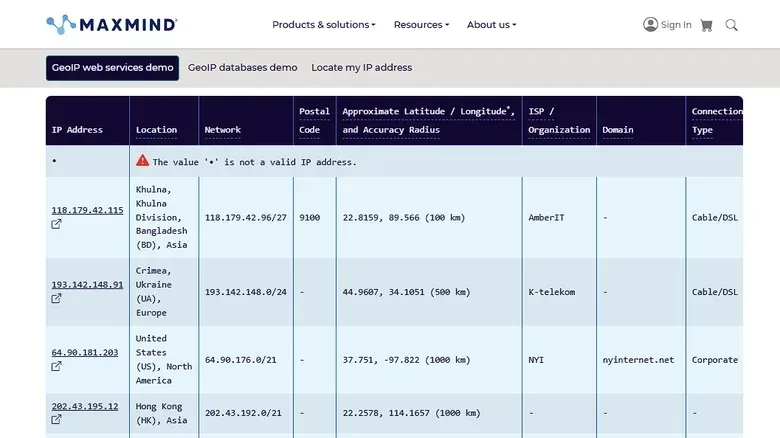
An IP lookup can generally identify the internet service provider and produce an approximate city or regional result. “Approximate” deserves emphasis. IP geolocation is not a precise home-address system, and treating it as one can cause serious harm.
A striking example came in 2016, when a Kansas family sued MaxMind after roughly 650 million unrelated IP addresses had been mapped to their farm. The mapping error led to repeated law-enforcement visits over incidents connected to people elsewhere. The case is a useful corrective to the mythology around IP searches: they can return location-like data, but the data can be broad, wrong or assigned to a place that has nothing to do with the person using the connection.
So an exposed address may disclose a useful clue to an attacker—such as a provider and rough area—but it does not hand over a street address, passwords or the contents of a device. It also should not be treated as conclusive evidence of who did something online. The apparent location is a database result, not a guaranteed identification.
IPv4 and IPv6 in plain language
Two common versions of the internet protocol are relevant here: IPv4 and IPv6. In many homes, several phones, PCs, consoles and other devices share a single public IPv4 address through the router. IPv6 can provide a device with its own public-facing address. That can sound inherently more dangerous, but visibility is not the same thing as accessibility.
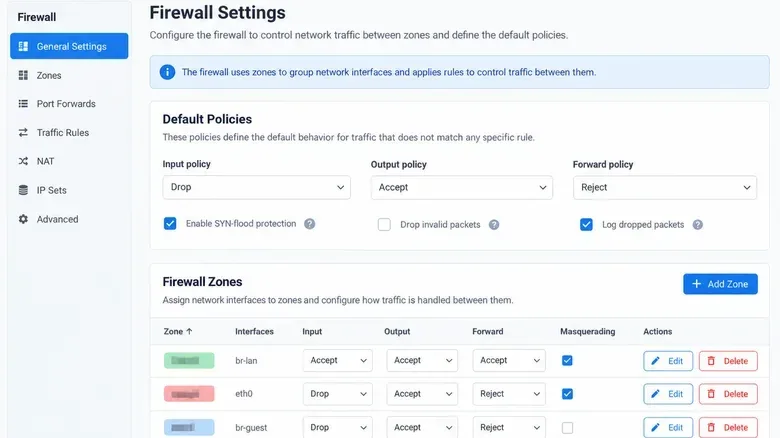
The security boundary is the router firewall and the rules around it. A correctly configured firewall can reject unsolicited inbound connection attempts while still permitting replies to traffic that a device inside the home network started. In practical terms, that means a PC can reach a game server or website, receive the expected response, and remain protected from a random external device trying to start an unrelated connection back into the home.
Some IPv6 addresses are restricted to local or private networks and are not useful as public targets. Temporary IPv6 addresses can also change over time, which can make tracking a particular device harder. Devices on the same home connection can nevertheless share a recognizable address prefix, so temporary addressing is a privacy feature, not a reason to ignore firewall settings.
The most immediate threat: denial of service
The clearest way an IP address can be abused without gaining access to a device is a distributed denial-of-service, or DDoS, attack. “Distributed” means the unwanted traffic comes from multiple sources. The target is flooded until the internet connection or the service handling it cannot keep up.
For a gamer, the result can be abrupt lag, disconnection from a match or an unusable voice chat session. For a household, it may interrupt video calls, browsing and every device sharing the connection. The same general kind of attack has been blamed for server disruptions at Bluesky, although the effect against an individual home connection is different in scale from one aimed at a large online service.
A firewall is important, but it is not a magic shield against an overwhelmed line. If unwanted traffic fills the available internet capacity before it reaches a home router, the firewall may have little ability to restore responsiveness. This explains why “my firewall is on” and “my connection cannot be disrupted” are not equivalent statements.
It also explains why avoiding needless IP exposure remains worthwhile. The address is not enough to steal an account, yet it can give an attacker a target for a disruptive act. The appropriate response is level-headed prevention, not panic.
When an IP address becomes a doorway
An attacker needs more than an address to enter a device. They need a route in: for example, an internet-exposed security camera, remote-access software affected by a security weakness, or a home server protected with a weak password. An IP address tells them where to look; an exposed, vulnerable service is what supplies the opening.
Two configuration issues are especially relevant. On IPv4, port forwarding can direct incoming traffic from the public internet to a specific device or service inside the home. It can be useful for a deliberately hosted service, but every unnecessary forwarding rule expands what is reachable from outside. On IPv6, permissive firewall rules can create a similar result by allowing unsolicited inbound traffic to reach devices.
An OpenWrt user’s experience illustrates the configuration side. After enabling IPv6 and remotely testing a home server, the user found remote-access and file-sharing ports accessible from outside the network. Their firewall was configured to allow forwarding. Switching that setting to reject closed the exposure. The lesson is not that IPv6 itself was the flaw; the risk came from a rule that allowed traffic through.
For players who only use a PC or console for ordinary gaming, the most useful question is simple: have you intentionally exposed anything to the internet? If the answer is no, remote-access rules and old port-forwarding entries deserve a review. A service that was installed for a one-time project, an unused file-sharing setup or a forgotten remote-management tool is not helping when it remains reachable without a present need.
Updates matter more than hiding an address
Network configuration is only one half of the picture. Software flaws can turn a reachable service into a serious problem. In October 2026, Microsoft disclosed CVE-2026-105016, a critical vulnerability in its QUIC implementation. The issue could allow specially crafted IPv6 traffic to execute code in affected .NET applications on Windows. Microsoft had not said whether the vulnerability had been exploited.
QUIC is a network protocol used for internet communications. The important takeaway for ordinary players is not that every system using IPv6 is compromised. It is that protocol support and exposed software need updates when a vendor identifies a critical issue. An IP address alone did not create the vulnerability, and disabling IPv6 would not be a universal security cure.
Microsoft notes that turning off IPv6 can create problems for some Windows components. A more proportionate approach is to keep the system updated, ensure the router firewall covers both IPv4 and IPv6, and remove inbound access that is no longer required. That addresses the real combination of factors: a target address, a reachable path and vulnerable software.
A practical home-network checklist for gamers
- Keep Windows, games, routers and networked software current. Security updates are the direct remedy when a relevant flaw is fixed.
- Check firewall behavior for both IPv4 and IPv6. The aim is to allow normal return traffic while blocking unexpected inbound connections.
- Review port forwarding and remote-access settings. Delete rules for services you no longer intentionally host, rather than leaving them as forgotten exceptions.
- Use strong protection for any service you deliberately expose. Weak passwords on a home server or internet-connected device turn an unnecessary risk into a viable route inside.
- Be skeptical of precise-looking IP location claims. An IP lookup can provide a provider and approximate region, but it is not reliable proof of a home address or an individual’s identity.
- Do not rely on a VPN as a patch. A VPN can conceal the usual public IP from websites when it handles both IPv4 and IPv6 correctly, but it cannot fix vulnerable applications or unsafe router rules.
- Verify privacy tools before trusting them. If using a VPN specifically to keep a regular public address out of view, check that it is actually carrying both protocol types as intended.
Account security belongs in this plan too, even though an IP address does not reveal passwords. Unique passwords and multi-factor authentication reduce the damage from separate account attacks such as phishing or password reuse. For anyone changing devices, this guide on moving Google Authenticator without losing codes is a useful reminder that authentication protection requires its own careful setup.
Don’t confuse privacy, disruption and compromise
These are three related but separate problems. Privacy concerns involve what a player can infer from an address, such as an ISP or an approximate area. Disruption concerns involve flooding a connection with traffic. Compromise concerns involve exploiting a reachable and vulnerable service to access a device. An exposed IP can contribute to all three scenarios, but it does not automatically complete any of them.
That framing is useful when deciding how to react to a lobby warning or an argument after a match. An address exposure should prompt sensible precautions: leave an environment that unnecessarily reveals connection details, apply updates, inspect router settings and avoid publicizing information that makes targeting easier. It should not cause someone to assume their passwords are already lost, disable a major networking protocol without understanding the consequences, or mistake approximate geolocation for a physical address.
Modern game networking can reduce unnecessary exposure, as the change following the Crab Game warning demonstrates. At home, the durable defenses are less dramatic: deny unexpected inbound traffic, expose only services with a real purpose, protect those services properly and install fixes when vulnerabilities are disclosed. An IP address is an address, not a skeleton key—but keeping the doors behind it closed is still the job.