When a PC suddenly feels like it has decided to render a feature-length cutscene in the background, the first instinct is usually to open Task Manager. Dave Plummer helped define that reflex: he wrote the original Windows Task Manager in 1996, and it shipped with Windows NT 4.0 that August. Now Plummer has returned to the category with TMOG, short for Task Manager OG, a beta system-monitoring utility for macOS, Windows and Linux.
TMOG is interesting for two connected reasons. The first is what it attempts to do for people diagnosing a sluggish computer: put whole-machine history beside individual-process activity, rather than leaving users to interpret isolated readings. The second is how it was made. Plummer describes the project as “sort of” vibe coded with Claude Code, but the qualifier matters. The work began with a 107-page specification, and Plummer has stressed that asking an AI tool to simply make a task manager would not produce a useful result.
That distinction is a helpful corrective to the simplest version of the AI-coding story. TMOG was not presented as a button press that replaced product decisions, platform knowledge or technical review. It was a focused project led by someone with unusually deep experience in the precise kind of software being built, with a detailed description of the intended result and two collaborators. Still, its reported development path points to a potentially major change: small teams may be able to undertake polished cross-platform utility work that would previously have been far more expensive and time-consuming.
What TMOG is designed to show
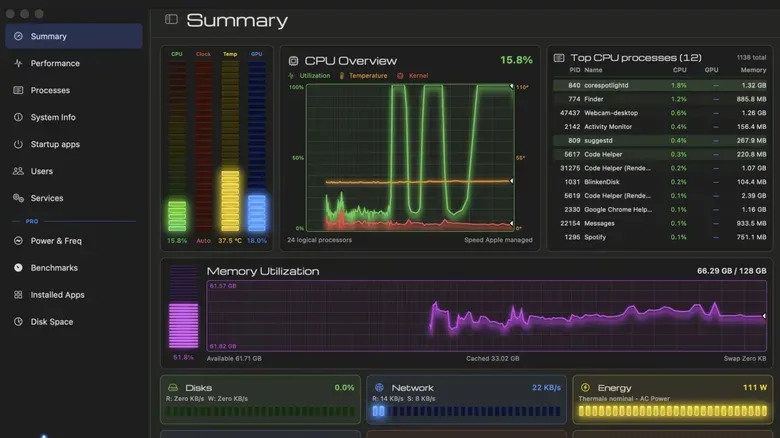
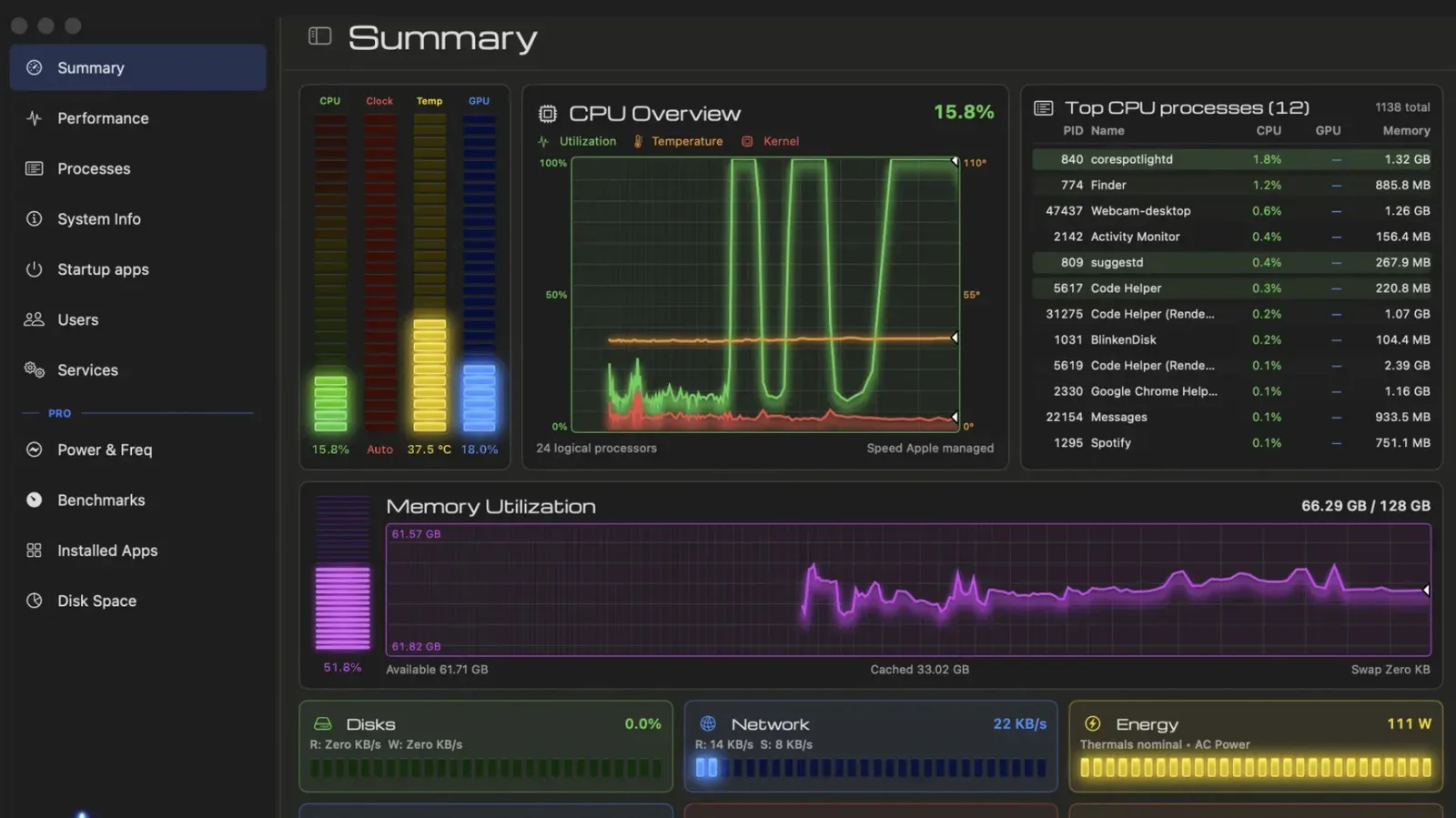
TMOG consolidates 12 views into a single application window. Those views cover a system summary dashboard, process-level resource use, startup applications, services, power and frequency, network connections, installed applications, disk space and benchmarks. In plain terms, it aims to provide both the immediate “what is using my machine right now?” answer and the broader context needed to understand whether a spike is unusual.
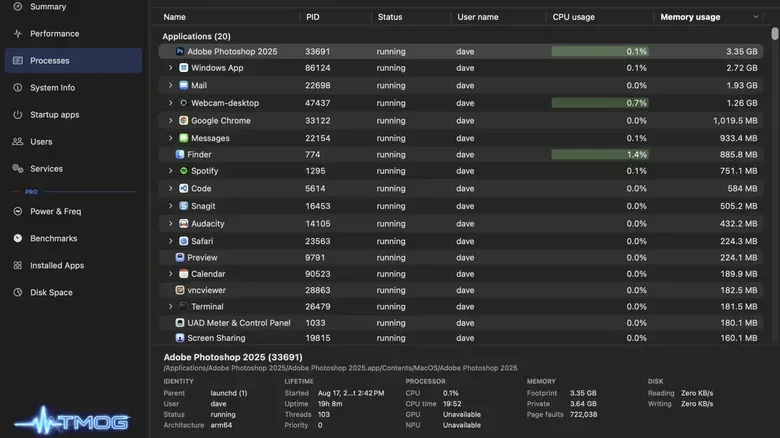
A process is an executing instance of an application or background component. A browser with several tabs, for example, may involve more than one process. Monitoring at that level can identify a specific program consuming compute time or memory, but it does not automatically explain whether that activity caused the machine-wide slowdown. TMOG’s design focuses on presenting the overall history alongside process activity, which Plummer says makes it easier to associate a system hitch with an apparent culprit in areas such as compute or memory use.
That is the practical difference TMOG is trying to make. A process table can show a high number; diagnosis asks a more useful sequence of questions: Did the wider system slow down at the same moment? Was memory pressure rising? Did network activity change? Did the issue disappear before a user opened the monitor? A historical view cannot guarantee an answer, but it can give an investigation a timeline instead of a snapshot.
The app also updates its status meters at 60Hz, rather than following the once-per-second rhythm associated with Windows Task Manager. TMOG assigns separate colors to efficiency cores as well. Efficiency cores are processor cores intended for lower-power work; distinguishing them visually may help users read how a modern processor’s workload is distributed. The interface also includes green, amber and blue phosphor themes, giving the app a retro-monitor aesthetic without changing its diagnostic purpose.
There is a self-monitoring option, too. Enable it and TMOG includes its own process in its measurements. That feature is valuable in a straightforward way: system monitors consume some resources themselves, so exposing that overhead makes the tool’s footprint visible rather than implicit. It also fits Plummer’s stated intent that the application should not invent an answer when the available information does not support one.
Flight Recorder is the paid diagnostic layer
The basic version is free, does not expire and handles live system and process monitoring across all three supported platforms. TMOG Pro adds Flight Recorder, a record-and-replay mode intended for looking back through a slowdown after it occurs. Rather than needing to catch a transient problem while staring at the app, a user can scrub through the retained activity as a postmortem.
That is a more meaningful upgrade than an extra color scheme or a cosmetic dashboard. Intermittent problems are difficult precisely because they can end before someone starts investigating. A record-and-replay approach is built around the idea that the useful evidence may be the sequence of events surrounding the stall, not merely the readings after everything has returned to normal.
TMOG Pro is priced at $39.95 through Plummer’s Lemon Squeezy store. The app cannot be sold through Apple’s App Store because Apple’s sandboxing rules prevent an app from enumerating system processes or terminating other programs. Sandboxing is a security model that restricts what an app can access or control. In this case, those restrictions conflict with the core responsibilities of a full system-management utility. The result is a direct-download model for the macOS version rather than App Store distribution.
For Mac owners considering tools around their setup, TMOG’s macOS support also arrives in a broader landscape where hardware purchasing and system maintenance often overlap; current Mac hardware deals can be found in this MacBook Pro pricing roundup. TMOG itself remains software in beta, however, and its purpose is monitoring and diagnosis rather than changing a computer’s underlying performance.
Native interfaces, one shared core
Cross-platform software can mean different things. Some applications primarily package a shared web interface for each operating system. TMOG instead uses platform-specific native technologies for its front end: Swift and AppKit on macOS, Direct2D on Windows, and Qt 6 on Linux. Beneath those interfaces is a shared C++ core.
“Native” here means that each version is built to work with its operating system’s own programming frameworks rather than presenting the same web application everywhere. Swift and AppKit are Apple technologies used for macOS applications. Direct2D is Microsoft’s graphics API, while Qt 6 is a cross-platform application framework used for the Linux implementation described here. A shared C++ core means common underlying logic can be reused even while each platform receives a tailored interface and platform integration.
This architecture helps explain why TMOG is more than a nostalgic reskin of Windows Task Manager. It is a new tool intended to exist credibly on three operating systems. That is an ambitious scope for a utility that must report meaningful information about distinct platforms, especially when users will naturally expect a system monitor to be reliable about the system it is monitoring.
The AI story starts with the specification, not the prompt
Plummer said the project emerged from a debate about whether Microsoft Word could be vibe coded. His conclusion was that Word was not an appropriate target, while something smaller might be. Task Manager was a natural test case because he already knew the problem space intimately.
He prepared the 107-page specification and said Claude Code produced a working application in roughly four hours after receiving it. That early work reportedly occurred while he was with his son at a hospital during recovery from surgery. The account is striking, but it should not be read as proof that a similarly complicated app can be reliably created with a short conversational request. Plummer’s own warning is the better takeaway: a vague “write a task manager” instruction yields poor results.
Vibe coding is commonly used to describe a workflow in which a developer tells an AI coding assistant what they want in natural language and iterates on the generated code. In TMOG’s case, the process involved a highly specified target, established expertise and subsequent development, rather than blind acceptance of generated output. The detailed spec effectively set requirements for the assistant to implement.
Plummer says the team completed TMOG in under six weeks with two collaborators and Claude Code doing much of the heavy lifting. The macOS beta arrived July 31. Windows and Linux builds followed August 23, then a third software iteration and the first Pro releases arrived September 7. Those dates show rapid movement, but the project is still beta software. Early adopters are continuing to find bugs, which Plummer says he is fixing.
Why the beta label matters
A monitoring app occupies a sensitive place on a computer. People may use it to decide whether to close a program, investigate an unfamiliar background process or judge whether a slowdown is normal. TMOG’s beta status means prospective users should keep their expectations grounded: the software is available without an account, but ongoing bug discovery is part of its current stage.
The project’s most compelling promise is not that it will make every mysterious slowdown easy to solve. Modern systems are complicated, and a resource spike does not necessarily establish a cause. Instead, TMOG’s value proposition is better observability: a clearer way to see system-wide behavior, individual activity and—through Flight Recorder—what was happening before a problem disappeared.
For users on Windows, macOS or Linux, that cross-platform consistency is the central appeal. For developers, TMOG is also a concrete example of AI-assisted development’s current reality: detailed planning and domain knowledge remain essential, while AI can substantially change how quickly a small team turns those decisions into working software.