
There is a particularly aggravating kind of PC performance problem that does not always show up in an average frame-rate number: the game runs smoothly, then briefly freezes as a new effect, room or piece of scenery appears. Shader Compilation Stutter Killer, generally abbreviated as SCSKiller, is a free open-source utility built to tackle that specific problem.
The distinction is important. SCSKiller is not presented as a magic performance booster, a fix for an underpowered processor, or a universal repair tool for troubled PC ports. It is designed around one narrow task: identifying shaders a game needs and pre-compiling them into the graphics driver cache before play. Where shader compilation is the reason for disruptive hitches, that focused approach can be remarkably effective. Where the hitch comes from CPU load, streaming new world data, or another bottleneck, it may not make a visible difference.
That precision is the main reason the software is worth understanding. PC players frequently call every pause or rough patch “stutter,” but several different failures can produce a similar sensation on-screen. A tool aimed at the wrong type cannot solve the underlying problem, however appealing its promise may be.
Shader stutter, explained without the benchmark fog
A shader is a small program used by the GPU to render visual work. Lighting, shadows, reflections and other effects depend on them. Modern games can use huge numbers of shaders, and the rendering pipeline has to prepare the appropriate one when an effect is required.
Shader compilation stutter occurs when that preparation happens while a game is running and the next frame has to wait. To a player, it can look like a sudden frame-rate collapse: movement jolts, the camera catches, and the action resumes moments later. These incidents are often most noticeable on a first trip through an unfamiliar area or when a previously unseen visual effect appears, because the system is encountering that shader for the first time.
This should not be confused with a conventional frame-rate drop. A lower frame rate can result when a GPU cannot draw a demanding scene quickly enough, or when a CPU cannot finish simulation, physics or related tasks in time. Shader compilation can happen alongside those bottlenecks, which makes diagnosis difficult, but it is a separate issue. Throwing more GPU power at a compilation wait does not necessarily remove the wait.
The PC’s hardware variety is a central complication. Developers cannot target one fixed set of specifications in the same way they can for a console platform. That does not mean console games never have performance issues, but it helps explain why shader management can be especially messy across a vast mix of PC processors, graphics cards and driver setups. The problem has been especially prominent in some games using Unreal Engine 5.
What SCSKiller actually does
SCSKiller reads installed game libraries and identifies titles that it recommends for compilation. For compatible games, it can compile shaders ahead of launch and place the results in the graphics card driver cache. The intended result is simple: instead of stopping during play to build a needed shader, the game can call on work already prepared.
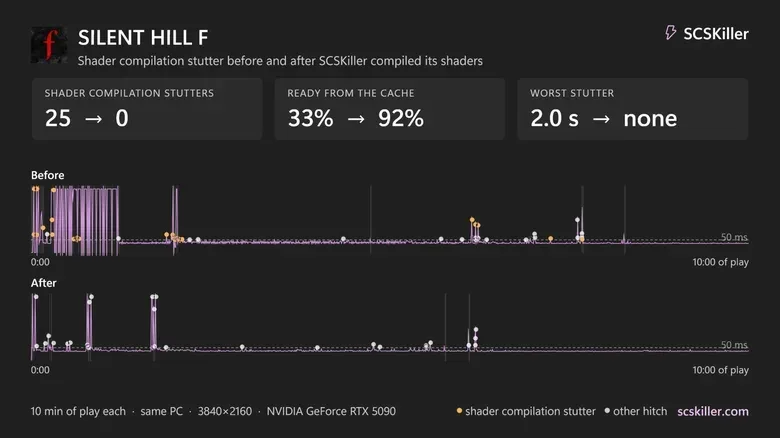
The app also includes before-and-after statistics. That is valuable because it moves the discussion beyond the vague feeling that a game “seems smoother.” Players can check whether compilation stutters, shader hitches and low-frame-rate behavior changed over comparable sessions. It does not turn every metric into a verdict on the whole game, but it can help establish whether shader compilation was a major contributor to the roughness.
Reported results in several high-profile games illustrate both the upside and the caveat. Pre-compilation was found to more or less remove compilation stutter in Silent Hill f, Silent Hill Townfall, Elden Ring and The Witcher 3: Wild Hunt — Remastered. In the latter two cases, hitches that had made play feel intolerable reportedly disappeared after the compilation pass.
Silent Hill f offers the clearest numerical example. In a ten-minute session before pre-compilation, the app recorded 25 compilation stutters, with the worst measured at 246 milliseconds, as well as 67 shader hitches and a 1% low of 3 fps. A 1% low represents the performance floor across the slowest one percent of frames, so it is often a more revealing indicator of momentary disruption than an average fps reading. After shader pre-compilation, the reported compilation-stutter count fell to zero.
Those results are encouraging, but they should be read as evidence of fit rather than proof that every game will behave the same way. The tool appears strongest when shader compilation is genuinely the dominant cause of the interruption.
Why VRR helps, and why it cannot do everything
A variable refresh rate display can make certain remaining fluctuations less distracting. VRR means the display dynamically adjusts its refresh behavior to better match the rate at which a GPU delivers frames. G-Sync and FreeSync are familiar examples. This can smooth uneven frame delivery and can also help reduce screen tearing.
VRR is useful in the SCSKiller story because it addresses the visibility of smaller hitches, not the root cause of a processor-bound compilation stop. A screen cannot create frames while the system is stalled. If compilation or CPU pressure drives the game to 0 fps for seconds, that is a workload problem rather than a display-timing problem.
In the Silent Hill f example, pre-compilation eliminated the tracked compilation stutters, while a G-Sync display made smaller hitches difficult to notice. That is a sensible division of labor: reduce the known shader issue before play, then use VRR to make less severe frame-time inconsistency gentler on the eye. Neither side should be oversold as a guaranteed remedy for every form of stutter.
Compatibility is the major practical limitation
SCSKiller is forthright about games it cannot presently handle. Many installed titles may appear as unsupported, with the explanation that their shaders are compressed or packed and require an engine reader. An engine reader, in this context, is the missing capability needed to interpret the game’s way of storing or packaging shader material. Without it, the app cannot simply apply the same pre-compilation workflow.
There is a workaround inside the app: a “Record while I play” option. After a player selects a game and enables recording, SCSKiller can observe the rendering pipeline during gameplay and then pre-configure shaders after roughly ten minutes of play. It is a more hands-on route than immediately compiling a recognized library entry, and it still does not promise success for every title, but it gives unsupported games an avenue worth investigating.
That recorder also reinforces a sensible expectation for anyone trying the software: the first pass may involve playing through the sections that normally provoke hitches. A pre-compilation tool cannot prepare effects it has not been able to identify. Players should treat their initial results as a test of whether their particular game and system are a match, rather than expecting a single switch to repair all frame-time problems.
Time is part of the trade
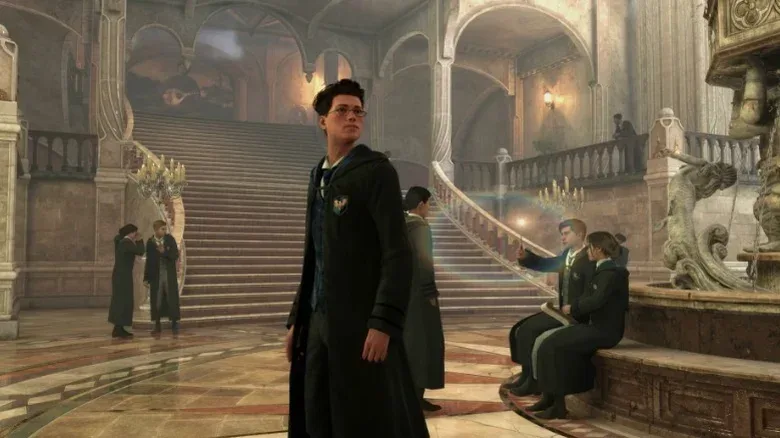
Pre-compilation transfers work from gameplay to a setup stage, so it naturally takes time. Some games can be processed in only a few minutes, but not all. On a system using an AMD Ryzen 7 9800X3D, compiling 291,688 shaders for Hogwarts Legacy took 17 minutes. That is far preferable to recurrent pauses for players whose issue is compilation, but it is still a meaningful wait.
It also points to an important practical choice. A user who is about to launch a game for a brief session may not want to wait for a lengthy compile cycle. Someone planning a longer playthrough, meanwhile, may see a one-time preparation period as a very favorable exchange for fewer interruptions later. The answer depends on the game, the shader count and how strongly the player notices hitches.
The anti-cheat warning is not optional
The most consequential caution concerns games with anti-cheat software. Using SCSKiller can trigger bans in those environments. That means players should not assume that a tool designed for performance is harmless in an online game simply because it is not intended as a competitive advantage.
Elden Ring is the explicit example: it should be set to launch offline when using the tool. This is not a minor footnote. Any prospective user needs to check the game’s anti-cheat situation before experimenting, keep the utility out of online play where appropriate, and avoid treating successful results in one single-player context as permission to run it everywhere.
That caution is especially timely for PC players who divide their library between local and online experiences. The broader PC ecosystem is already in flux, as illustrated by the planned shutdown of a PlayStation PC streaming app; the service’s limited adoption and upcoming closure underline how varied PC gaming setups and services can be. Performance utilities sit within that same complicated landscape of drivers, launchers, platform rules and game-specific safeguards.
What SCSKiller cannot fix
Hogwarts Legacy is the clearest reported counterexample. Even after a large shader compilation pass, a ten-minute run still produced six major compilation hitches. The game’s problems extend beyond the narrow category SCSKiller targets. Traversal stutter and CPU spikes can remain, and VRR may only soften their presentation rather than eliminate them.
The same distinction applies to Dead Space from 2023, another named example of a game affected by traversal stutter and CPU spikes. When a hitch arises because new areas are being streamed in or because CPU work suddenly surges, the shader cache is not necessarily the blocked part of the chain. A pre-compilation utility should therefore be judged honestly: it can resolve shader compilation stutter extremely well in the right game, while leaving other technical causes visible.
That is not a failure of the concept. It is a reminder that “stutter” is a symptom, not one diagnosis. SCSKiller’s value lies in making a specific, traditionally frustrating PC problem more manageable. Its free price, automatic library scan, clear recommendations and statistics make it approachable, while its unsupported-game notices and recorder provide a transparent view of where the technology currently stops.
For players affected by first-time shader hitches in supported single-player games, SCSKiller looks like a compelling tool to test. Go in with a backup of common sense rather than a promise of universal smoothness: allow time for compilation, check whether the game is supported, use the recording option carefully where necessary, and never ignore anti-cheat restrictions. If the stutter is truly shader compilation, the payoff can be a game that finally plays the way its frame-rate counter suggested it should all along.