Claude is moving beyond the familiar chatbot prompt box and into the crowded, occasionally terrifying arena of workplace collaboration software. The new lineup includes Claude Sheets for creating and editing spreadsheets, Claude Meetings for note-taking in video calls, and Claude Whiteboards for turning a messy team brainstorm into themes and assigned follow-ups. The company is also renaming Claude Dashboards as Claude Data and expanding the way third-party apps can work within Claude.
The common thread is clear: instead of asking an AI to produce a block of text and manually carrying that result into a spreadsheet, meeting document, whiteboard or business system, users are being offered a set of places where the work can happen with Claude in the room. Or, in the case of meetings, visibly in the call. That distinction matters. These products are designed around shared documents, editable outputs and organizational controls—not just solitary prompting.
Claude Sheets brings AI into the spreadsheet grid
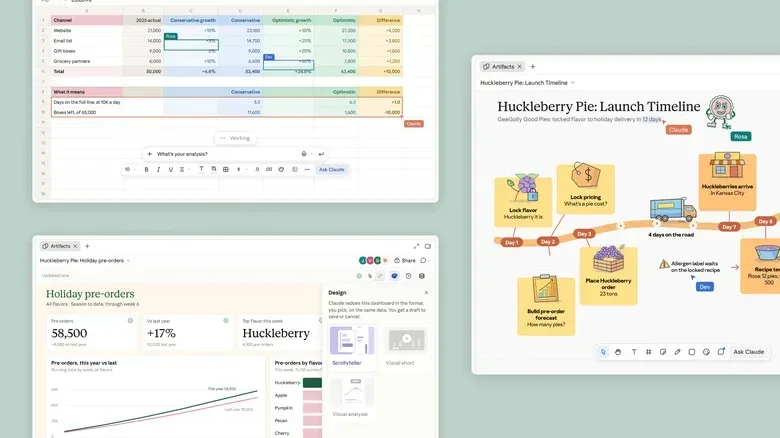
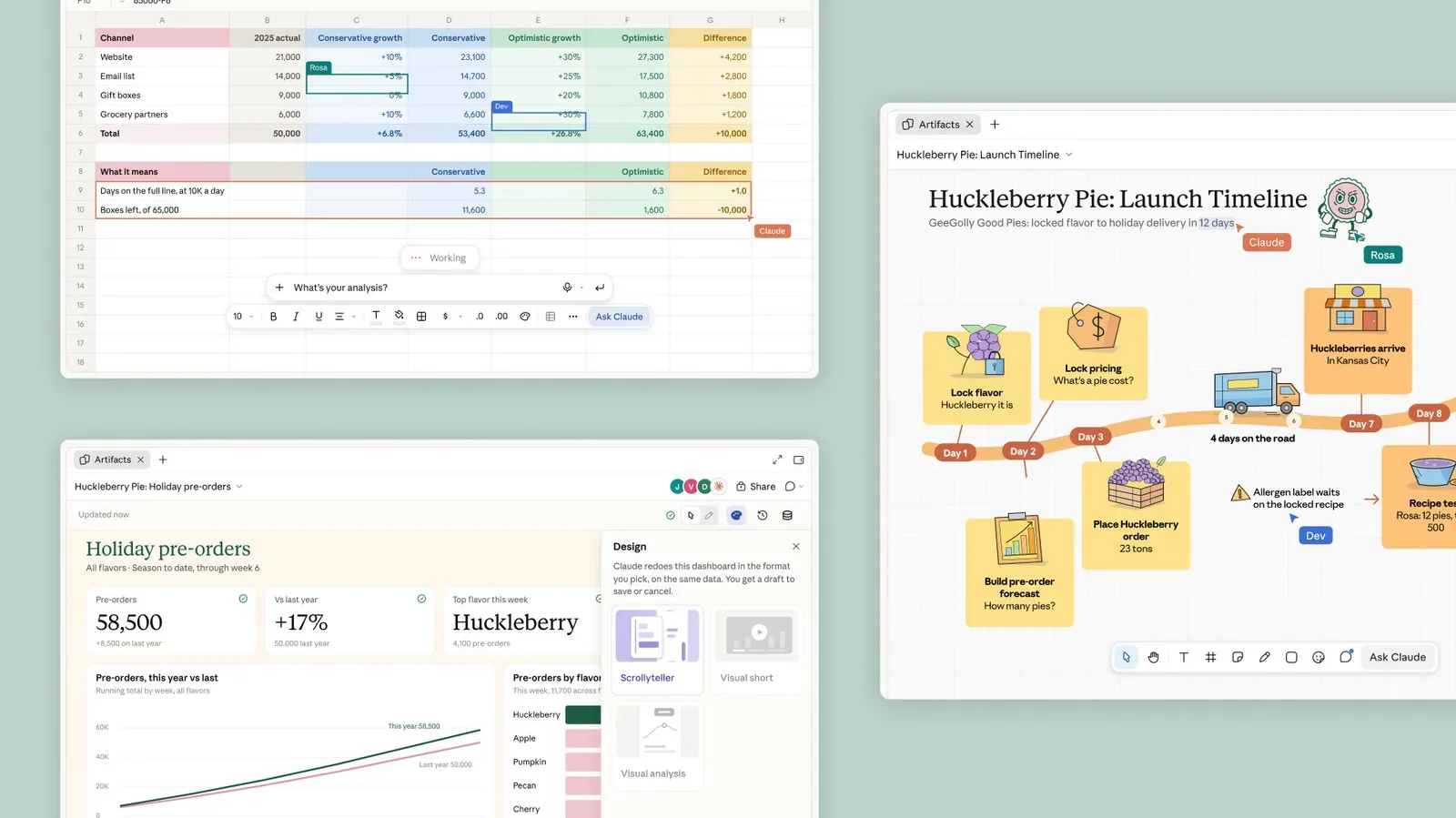
Claude Sheets is a beta tool that can generate and edit spreadsheets. Files can contain multiple tabs and formulas, alongside conventional formatting options. That puts the tool in a category familiar to anyone who has opened a blank workbook, stared at column A, and briefly considered a less spreadsheet-intensive career.
A formula is an instruction within a spreadsheet that calculates or transforms values using cells and functions. Formulas are central to how spreadsheets become useful models rather than merely well-organized lists. Multiple tabs, meanwhile, allow a single file to hold separate but related worksheets—for example, distinct data sets, planning views or supporting calculations. The announced capabilities mean Claude Sheets is intended to work with the structural pieces people expect from a spreadsheet, not only generate a static table.
The collaboration angle is just as important as the AI angle. People with edit access can change a file, and alterations made by Claude will be recorded for collaborators to track. That creates a basic layer of accountability around AI edits: teammates can identify that a change came from Claude rather than assuming every value or formatting decision was entered by a person.
That does not remove the need to check work. A change history can clarify who or what made an edit, but it does not establish whether a formula, categorization or generated value is appropriate. For teams using a spreadsheet for planning or analysis, the practical habit remains the same: inspect the output, understand the logic where it matters, and make sure responsibility stays with the people approving the file.
Claude Sheets can export files to Excel and supports the Claude Google Workspace plugin. Export capability is meaningful because organizations rarely begin with a completely empty software environment. It gives teams a route to take a Claude-created file into Excel rather than asking every collaborator to abandon established workflows. Google Workspace plugin support similarly places the tool near an ecosystem many workplaces already use.
Claude Sheets is available in beta to Claude subscribers on web, desktop and mobile. “Beta” is worth taking literally: it signals an in-progress release rather than a finished, locked-down product promise. Teams evaluating it should distinguish between what is available now and what they may need for a durable process later.
Related coverage includes Anthropic Expands Claude With Sheets, Meetings and Whiteboards.
Meetings makes Claude an explicit participant
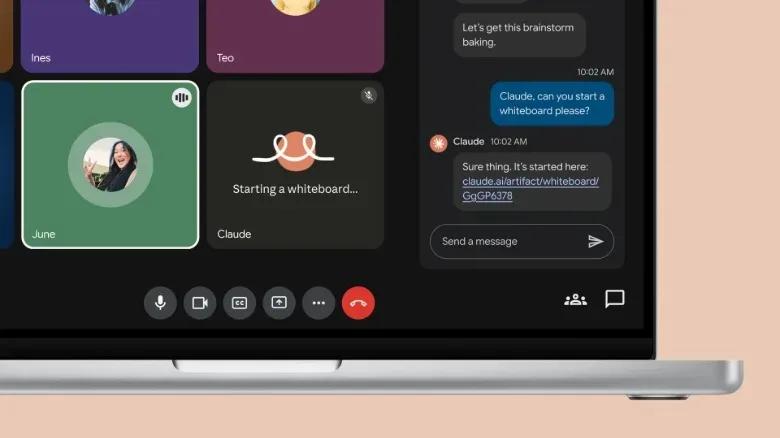
Claude Meetings is a meeting agent initially available in Google Meet. It can join video calls, take notes while participants speak, and later answer questions about plans or action items from the call. In plain terms, it aims to turn an ephemeral conversation into something a team can search and revisit without relying solely on one person’s notes.
An action item is a task that emerges from a discussion and needs an owner or follow-up. Identifying action items is often more useful than producing a long transcript, because a meeting can contain plenty of conversation without a clear record of what happens next. The appeal of a meeting agent is therefore not simply transcription; it is the possibility of querying the meeting after the fact for decisions, commitments and next steps.
There is also an important visibility safeguard in the announced behavior. Claude marks itself as a participant and posts a notice in the meeting chat. The system will not join a call containing outside guests unless an administrator permits it, and it leaves if an outside guest joins. These measures do not answer every policy question a workplace may have, but they address a core expectation: people should know the AI note-taker is present.
The administrator condition is especially notable. A meeting with outside guests can involve people who are not governed by the same internal rules or expectations as employees. Requiring admin approval before Claude joins those conversations makes the tool’s behavior more controllable at an organizational level. It also suggests that deploying an AI meeting assistant is not simply an individual productivity decision; it can be a matter for workplace policy, permissions and participant awareness.
Claude Meetings is currently limited to Team and Enterprise customers. That positioning fits a tool whose value and risks both increase when shared across an organization. It is not presented as a general paid-user feature at this stage.
Whiteboards aim to sort the brainstorm pile
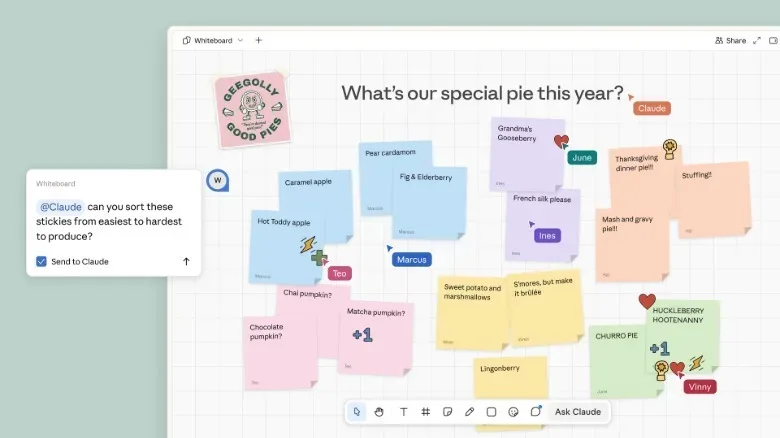
Claude Whiteboards is a collaborative brainstorming app in beta for all paid users across web, desktop and mobile. As a group works, Claude can organize ideas into themes and draft action items for individual people. It can also be used alongside Claude Meetings.
A digital whiteboard is usually a shared visual workspace for fragments of an early idea: notes, categories, clusters and prompts rather than a polished final document. The hard part of brainstorming is often not generating a lot of material. It is recognizing the patterns in it, deciding which ideas belong together, and converting discussion into actual responsibilities. Claude Whiteboards is aimed at that handoff.
Using Meetings and Whiteboards together could make the relationship between discussion and organization more direct. A team can talk through ideas in a video call while a shared workspace groups themes and shapes potential follow-ups. The practical benefit is a reduction in copy-and-paste travel between a chat assistant, a meeting record and a separate collaboration board.
Still, grouping is an interpretive task. Two ideas that look similar can carry different priorities, owners or implications. AI-generated themes may be a helpful first pass, but teams should treat them as a proposal to review rather than an unquestionable map of what the group meant. The same goes for individual action items: assigning a name in a draft is not the same as securing agreement from the person assigned.
Claude Data is a broader name for connected business information
Claude Dashboards is being renamed Claude Data and is beginning a rollout to all paid users. The revised name reflects a straightforward idea: company data has uses beyond a dashboard view.
Claude Data can connect to a company’s CRM, enabling the chatbot to answer questions about information in that system. A CRM, or customer relationship management system, is a business database used to organize information connected to customers and relationships. The announced feature is about asking Claude specific questions of that connected data rather than limiting it to general-purpose conversation.
For users, the promise is more direct access to information without manually navigating every field or report. For organizations, the consequential question is access control. Connecting a chatbot to company systems makes the scope of the chatbot’s answers depend on the information it is allowed to see. The announcement establishes that the CRM connection exists; teams will still need to decide which workflows and users should receive access.
Plugins shift from pulling information to working in apps
Claude’s updated plugin functionality is the other major piece of this office-suite expansion. Users can already connect services such as Canva and Notion so Claude can pull information from them. There are more than 9,000 connectors in the Claude Marketplace. The new change allows full apps to open inside Claude, letting the chatbot act based on what it can see in that app window.
A connector is a bridge between software services that allows information or actions to move between them. The shift described here is more ambitious than simply retrieving material from a connected service. Opening a full app within Claude suggests a workflow in which the assistant can work in closer proximity to the interface and context a user is already using.
The rollout begins with a small group of partners: Adobe, Atlassian and HubSpot. This is a staged rollout, not a declaration that every one of the marketplace’s connectors now has identical full-app behavior. That distinction will matter to users who see a large connector count and assume every integration has the same depth.
What the expansion means in practice
Taken together, the announcements frame Claude as a workplace layer spanning documents, meetings, brainstorming, company data and external applications. The immediate competitive terrain includes established spreadsheet and collaboration habits, video-meeting assistants, and AI features already embedded in major productivity platforms. Google Meet, for instance, has its own Gemini meeting agent. The contest is not just about who can summarize a meeting or format a table; it is about who can reduce the friction among all the places work is scattered.
For teams, the relevant questions are practical rather than mystical:
- Which collaborators can edit a Claude Sheet, and how will AI-tracked changes be reviewed?
- When should a meeting agent be enabled, particularly when people outside the organization are involved?
- Who confirms themes and action-item ownership on a shared whiteboard?
- What company data should be reachable through a connected CRM?
- Which app connections are useful enough to justify granting Claude access to their context?
Those questions become more significant as AI shifts from producing an answer in a chat to participating in shared work. The most useful feature may be the one that removes a tedious handoff. The most important discipline may be ensuring every automated handoff remains visible, reviewable and appropriate for the people affected by it.
Claude Sheets, Meetings, Whiteboards, Data and deeper plugins do not make the productivity-software maze disappear. They are an attempt to put an AI guide in more of its corridors. Whether that feels like a helpful co-op teammate or another participant asking to be invited to every quest will depend on how organizations set the rules.
For another look at how AI tools are moving into specialized workplace workflows, see Google’s push to use Gemini in healthcare administration.