Command an Army players have six listed promo codes to enter in September 2026, with each one granting Gems for building out an army. The rewards range from 500 to 1,000 Gems per code, making the full set a useful early stockpile for anyone looking to add Units or unlock Classes in the Roblox strategy game.
The list includes codes named OPTIMIZE, SORRY, WAR, SHIELDBREAKER, CONQUER, and RELEASE. There are no expired Command an Army codes listed as of September 14, 2026. That does not mean they are permanent: redemption codes in Roblox games can be removed without much warning, so it makes sense to claim any working reward before putting it off for another deployment.
Gems matter because they support the game’s army-building loop. They can be spent to roll for Units, with Samurai and Berserkers among the examples of possible additions, or put toward Classes that open up different weapons and setups. Players are attacking and defending bases, so a stronger roster and a class combination that suits the situation can be more valuable than treating every battle as a charge straight down the middle.
All Command an Army codes listed for September 2026
Here are the six codes and their stated Gem rewards:
- OPTIMIZE — 700 Gems
- SORRY — 1,000 Gems
- WAR — 500 Gems
- SHIELDBREAKER — 700 Gems
- CONQUER — 500 Gems
- RELEASE — 500 Gems
Redeeming all six adds up to 3,900 Gems. The biggest single payout is SORRY at 1,000 Gems, while OPTIMIZE and SHIELDBREAKER each provide 700. WAR, CONQUER, and RELEASE round out the list at 500 Gems apiece.
That total does not dictate exactly what a player will receive from Unit rolls, nor does it guarantee a particular Class or army composition. It does, however, provide currency that can be directed toward the game’s stated options: trying for new Units and purchasing Classes. For a game built around training and leveling a force before trying to seize an opposing base, a large batch of Gems is an opportunity to broaden the squad rather than relying solely on whatever the starting lineup happens to be.
How to redeem codes in Command an Army
The redemption process is short, provided the tutorial has been completed. The tutorial is the only listed requirement before the code menu can be used.
- Finish the Command an Army tutorial.
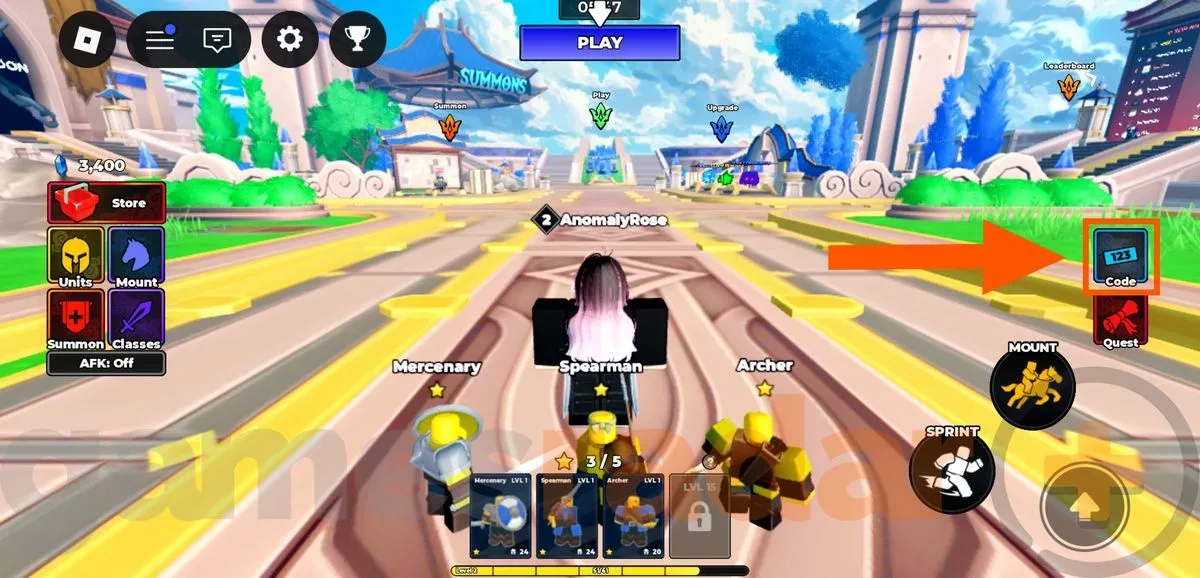
- Open the game’s on-screen Codes button on the right-hand side.
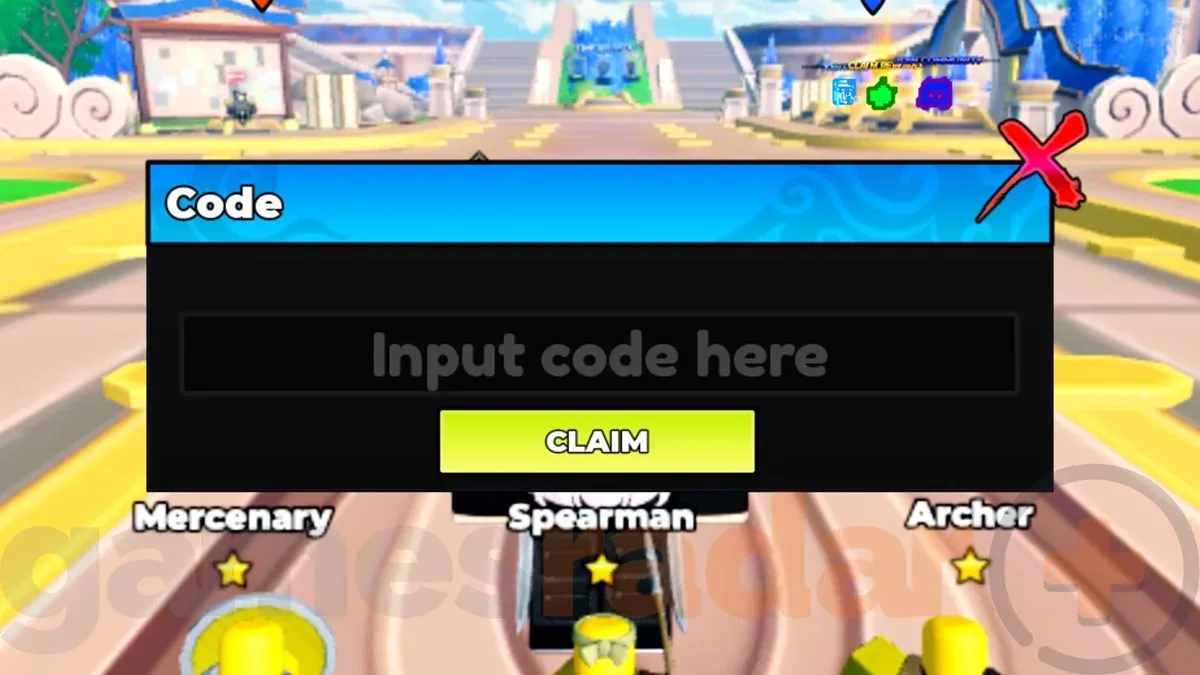
- Enter one code into the redemption box.
- Select Claim.
- Repeat the process with the remaining codes.
The listed codes are not case-sensitive, which removes one common source of frustration when entering promotional rewards. Spelling still matters, of course. Copying a code exactly is the simplest way to avoid accidentally adding spaces, omitting a letter, or entering a similar-looking word that the system will not recognize.
Related coverage includes Command an Army Codes for September 2026: All Active Gem Rewards.
It is also sensible to claim codes one at a time. That way, if a code no longer works, players can identify which one failed rather than having to guess after entering several in quick succession. A failed redemption may indicate a typo, a code already redeemed on that account, or a reward that has expired since the September list was compiled. No specific error behavior or replacement code process is listed, so players should not assume an inactive entry will be restored later.
What the Gem rewards are for
Command an Army frames Gems as a route to army customization and expansion. Unit rolls can bring new recruits into the force, including the noted Samurai and Berserker examples. Classes, meanwhile, offer access to fresh weapons and let players experiment with a setup that better fits their approach.
Those are two related but distinct choices. New Units potentially change the makeup of the army itself, while new Classes give players more room to decide how they want to operate. A player who wants to test alternatives does not have to view Gems as useful only for chasing one specific kind of recruit. The currency can instead support a wider set of strategic options, whether the immediate plan is to reinforce an attack or prepare a more durable defense.
Training and Unit levels remain an important part of the broader picture. Codes may accelerate access to Gems, but they do not remove the need to develop a capable team. An underpowered group is unlikely to be ideal for capturing an enemy base simply because it has received a currency windfall. The practical value of these rewards is in giving a player more choices while they continue improving the force they take into battle.
That makes the 3,900-Gem total worth viewing as a pool of flexibility, not a prescribed shopping list. Players can choose to spend immediately, save for later decisions, or use the rewards as they work out which Units and Classes best complement their preferred tactics. The available information establishes the currency’s uses, but not the exact costs of every roll or Class, so it would be premature to declare a single universally best way to spend it.
Are there any expired Command an Army codes?
No expired codes are listed at this time. Command an Army is described as relatively new, and RELEASE remains active in the September 2026 list. Still, the lack of a retired-code section should be treated as a snapshot, not a promise that every entry will remain usable indefinitely.
Code lists naturally change. A reward connected to a launch period can disappear, a replacement can be added after an update, or a developer can end multiple promotions at once. For that reason, the best low-effort move is simply to redeem the listed codes while they are available and then check the Codes menu in-game for confirmation.
Players who return to Command an Army after a break should also keep expectations measured. The six entries above were listed for September 2026, specifically as of September 14. If a code does not work at a later date, it should be treated as potentially expired rather than as evidence that the game’s redemption menu is necessarily broken.
A quick checklist before your next battle
- Complete the tutorial before attempting to redeem anything.
- Use the Codes button positioned on the right side of the screen.
- Claim SORRY, OPTIMIZE, WAR, SHIELDBREAKER, CONQUER, and RELEASE individually.
- Remember that capitalization is not required, but correct spelling is.
- Use Gems for Unit rolls or new Classes, depending on the kind of army options you want to explore.
- Keep training and Unit levels in mind when preparing to attack or defend bases.
Roblox continues to be a place where games frequently use small currency drops to help players get moving in a new progression system, but each game sets its own redemption rules and reward economy. Command an Army’s current list is especially straightforward: finish the tutorial, enter six codes, and collect the stated Gems. For a look at a very different game project on mobile, see Game Freak’s weather-driven magical laundry game.
For Command an Army players, the immediate takeaway is simple. The six September codes represent 3,900 Gems in total, with no expired entries currently recorded. Redeem them promptly, then decide whether the army needs more Unit-roll opportunities, a new Class and weapon option, or a little patience while the squad’s training catches up to its ambitions.