A dedicated menu for Hekate entries
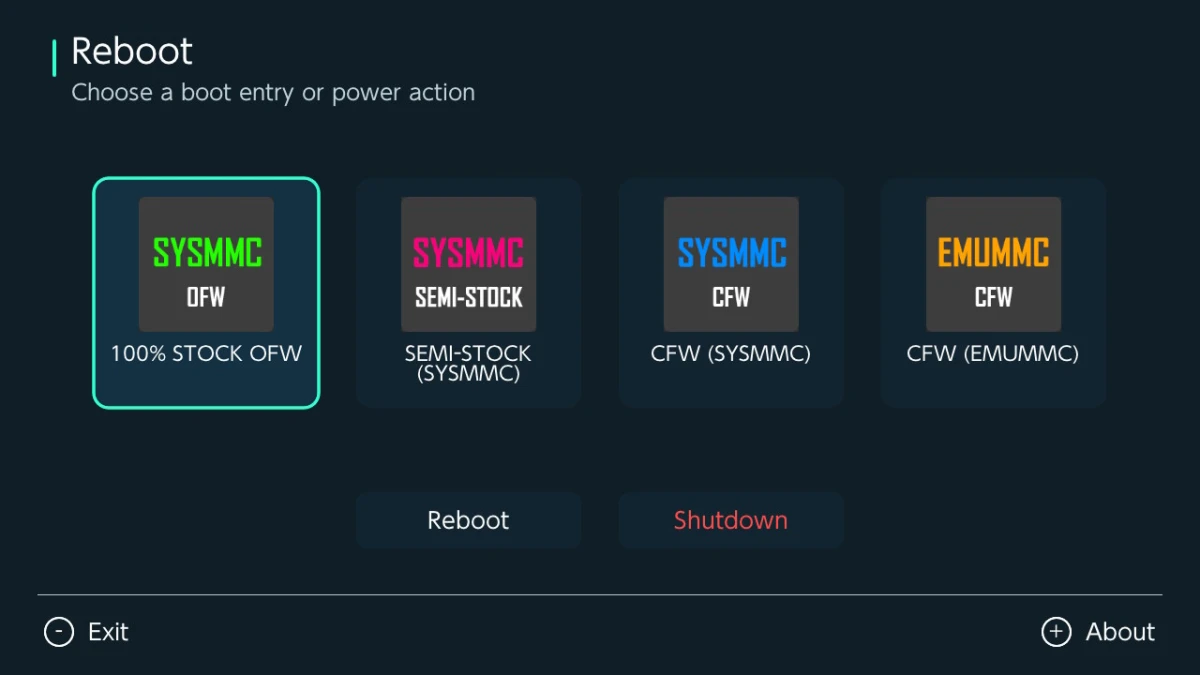
Reboot v1.0.0 gives Nintendo Switch users a homebrew menu for launching entries from an existing Hekate configuration. It displays the available entries as boot cards and places separate Reboot and Shutdown buttons below them.
The release was published on November 15, 2026, and is distributed as Reboot-1.0.0.zip. Boot cards are loaded from sdmc:/bootloader/hekate_ipl.ini in the same order as the entries in that file. The app leaves out the [config] section and captions, and it does not scan additional configuration files in bootloader/ini.
Icons come from the SD card
Reboot first checks an entry’s icon= path for artwork. If no path is specified, it also searches bootloader/res for image files matching the entry name, including Hekate filename variants such as _hue_nobox, _hue, and _nobox.
BMP and PNG images up to 512 by 512 pixels are supported. When no matching image is available, Reboot uses custom or default system icons and then a built-in NX label as fallbacks. Nyx hue effects are not applied to the displayed images.
The app reads the existing SD card configuration without modifying it. After changing boot entries or icons, users should restart Reboot so it can load the updated information.
Controller and touchscreen navigation
The interface displays up to four boot entries per page. The D-pad or analog stick moves between boot cards and power controls, while A launches the selected entry or performs the selected power action. L and R change pages when more than four entries are available.
Touch input can activate boot cards, power buttons, page arrows, Exit, and About. Minus exits to the Homebrew Menu, Plus opens the About dialog, and B or Plus closes About.
Atmosphere and Hekate requirements
Reboot is intended for Nintendo Switch consoles running Atmosphere with a compatible Hekate setup. Launching an entry depends on the console model and its existing boot configuration.
On Erista consoles, launching an entry requires a compatible Hekate payload at sdmc:/payload.bin. Reboot passes the selected entry through Atmosphere’s reboot-payload service. The maximum supported entry index on Erista is 255; higher entries are rejected rather than redirected.
On Mariko systems, including Switch Lite and OLED models, the project requires Atmosphere 1.6.0 or newer and a boot chain that can run compatible Hekate after reboot. Reboot uses Hekate’s RTC reboot-reason protocol on these systems, with a maximum supported entry index of 15. The next boot can also depend on the console’s modchip and boot configuration.
The standard Reboot button follows Atmosphere’s normal reboot behavior and does not force a particular Hekate entry. Shutdown is provided as a separate action.
Installation on the Switch SD card
To install the release, download Reboot-1.0.0.zip and extract it to the root of the SD card. The application should be located at sdmc:/switch/reboot/reboot.nro, after which it can be launched from the Homebrew Menu.
Boot cards require Hekate entries in sdmc:/bootloader/hekate_ipl.ini. Icons used by those entries must also be present on the SD card in one of the supported locations.
A focused first release
Reboot v1.0.0 combines existing Hekate entries, their artwork, page navigation, reboot, shutdown, and basic app information in one Switch homebrew interface. The release notes list this feature set but do not report a separate series of fixes or performance changes.
The available package is Reboot-1.0.0.zip. Its documented behavior centers on reading the current SD card configuration and passing a selected boot action to the supported Atmosphere and Hekate setup.