Atmosphere 1.12.0 compatibility arrives
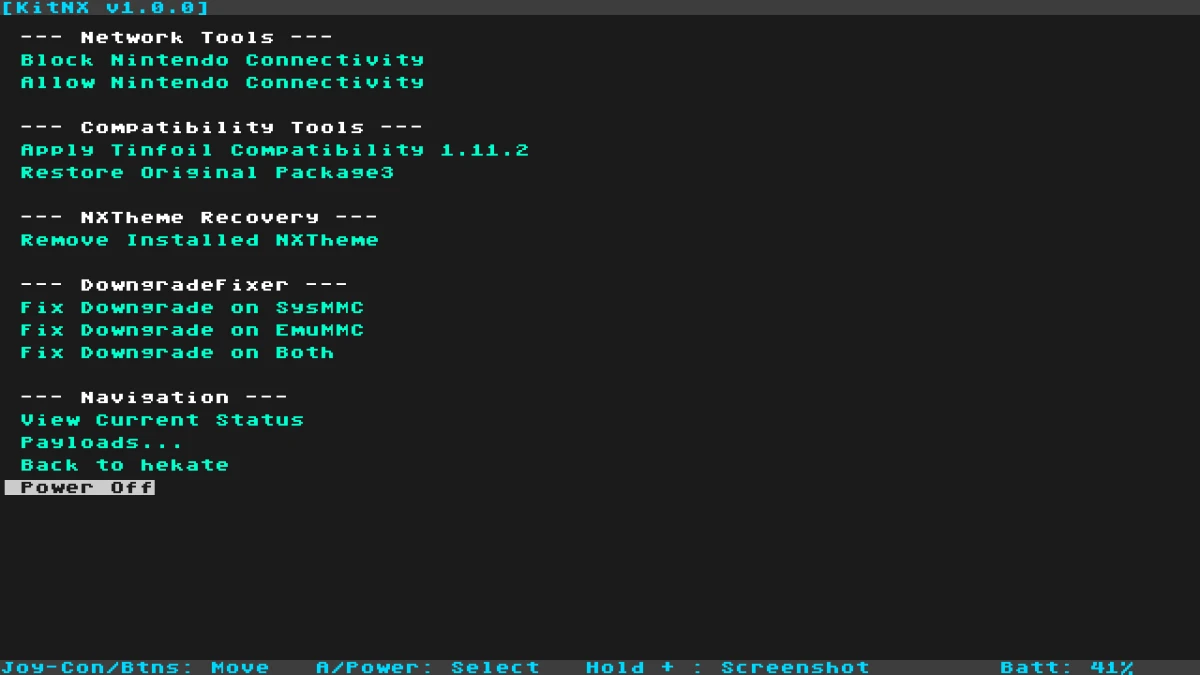
KitNX 1.0.1 is an updated maintenance and recovery payload for Nintendo Switch. Its main change is a bundled compatibility package3 for Atmosphere 1.12.0, intended for the project’s Tinfoil compatibility function.
The package3 is included with KitNX’s compatibility data under config/kitnx/tce/. Existing backups in config/netman/tce/backup/ remain available as a restore fallback, according to the project documentation. The update does not include the removed Syncfix feature, so that function is not part of this release.
More predictable menu input
The release improves how KitNX handles button releases while navigating its menus. It also ignores R3 input, reducing the chance that an accidental right-stick press will be interpreted as a menu action.
KitNX uses Volume Up and Volume Down for navigation and Power for confirmation. The input changes apply across its network, compatibility, theme and recovery tools, where more consistent controls can make menu selection easier to manage.
A single interface for maintenance tasks
KitNX brings several maintenance and recovery functions into one guided interface instead of requiring users to launch TegraExplorer and select a script separately.
Its network tools can block or allow Nintendo connectivity on sysMMC and display the current network and compatibility configuration. The project documentation warns that allowing sysMMC network access does not remove the risk of a console ban.
The compatibility tools can apply the bundled Tinfoil-compatible Atmosphere package3, as well as back up and restore the original package3 and boot logos. KitNX also includes a function for removing an installed qlaunch theme override from the documented Atmosphere contents location.
Recovery operations remain separated
KitNX separates SD-card maintenance from operations that affect NAND. Network, compatibility and theme functions modify files on the SD card, while downgrade recovery mounts the encrypted NAND SYSTEM partition and deletes the specific SYSTEM/save/8000000000000073 save file used by the documented repair process.
The recovery menu can address SysMMC, emuMMC or both when the relevant configuration is available. It disables emuMMC targets when no emuMMC configuration is detected, and destructive operations require explicit VOL+ confirmation.
The project advises keeping NAND and SD-card backups. That precaution is especially important for recovery functions, which operate on console storage rather than only changing files on the SD card.
Installation and release details
To use the release, copy KitNX.bin to bootloader/payloads/ on the Nintendo Switch SD card, launch Hekate, open Payloads and select KitNX.bin. The documented controls then use Volume Up and Volume Down for navigation and Power to confirm a selection.
The release is tagged 1.0.1 and includes KitNX-1.0.1.zip. It is a packaged release rather than a rolling development build.