JoyOff gains a full Joy-Con color editor
JoyOff 1.5.0 adds tools for changing the body and button colors stored on original Nintendo Switch Joy-Con controllers. The editor provides separate RGB sliders, a live Joy-Con preview, and an advanced mode for more precise adjustments.
The advanced controls let users change individual red, green, and blue values with plus and minus buttons or enter exact values through a numeric keyboard. Each channel accepts values from 0 to 255. Switching between slider and advanced modes preserves the selected colors, while keyboard edits affect the preview until the user confirms the change.
The update supports individual wireless Joy-Con controllers. Users can select a controller with the left and right navigation controls, adjust its body and button colors, and then apply the result after confirmation. The software requires a verified Bluetooth connection before it writes color data.
Backups and restore add protection before editing
JoyOff now includes dedicated color backup and restore actions. A manual backup reads the selected Joy-Con’s current color values, saves them to the SD card, and verifies the resulting backup file without changing the controller.
Applying new colors also creates an automatic backup before writing. The software then reads the color data back from the controller to verify the operation. If the backup step fails, JoyOff does not send the color write. This gives users a way to retain the original six color bytes before experimenting with a new appearance.
Restore uses a file browser and displays a preview before the selected backup is written. After confirmation, JoyOff backs up the controller’s current colors, restores the chosen values, and performs SPI read-back verification. A second Apply action is not required.
Backup files are saved under the JoyOff folder on the SD card and contain color data only, rather than a complete SPI backup. Their filenames include the controller’s Bluetooth address and original RGB bytes, allowing JoyOff to check that a selected file matches the intended Joy-Con. Keeping the original filename is therefore important when moving or organizing backups.
The existing utility still handles storage mode
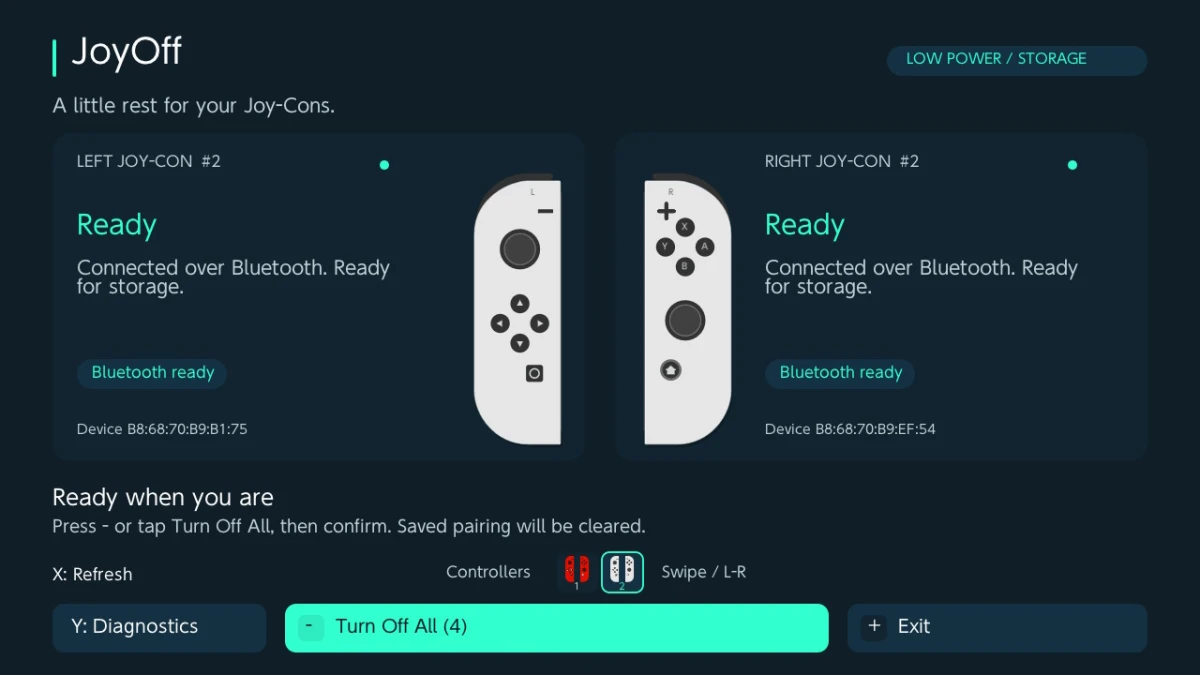
Color editing complements JoyOff’s original purpose: placing connected original Joy-Con controllers into shipment low-power mode for long-term storage. The app can detect wireless left and right Joy-Cons, show their connection states and operation results, and turn off all ready controllers across its controller pages after one confirmation.
The storage operation has an important pairing consequence. JoyOff clears the saved Bluetooth pairing, enables shipment low-power mode, and disconnects the controllers. Attaching a Joy-Con to a Switch wakes it and allows pairing again. If the operation stops partway through, pairing may already have been cleared, so the per-controller result should be checked.
The color tools and storage controls remain usable through the touchscreen. JoyOff also supports controller-page navigation, touch swipes, a miniature Joy-Con legend, and diagnostics with optional text logging. Touch controls remain available after the controllers disconnect, which is useful when completing the shutdown process.
Requirements and release package
JoyOff 1.5.0 is a Nintendo Switch homebrew application for a Switch running custom firmware 13.0.0 or newer. It must be launched through the Homebrew Menu in full application mode, using a title override. Original left and right Joy-Cons need to be connected wirelessly for detection and color operations.
MissionControl is not required. Pro Controllers, Joy-Con 2, and third-party controllers are outside the application’s supported scope. The documented workflow also requires detaching the Joy-Cons and connecting them over Bluetooth before refreshing detection or using Apply and Restore.
The release was published under the exact tag 1.5.0 on November 6, 2026. The packaged download is JoyOff-1.5.0.zip; its documented contents are the application file in the switch folder. The source archive is separate. To use the packaged build, the release notes instruct users to extract it to the SD card root.