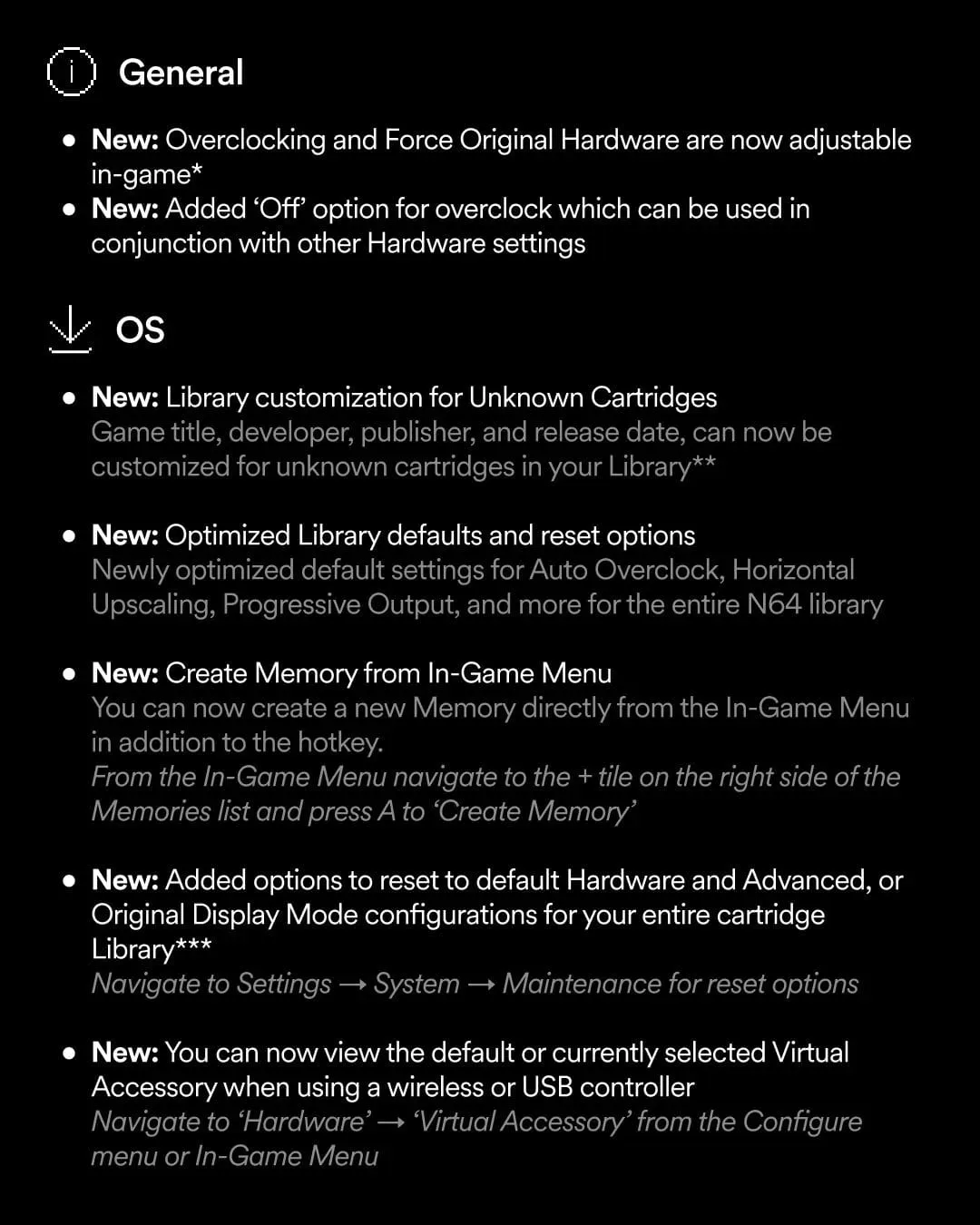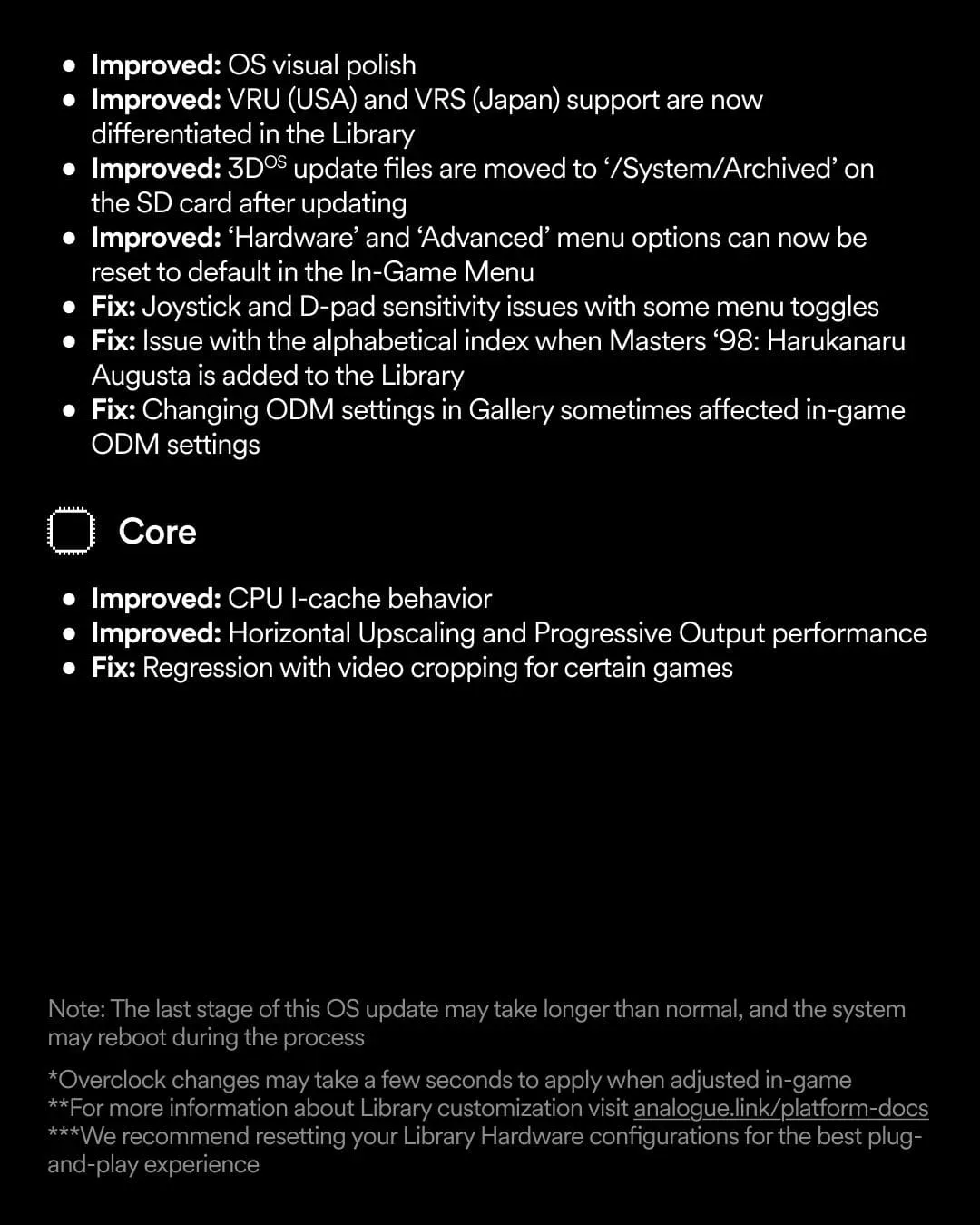
Analogue has released version 1.5.1 for the Analogue 3D, refining its FPGA-based Nintendo 64 hardware with options aimed at reducing trips back to the system menus. The most consequential change is simple: overclocking and Force Original Hardware can now be adjusted while a game is running.
That is a quality-of-life update rather than a new game-changing mode, but it addresses a practical friction point for people experimenting with hardware behavior on different cartridges. Analogue also says the change may not apply instantly, so players should allow a few seconds after altering either option before judging the result.
The update further adds the ability to turn overclocking off completely, including alongside other hardware settings. On the organisation side, the Library now permits custom information for cartridges the system does not recognise, with fields for a title, developer, publisher and release date.
What changes with in-game controls
Before this update, adjusting the relevant hardware options required leaving the game and using the system menus. Version 1.5.1 moves those choices into the active play experience. The benefit is not that every Nintendo 64 game suddenly needs altered settings; it is that an owner can make a change, wait for it to take effect and assess the result without repeatedly breaking the session to navigate elsewhere.
That distinction matters because these are system-level controls, not conventional game options such as music volume or button remapping. Their purpose is to affect how the console behaves while running a cartridge. Giving users access during play makes experimentation less cumbersome, especially when an owner wants to compare a setting against another configuration.
Analogue’s note about a short delay is equally important. A change should not be treated as immediate simply because the menu has accepted an input. Players trying the controls should make one adjustment at a time, give the system a moment, then observe the game. That is a sensible way to avoid confusing the effect of a newly selected setting with what was already occurring on screen.
Overclocking, in plain terms
Overclocking is the practice of running hardware at a higher speed than its standard operating setting. In this update, it is presented as a user-adjustable Analogue 3D hardware option. The patch also provides a full off position, allowing players to disable it rather than merely choose among active configurations.
What version 1.5.1 does not establish is a universal best setting for every game or cartridge. The update information does not claim that overclocking will improve every title, nor does it provide game-by-game recommendations. The useful takeaway is therefore control and convenience: users can enable, alter or disable the option in-game and combine the off choice with other hardware settings.
Related coverage includes Analogue 3D Update 1.5.1 Adds In-Game Overclocking Controls.
That restraint is worth keeping in mind amid the wider interest in FPGA Nintendo 64 hardware. FPGA, short for field-programmable gate array, refers to configurable hardware used here as part of the console’s approach to Nintendo 64 play. For owners, firmware updates can be especially meaningful because they change the available controls and system polish without requiring a new physical console. In this case, the changes are focused on access to existing hardware-oriented choices and cleaner library records.
Force Original Hardware is now easier to compare
Force Original Hardware is the other named setting that can now be changed while a game is running. Analogue has not detailed its behavior in the provided update information, so it would be premature to treat it as a fix, enhancement or compatibility answer for any specific cartridge.
Its new placement still has a clear practical implication. An owner who understands why they want to use the setting no longer has to make that choice exclusively before launching a game. Along with overclocking, it becomes part of a more immediate in-session configuration workflow.
For careful users, the most useful approach is to keep track of what was changed and when. When several hardware settings are available, altering multiple variables at once makes it harder to identify which choice corresponded with a particular outcome. The new in-game access removes menu friction, but it does not remove the value of patient, methodical testing.
Library edits help with unidentified cartridges
The other major addition in version 1.5.1 is Library Customisations for unknown cartridges. When the Analogue 3D does not identify a cartridge automatically, an owner can now enter its title, developer, publisher and release date.
This is a small feature with a potentially large payoff for players who use a varied physical library. An unfamiliar entry does not have to remain a blank or incomplete item in the interface. Instead, a user can make their own record more legible and consistent.
- Title: identifies the game in the Library.
- Developer: records the studio or team associated with its development.
- Publisher: records the company responsible for publishing the game.
- Release date: adds a date field to the Library entry.
The feature is best understood as metadata management. Metadata is information that describes an item rather than the item itself. Here, the cartridge remains the same physical game, while the added fields make the console’s Library entry more informative. It is particularly useful to anyone who cares about a tidy catalogue, but it also has a basic functional appeal: it gives a user a way to recognise an otherwise unknown listing later.
Because the update makes these fields editable for unknown cartridges, accuracy remains in the owner’s hands. Users looking to maintain a dependable catalogue should enter details carefully and consistently. The system’s new flexibility is valuable precisely because it lets people fill in gaps; it should not be mistaken for automatic verification of every entered detail.
A firmware update focused on fewer interruptions
Version 1.5.1 does not appear designed to redraw what the Analogue 3D is. Instead, it improves the moment-to-moment use of the machine in two areas: switching hardware settings and organising cartridges. Both changes respond to tasks that can become repetitive over time—leaving a game to alter a configuration, or living with an incomplete Library entry when a cartridge is not recognised.
That focus on practical control is increasingly relevant across games and gaming hardware. Options are most useful when players can understand what they affect and reach them at the moment they need them, a theme also visible in discussions around approachable systems that retain deeper possibilities, such as designs that aim to welcome players without discarding a high skill ceiling.
For Analogue 3D owners, the immediate checklist is straightforward: update to version 1.5.1, use the in-game controls deliberately, allow a few seconds for a selected setting to take effect, and add missing Library information where it will make a cartridge collection easier to navigate. Players who prefer the standard configuration also gain something useful: overclocking can now be turned off entirely and used alongside other hardware settings.
As FPGA Nintendo 64 hardware continues to attract attention, refinements like these may not be flashy, but they can matter most to the people using a console frequently. A setting is more valuable when it is available at the point of use, and a Library becomes more valuable when owners can correct the entries it cannot identify on its own.