A controller deal is rarely just a controller deal. It is an invitation to ask whether the extra gamepad will become the sensible second set of hands for local multiplayer, the permanent PC pad, or a handsome plastic monument to the idea of eventually playing more couch co-op. In this case, the numbers make the question fairly straightforward: 8Bitdo’s Ultimate 2 is listed at $58 for a limited time, down from $70. Nintendo’s official Switch 2 Pro Controller is cited at its $80 MSRP, leaving a $22 gap between the two options at the stated prices.
That is a 17% reduction from the Ultimate 2’s usual $70 price, or $12 off. The larger comparison is the more useful one for a Switch 2 owner: the discounted 8Bitdo pad costs less than the official alternative while bundling an integrated charging dock and offering compatibility beyond Nintendo hardware. Pricing and limited-time promotions can change, naturally, so prospective buyers should treat the $58 figure as a current listing rather than a permanent new floor.
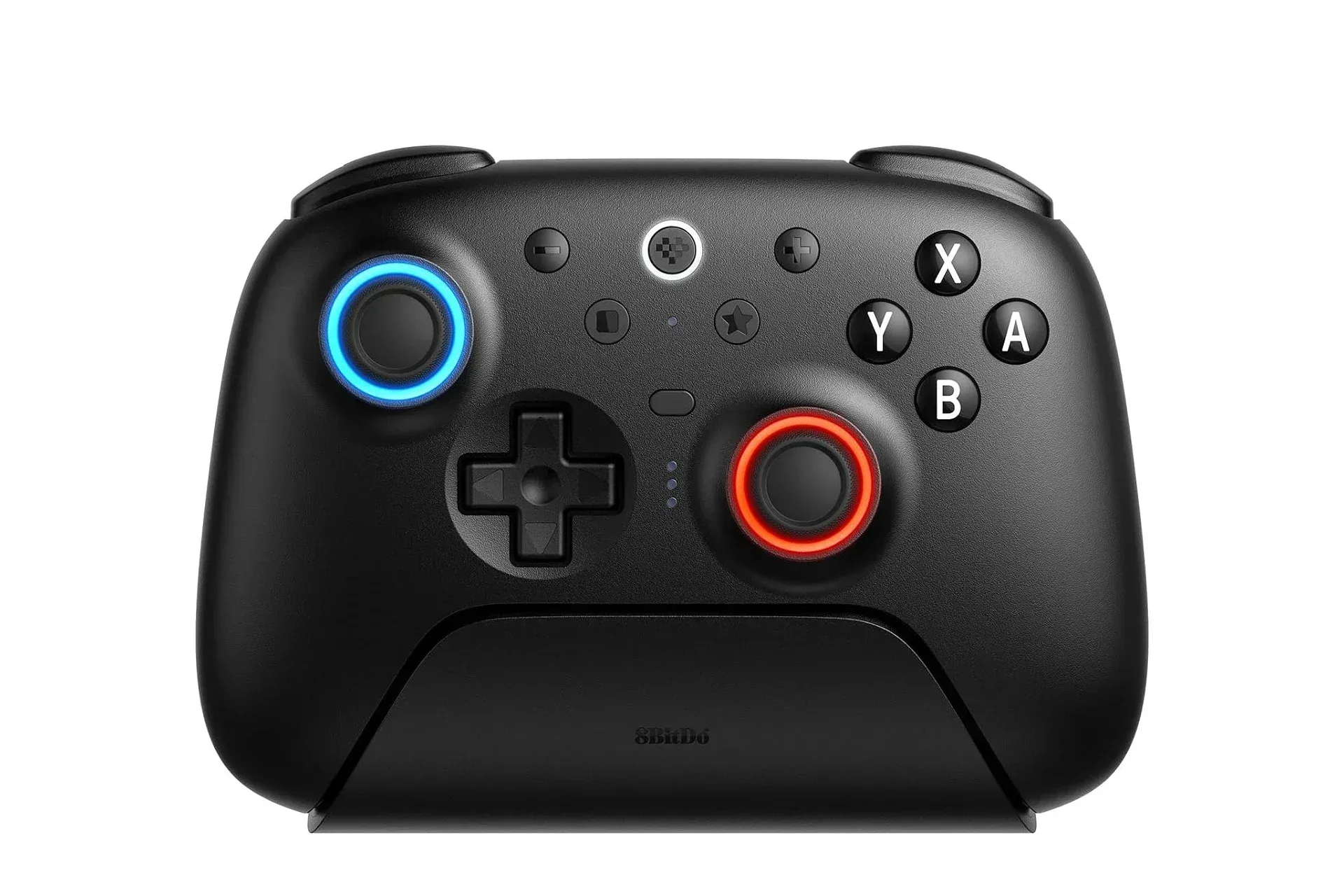
The Ultimate 2 is presented as 8Bitdo’s modern flagship rather than one of the company’s nostalgia-led controller designs. Its feature list targets a practical mix of console and PC use: Switch and Switch 2 compatibility, Windows PC support, vibration, motion controls when used with a Nintendo Switch console, configurable trigger behavior, TMR thumbsticks, RGB rings, and the charging dock. None of those points automatically makes one controller universally better. They do, however, make the Ultimate 2 an unusually direct alternative for someone comparing it against a more expensive first-party pad.
The deal maths: $12 off, $22 below the official pad
There are two distinct savings figures worth keeping straight. The Ultimate 2’s own discount is $12, taking it from $70 to $58. The comparison against Nintendo’s $80 Switch 2 Pro Controller is $22. The latter is likely the meaningful figure for a buyer who has already decided they want a full-size controller for Switch 2 play and is now weighing which one belongs on the coffee table.
At full price, the Ultimate 2 would already sit $10 below the cited official-controller MSRP. At $58, it moves into a different value conversation. A buyer is not simply accepting a lower price in exchange for a stripped-back feature set; the controller is described as including a dock, multiple trigger modes, cross-platform support and lighting around the sticks.
That does not erase the appeal of buying first-party hardware. Some players simply prefer Nintendo’s own controller design and its direct place in the console ecosystem. But the available information makes a clear case for the 8Bitdo model as a feature-conscious option, especially where one purchase needs to cover both a Nintendo console and a Windows PC.
For anyone still deciding whether to get the console itself, it may be useful to separate the hardware decision from the accessory decision. A recent Switch 2 price drop in the UK illustrates how console and accessory promotions can move independently. A discounted controller is valuable only if its platform fit and controls match the games a household actually plays.
What TMR joysticks are intended to bring
The Ultimate 2 uses TMR joysticks. TMR, short for tunneling magnetoresistance, is a joystick-sensing approach referenced here for its potential sensitivity, precision and durability benefits. In plain language, a controller stick needs to translate physical movement into directional input. The sensing technology used inside it matters because the stick is among the most frequently handled and stressed parts of a gamepad.
Related coverage includes 8Bitdo Ultimate 2 Controller Deal Undercuts Switch 2 Pro Controller by $22.
The stated pitch is that TMR offers higher sensitivity, greater precision and improved durability. Those traits are relevant whether a player is feathering a steering input, adjusting a camera, or lining up a movement direction. They are also relevant to longevity: concerns over joystick reliability have been a persistent part of how players evaluate controllers, so a design that emphasizes durability is not merely a technical bullet point.
It is important not to turn that claim into a lifetime guarantee. The supplied details identify the technology and the intended benefits, but they do not provide long-term testing results, repair data, a drift guarantee, or a specific durability measurement. The sensible interpretation is that TMR is a meaningful design consideration for shoppers who prioritize stick performance and resilience, not a promise that no stick can ever develop a fault.
8Bitdo also puts RGB rings around the sticks. RGB refers to lighting that combines red, green and blue light to create different colors. This does not improve control accuracy, but it does give the pad a customizable visual element. For a docked controller that lives in view, presentation can be part of the product’s appeal. For players who prefer a stealthier setup, it is simply a feature to consider rather than a core buying reason.
Two trigger modes, explained without the laboratory coat
The Ultimate 2 can switch between linear Hall Effect triggers and non-linear tactile triggers. This is one of its more consequential features because triggers are not used the same way in every game.
A linear trigger is designed to recognize varying degrees of press. Rather than functioning only as off or on, it can respond to how far the trigger has been pulled. That kind of graduated input is naturally suited to situations where a player wants finer control over an action. The controller’s Hall Effect description identifies the trigger mode by the sensing approach it uses.
A non-linear tactile trigger changes the feel and response profile toward a more distinct, tactile action. “Tactile” describes a physical sensation a player can feel during the press. The practical value of being able to switch modes is flexibility: one configuration can favor measured, variable input, while the other can prioritize a more immediate-feeling press.
The key word is choice. The supplied information does not assign individual games or genres to a particular trigger mode, and it would be unhelpful to pretend every player will share the same preference. But users who move between different styles of games have an additional control option here that goes beyond a simple fixed-trigger design.
A dock is mundane until the battery is dead
The most quietly useful included extra may be the integrated charging dock. Nintendo’s Switch 2 Pro Controller, as compared here, does not include one. The benefit needs no marketing vocabulary: place the controller on the dock when play is over, and it is positioned to be charged for the next session.
That changes a small routine rather than changing how a game plays, which is precisely why it can matter. A loose cable works when it is connected and remembered. A dock gives the controller a designated resting place and makes charging part of putting it away. It can also reduce the familiar pre-session treasure hunt in which the cable has apparently joined a side quest of its own.
For a household with multiple controllers, the dock also helps identify which pad is meant to be ready. For an individual player, it makes the Ultimate 2 a tidier desk or entertainment-center accessory. This is not a performance feature in the same category as sticks or triggers, but it is a practical inclusion that contributes to the price comparison.
One controller for Switch, Switch 2 and Windows PC
The Ultimate 2 supports the original Switch, Switch 2 and Windows PCs. Its Nintendo-console use includes vibration and full motion control. Motion control means the controller can detect physical movement and orientation, allowing it to provide the movement-based input supported on Nintendo Switch consoles. Vibration supplies tactile feedback through the controller.
Cross-platform compatibility is especially relevant for a buyer who does not want separate controllers for every screen in the home. A Switch 2 owner who also plays on a Windows PC can potentially put the same full-size pad to work in both places. That makes the $58 listing more compelling for the right use case, because its value is distributed across more than one device.
There is a useful boundary in the provided compatibility notes: full motion control is specifically described for use on a Nintendo Switch console. Buyers whose must-have feature is motion input should keep that platform-specific wording in mind rather than assuming identical behavior everywhere the controller connects.
Who the Ultimate 2 deal suits best
- Switch 2 owners seeking a lower-cost full-size alternative: The stated $58 price is $22 below the cited $80 official controller MSRP.
- Players who also use Windows PCs: Support for both Nintendo consoles and Windows is a substantial convenience advantage if one pad is meant to serve multiple machines.
- People who care about stick technology: TMR sticks are positioned around sensitivity, precision and enhanced durability, though they should not be read as an absolute failure-proof promise.
- Anyone tired of charging cables wandering off: The bundled dock gives the controller a consistent charging home.
- Players with varied control preferences: The ability to switch between linear Hall Effect and non-linear tactile trigger modes adds a degree of adaptability.
Conversely, shoppers who specifically want Nintendo’s own controller design may reasonably stick with the official option. The Ultimate 2’s case is not that every player must abandon first-party hardware; it is that this particular discount creates a sizable enough difference to demand a real comparison.
The sensible takeaway before checking out
On the supplied specifications, the Ultimate 2 offers a notably broad package at its current $58 listing: modern joystick technology, adjustable trigger behavior, an integrated dock, Windows compatibility, Switch and Switch 2 support, vibration, and motion controls on Nintendo Switch consoles. Against an $80 official Switch 2 Pro Controller, the $22 difference is large enough that buyers can evaluate the 8Bitdo pad on its own merits rather than seeing it merely as a cheaper substitute.
Before purchasing, confirm that the limited-time price is still active and focus on the features that will affect daily use. If the controller will regularly move between a Switch 2 and a Windows PC, live on its charging dock, and benefit from its alternative trigger modes, the value argument is particularly strong. If it is simply going to sit in a drawer until the next multiplayer night, at least it will have RGB rings to make the drawer feel a little more premium.
Shop the products
Check current price, model and availability at the retailer.